
• Skip to primary navigation
  • Skip to main content
  • Skip to primary sidebar
Source Digit

Source Digit

Linux, Ubuntu Tutorials & News, Technology, Gadgets & Gizmos

  • Home
  • How To
  • Ubuntu
  • Instagram
  • Blogging
  • Android
  • WordPress
  • +More
    • Cloud Computing
    • Gadgets
    • Social Media
    • Technology
  • Write for Us
Home / Ubuntu / How To Ubuntu : Merge & Split PDF Into Separate Pages Or Multiple Files

How To Ubuntu : Merge & Split PDF Into Separate Pages Or Multiple Files

By Sourabh / January 16, 2017 Category: How To, Ubuntu

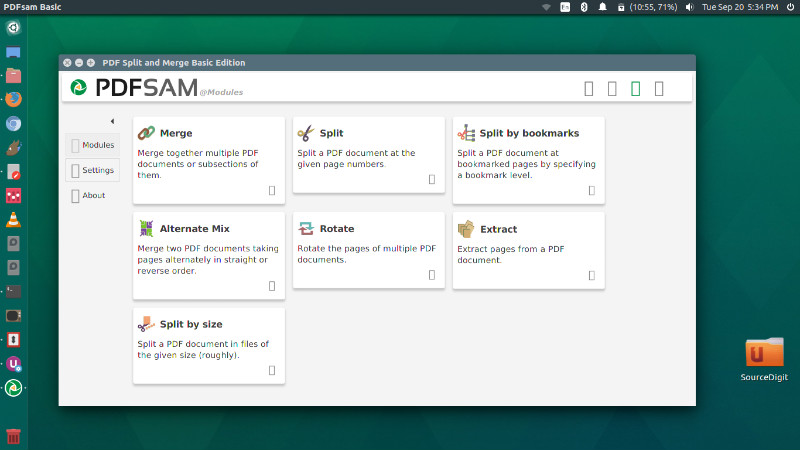
How to Ubuntu : split pdf into separate pages or multiple files. Install PDFsam on Ubuntu 16.04. PDFsam is a tool to split and merge PDF files in Ubuntu Linux. PDFsam, name for PDF Split and Merge, is an open-source tool that can easily split, merge and rotate PDF files on Ubuntu Linux Systems. Here’s how to install the latest version PDFsam 3.1.0 on Ubuntu 16.04 and other Ubuntu Derivatives.
pdfsam-ubuntu

PDFsam Basic is free of charge and this tutorial is going to show you how to install PDFsam basic on Linux. It’s features are as follows:

  • Merge: Merge together multiple PDF documents or subsections of them
  • Split: Split a PDF document at the give page numbers
  • Split by bookmarks: Split a PDF document at bookmarked pages by specifying a bookmark level
  • Alternative Mix: Merge two documents taking pages alternatively in straight or reverse order
  • Rotate: Rotate the pages of multiple PDF documents.
  • Extract: Extract pages from a PDF document
  • Split by Size: Split a PDF document in files of the given size (roughly)

Install PDFsam Basic 3.1.0 on Ubuntu
java-environment

Before you begin to install PDFsam, you will require a Java Runtime Environment to be installed on your system. Run the command given below to install all the necessary dependencies:

sudo apt install openjdk-8-jre libopenjfx-jni libopenjfx-java openjfx

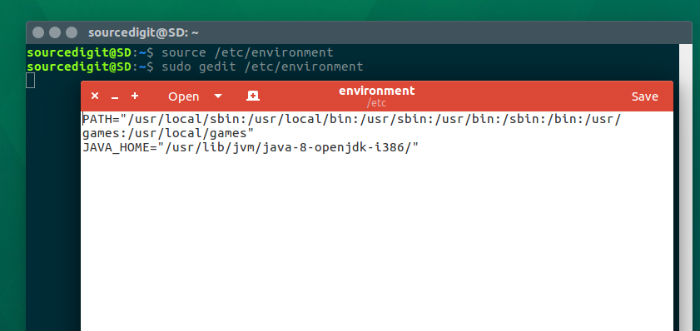
You will also have to set the JAVA_HOME environment variable. Use the following command to edit the /etc/environment file and set it.

sudo gedit /etc/environment

When the /etc/environment file is open, please add the following line in this file and save it.

  • On 64 Bit Ubuntu Systems
    JAVA_HOME=”/usr/lib/jvm/java-8-openjdk-amd64/”
  • On 32 Bit Ubuntu Systems
    JAVA_HOME=”/usr/lib/jvm/java-8-openjdk-i386/”

Once you are done with the above step, save and close the file. Now reload the file by running the following command.

source /etc/environment

Now it’s time to download and install the PDFsam basic .deb file on Ubuntu Systems.

sud0 apt-get update
wget https://github.com/torakiki/pdfsam/releases/download/v3.1.0.RELEASE/pdfsam-3.1.0.RELEASE-1_all.deb
sudo dpkg -i pdfsam-3.1.0.RELEASE-1_all.deb

Once installed, open the PDFsam from Ubuntu Dash or from Terminal/commandline:

/opt/pdfsam-basic/bin/pdfsam-basic

Tags: Download PDFsam on Ubuntu, How To Merge PDF files in Linux, How To Merge PDF files in Ubuntu, How To Merge PDF in Linux, How To Merge PDF in Ubuntu, How To Split PDF files in Linux, How To Split PDF files in Ubuntu, How To Split PDF in Linux, How To Split PDF in Ubuntu, Install PDFsam on Ubuntu, Install PDFsam Ubuntu, Merge PDF files in Linux, Merge PDF files in Ubuntu, Merge PDF in Linux, Merge PDF in Ubuntu, Pdf Split And Merge Ubuntu, Pdf Split And Merge Ubuntu 16.04, Pdf Split And Merge Ubuntu 16.10, PDFsam Ubuntu, PDFsam Ubuntu 16.04, PDFsam Ubuntu 16.10, PDFsam Ubuntu PPA, PPA Ubuntu PDFsam, Split PDF files in Linux, Split PDF files in Ubuntu, Split PDF in Linux, Split PDF in Ubuntu, Split Pdf Into Multiple Files, Split Pdf Into Multiple Files Ubuntu 16.04, Split Pdf Into Multiple Files Ubuntu 16.10, Split Pdf Ubuntu, Split Pdf Ubuntu 16.04, Split Pdf Ubuntu 16.10, Ubuntu 16.04 PDFsam, Ubuntu 16.04 Split Pdf Into Multiple Files, Ubuntu 16.04 Split Pdf Into Separate Pages, Ubuntu 16.10 PDFsam, Ubuntu 16.10 Split Pdf Into Multiple Files, Ubuntu 16.10 Split Pdf Into Separate Pages, Ubuntu Install PDFsam, Ubuntu PDFsam, Ubuntu PPA PDFsam, Ubuntu Split Pdf Into Multiple Files, Ubuntu Split Pdf Into Separate Pages

Primary Sidebar

Latest Posts

Free AI Courses With Certificate For Beginners In India

Best AI Plugins For WordPress To Use In 2026

3 Commands To Check USB Connection In Linux Terminal

Linux Terminal Commands for Beginners With Examples

How To Password Protect A Folder In Linux Command Line

Best Download Managers for Ubuntu Linux (2026 Edition)

5 Best Free Keyword Research Tools for Bloggers in 2026

How To Check Linux 32 or 64-Bit Command Line

How To Delete And Remove Repository In Ubuntu Terminal

Fix Unexpected Inconsistency By Running Fsck Manually From Initramfs

© 2026 Source Digit • Linux, Ubuntu Tutorials & News, Technology, Gadgets & Gizmos

  • Home
  • About
  • Privacy Policy
  • Terms & Conditions
  • Contact Us
  • Sitemap