
Here is how to check last reboot time in Linux Ubuntu. Learn how to check who did last reboot in Linux Ubuntu.
We will also learn how to check last 10 reboot in Linux.
Check who did last reboot in Linux Ubuntu?
The last command is one of the easiest commands to get a list of last reboots on any Linux Ubuntu machine. The last command reads from the /var/log/wtmp file to display a log of all previous login and logout sessions, including system reboots. Simply run the last command (see below) to see a list of all reboots:
last rebootThe command output will show the boot time, duration, and kernel version for each corresponding entry.
NOTE:
- For systemd-based systems, for modern Linux distributions that use systemd, the journalctl command is a powerful tool to view logs.
- It must be also noted that the who command provides information about users currently logged in, but with specific command options (who -b) it can also be used to see the history of last logins. (see below)
Who Command To Check The Last Reboot Time
‘who’ prints information about users who are currently logged on. If given no non-option arguments, ‘who’ prints the following information for each user currently logged on: login name, terminal line, login time, and remote hostname or X display.
If given one non-option argument, ‘who’ uses that instead of a default system-maintained file (often ‘/var/run/utmp’ or ‘/etc/utmp’) as the name of the file containing the record of users logged on.
who -b
who -b command print the date and time of last system boot. You can also use the command who -q or who –count to print only the login names and the number of users logged on. Note that when we use -1 or –count options, it overrides all other options.
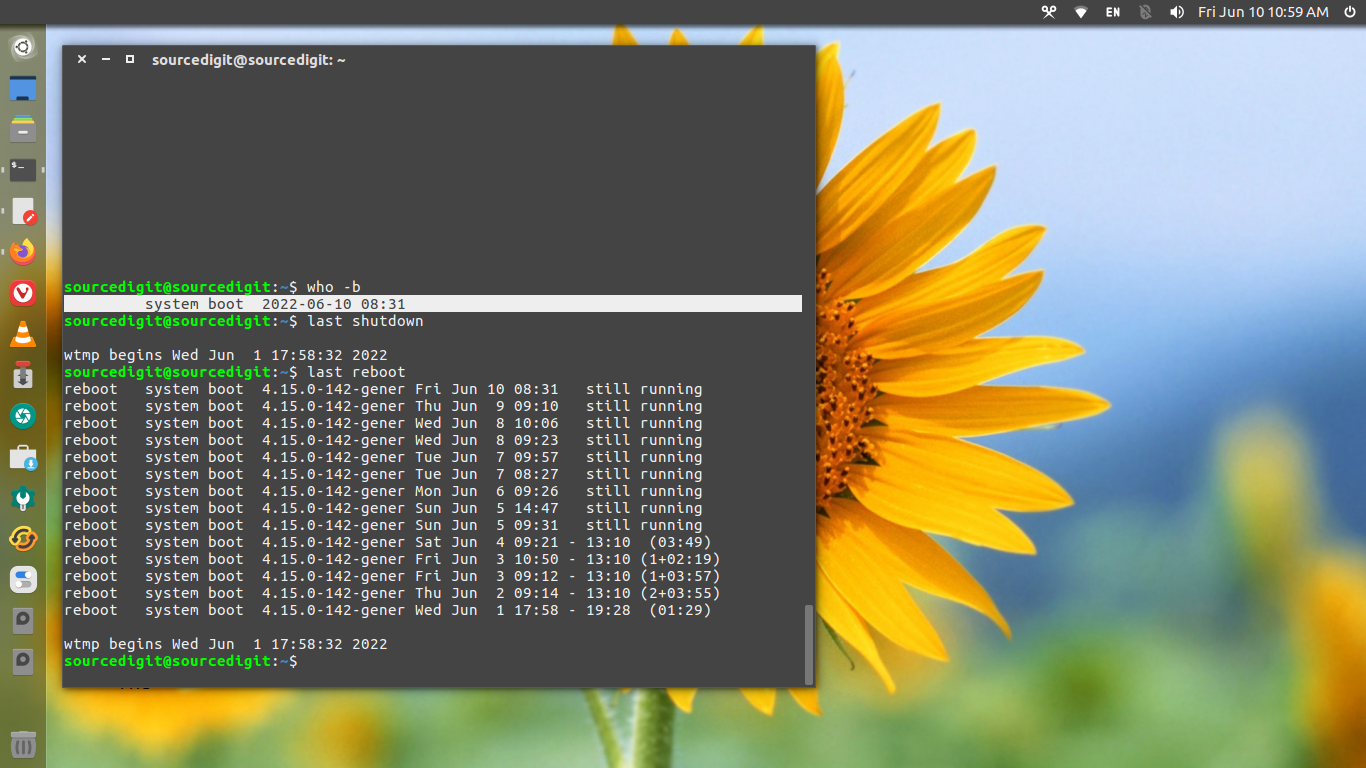
Last Command To Check The Last Reboot Time
last or lastb command is used to show a listing of last logged in users. The last command searches back through the /var/log/wtmp file (or the file designated by the -f option) and displays a list of all users logged in (and out) since that file was created.
One or more usernames and/or ttys can be given with the command but in that case last matching entries (with the specified arguments) will be shown.
Note that the pseudo user reboot logs in each time the system is rebooted. Thus last reboot will show a log of all the reboots since the log file was created.
How To Check Last 10 Reboot In Linux Ubuntu
You can use the last command to display last logged in users and system last reboot time and date:
last reboot | less
last reboot | head -1
If you want to finding systems’ last shutdown date and time, run the following command:
last -x|grep shutdown | head -1
The last command searches back through the file /var/log/wtmp and displays a list of all users logged in (and out) since that file was created.
It is interesting to note that the lastb command can be used to view a history of failed login attempts, it reads from the /var/log/btmp file. You will need root privileges to run the command.