
• Skip to primary navigation
  • Skip to main content
  • Skip to primary sidebar
Source Digit

Source Digit

Linux, Ubuntu Tutorials & News, Technology, Gadgets & Gizmos

  • Home
  • How To
  • Ubuntu
  • Instagram
  • Blogging
  • Android
  • WordPress
  • +More
    • Cloud Computing
    • Gadgets
    • Social Media
    • Technology
  • Write for Us
Home / How To / Install Guake Drop Down Terminal On Ubuntu 16.04

Install Guake Drop Down Terminal On Ubuntu 16.04

By Sourabh / November 5, 2016 Category: How To, Ubuntu

Install Guake Terminal on Ubuntu using WebUpd8 PPA. Fix “Have you installed guake.schemas properly?” error. Guake is a top-down terminal for Gnome (in the style of Yakuake for KDE, Tilda or the terminal used in Quake). Guake’s style of window is based on an FPS game, and one of its goals is to be easy to reach.
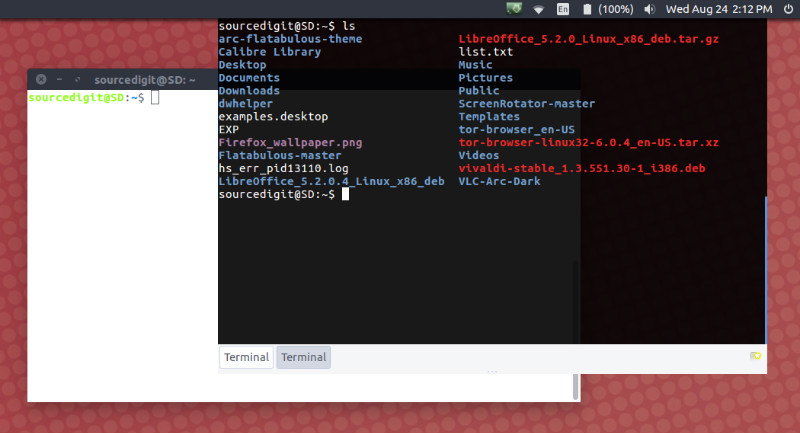
guake-terminal

Features

  • Lightweight
  • Simple Easy and Elegant
  • Smooth integration of terminal into GUI
  • Appears when you call and disappears once you are done by pressing a predefined hotkey (F12 by default)
  • Compiz transparency support
  • Multi tab
  • Plenty of color palettes
  • Quick Open in your favorite text editor with a click on a file name (with line number support)
  • Customizable hotkeys for tab access, reorganization, background transparency, font size,…
  • Extremely configurable
  • Configure Guake startup by running a bash script when Guake starts
  • Multi-monitor support (open on a specified monitor, open on mouse monitor)
  • Save terminal content to file
  • Open URL to your browser

Install Guake on Ubuntu

Ubuntu users can install Guake Terminal by using the WebUpd8 PPA. Open Terminal and run the following commands:

sudo add-apt-repository ppa:webupd8team/unstable
sudo apt update
sudo apt install guake

Once installed, open Guake from Ubuntu Dash. It can be involed/start using F12 key. When active, Guake terminal icon is displayed in the Ubuntu Panel Bar.

Guake Error

Have you installed guake.schemas properly? This is the most common error message that occurs because the guake.schemas file is not found in the correct location. Ubuntu users can easily fix this error by running the following commands:

sudo mkdir /etc/gconf/schemas
cd /etc/gconf/schemas/
sudo ln -s /usr/share/gconf/schemas/guake.schemas

Once done, try launching Guake again.

More Info:

  • http://guake-project.org/
  • https://github.com/Guake/guake


Tags: Guake Drop Down Terminal, Guake Terminal, Guake Terminal Emulator, Guake Terminal GNOME, Guake Terminal Ubuntu, Guake Terminal Ubuntu 16.04, Guake Terminal Ubuntu 16.10, Guake Terminal Ubuntu PPA, Guake Top Down Terminal, Install Guake Terminal Ubuntu, Install Guake Terminal Ubuntu 16.04, Install Guake Terminal Ubuntu 16.10, Ubuntu 16.04 Guake Terminal, Ubuntu 16.04 Install Guake Terminal, Ubuntu 16.10 Guake Terminal, Ubuntu 16.10 Install Guake Terminal, Ubuntu Guake Terminal, Ubuntu Install Guake Terminal, Ubuntu PPA Guake Terminal

Primary Sidebar

Latest Posts

How To Run Fsck Manually In Linux To Fix Unexpected Inconsistency

How To Fix Broken Packages On Ubuntu From Terminal

Re Execute The Previous Command In Linux Ubuntu Command Line

How Much RAM Is Needed For Ubuntu PC

How To Find Large Files And Directories In Linux Command Line

How To Use Clear Command History In Linux Terminal

Linux Command To Check RAM Size In Ubuntu Terminal In GB

How To Install Proprietary Drivers In Linux Ubuntu Using Terminal

How To Shutdown Linux With A 15 Minute Delay And Message

Free AI Courses With Certificate For Beginners In India

© 2026 Source Digit • Linux, Ubuntu Tutorials & News, Technology, Gadgets & Gizmos

  • Home
  • About
  • Privacy Policy
  • Terms & Conditions
  • Contact Us
  • Sitemap