
• Skip to primary navigation
  • Skip to main content
  • Skip to primary sidebar
Source Digit

Source Digit

Linux, Ubuntu Tutorials & News, Technology, Gadgets & Gizmos

  • Home
  • How To
  • Ubuntu
  • Instagram
  • Blogging
  • Android
  • WordPress
  • +More
    • Cloud Computing
    • Gadgets
    • Social Media
    • Technology
  • Write for Us
Home / Ubuntu / How To Ubuntu: Clean Apt-Get Cache & Old Kernel Images

How To Ubuntu: Clean Apt-Get Cache & Old Kernel Images

By Sourabh / December 28, 2018 Category: How To, Ubuntu

Install Ubuntu Cleaner. On Ubuntu, how to clean Apt-Get Cache or easily cleanup disk space on Ubuntu Systems. Users can also cleanup old Kernel images on Linux Ubuntu Systems using Ubuntu Cleaner application. Ubuntu Cleaner is a tool for Ubuntu that makes it easy to configure your system and desktop settings. It can be used to clean Apps Cache, Apt-Cache. Personal cache, System Cache – Apt-Cache, Old Kernel, package Configurations and Unneeded Packages.
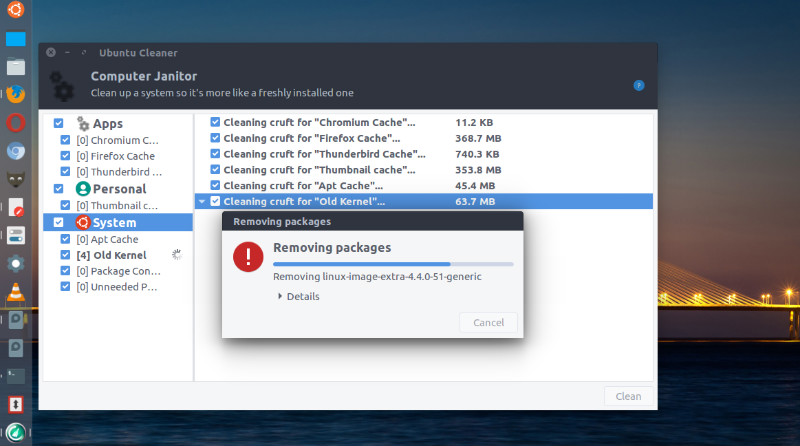
ubuntu-cleaner

Install Ubuntu Cleaner

Run the following commands to install Ubuntu Cleaner on Ubuntu 16.10, Ubuntu 16.04, Ubuntu 15.10, Ubuntu 15.04, Ubuntu 14.10 and Ubuntu 14.04 Systems:

$ sudo add-apt-repository ppa:gerardpuig/ppa
$ sudo apt update
$ sudo apt install ubuntu-cleaner

Once installed, open Ubuntu Cleaner from Ubuntu Dash.

If you wish to uninstall and remove Ubuntu Cleaner, run the following commands:

$ sudo apt update
$ sudo apt remove ubuntu-cleaner
$ sudo apt autoremove

More Info: https://launchpad.net/~gerardpuig/+archive/ubuntu/ppa

Tags: Clean Ubuntu Cache, Computer Janitor Linux, Computer Janitor Ubuntu, Download Ubuntu Cleaner, Install Ubuntu Cleaner, Linux Computer Janitor, Linux Ubuntu Cleaner, Ubuntu 14.04 Cleaner, Ubuntu 15.04 Cleaner, Ubuntu 16.04 Cleaner, Ubuntu 16.10 Cleaner, Ubuntu Autoclean, Ubuntu Bleachbit, Ubuntu Clean Apt-Get Cache, Ubuntu Cleaner, Ubuntu Cleaner App, Ubuntu Cleaner Software, Ubuntu Cleanup Disk Space, Ubuntu Cleanup Old Kernel Images, Ubuntu Computer Janitor, Ubuntu Janitor, Ubuntu Sudo Apt-Get Clean

Primary Sidebar

Latest Posts

Use Locate Command To Find File In Linux Terminal By Name

How To Change Terminal Color In Ubuntu Command Line

How To Run Fsck Manually In Linux To Fix Unexpected Inconsistency

How To Fix Broken Packages On Ubuntu From Terminal

Re Execute The Previous Command In Linux Ubuntu Command Line

How Much RAM Is Needed For Ubuntu PC

How To Find Large Files And Directories In Linux Command Line

How To Use Clear Command History In Linux Terminal

Linux Command To Check RAM Size In Ubuntu Terminal In GB

How To Install Proprietary Drivers In Linux Ubuntu Using Terminal

© 2026 Source Digit • Linux, Ubuntu Tutorials & News, Technology, Gadgets & Gizmos

  • Home
  • About
  • Privacy Policy
  • Terms & Conditions
  • Contact Us
  • Sitemap