
• Skip to primary navigation
  • Skip to main content
  • Skip to primary sidebar
Source Digit

Source Digit

Linux, Ubuntu Tutorials & News, Technology, Gadgets & Gizmos

  • Home
  • How To
  • Ubuntu
  • Instagram
  • Blogging
  • Android
  • WordPress
  • +More
    • Cloud Computing
    • Gadgets
    • Social Media
    • Technology
  • Write for Us
Home / How To / Terminal Commands To Find The Largest Files and Directories in Ubuntu Systems

Terminal Commands To Find The Largest Files and Directories in Ubuntu Systems

By Sourabh / June 7, 2019 Category: How To, Ubuntu

How to find the largest files & directories on Ubuntu Linux. Terminal command to find largest file in a directory in Ubuntu, files with maximum size in Ubuntu. An easy way to find out the largest files & directories on Linux Ubuntu system.

Open Terminal and type the following command to find out top 10 largest file/directories in Ubuntu systems:

du -a /var | sort -n -r | head -n 10
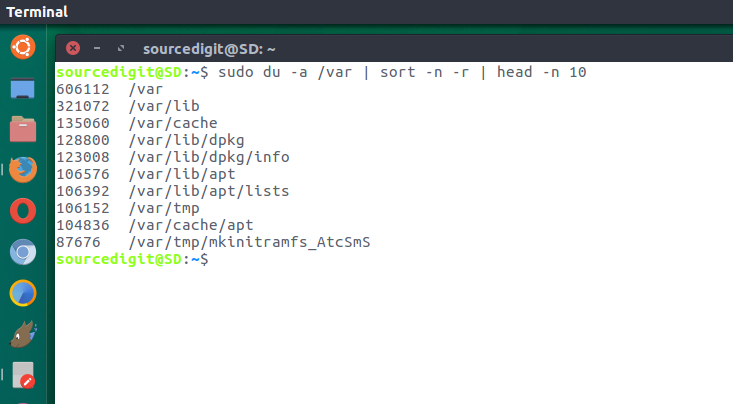
In the above command the options du is to estimate file space usage, sort if to sort lines of text files or given input data and head is to output the first part of files i.e. to display the n largest files/directories. n is to compare string numerical value and r to reverse the result being displayed.

It is somehow hard to interpret the numeric symbols of the file. So to get a more human readable output of the command, try the following command:

du -hsx * | sort -rh | head -10

You can also use the above command to find the top 10 largest files in a directory. To use this command, first change the directory and then use the command.

cd /path/to/directory
du -hsx * | sort -rh | head -10

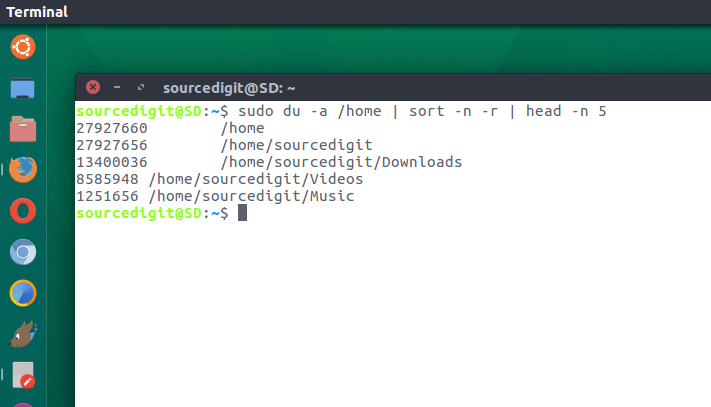
Run the following command in terminal to find out the top 10 biggest files and directories in the /home folder partition:

sudo du -a /home | sort -n -r | head -n 10

Similarly if you want to find out the 10 biggest directories in the current working directory, run the command given below:

sudo du -a | sort -n -r | head -n 10
Let us understand the command:

  • du command -h option : display file sizes in human readable format, in Kilobytes, Megabytes and Gigabytes.
  • du command -s option : Show total for each argument.
  • du command -x option : Skip directories. (if on different file systems)
  • sort command -r option : Reverse the result of comparisons.
  • sort command -h option : Compare the numbers.
  • head command -10 OR -n 10 option : Displays the first 10 lines of the output.

Please note that the above command will only work if GNU (sort is installed by default). For other Unix systems, use the following command:


for i in G M K; do du -ah | grep [0-9]$i | sort -nr -k 1; done | head -n 11

Find top 10 files and directories consuming maximum disk space

You can use the sort command to find the top 10 files and directories consuming maximum disk space.


alias ducks='du -cks * | sort -rn | head'

Now run the following command to get top 10 files and directories consuming maximum disk space in Ubuntu system:

ducks

Tags: Find 10 largest directories on Linux, Find 10 largest directories on Ubuntu, Find 10 largest files on Linux, Find 10 largest files on Ubuntu, Find files with maximum size in Ubuntu, Find Large Files Unix, Find Large Folders Windows 7, Find largest directories on Linux, Find largest directories on Ubuntu, Find largest file in directory linux, Find largest files on Linux, Find largest files on Ubuntu, Find The Largest Top 10 Files and Directories in Ubuntu 14.04, Find top 10 largest directories on Linux, Find top 10 largest directories on Ubuntu, Find top 10 largest files on Linux, Find top 10 largest files on Ubuntu, How To Find Large Files In Linux In / File System, Linux Find Files Larger Than 1gb, Linux Find Largest Directories, Linux Find Largest Directories Fast, Linux Find Largest File In Directory Recursively, Terminal command to find largest file in a directory, Terminal Command to Find The Largest Files and Directories in Ubuntu 14.04, Terminal Commands To Find The Largest Files and Directories in Ubuntu Systems, Ubuntu 14.04, Ubuntu find biggest files, Ubuntu find large directories, Ubuntu find largest file in directory, Unix Find Largest Files In Directory

Primary Sidebar

Latest Posts

Delete Directory And Contents Recursively Without Prompt On Linux

Check User Login History In Ubuntu Linux Command Line

Use Locate Command To Find File In Linux Terminal By Name

How To Change Terminal Color In Ubuntu Command Line

How To Run Fsck Manually In Linux To Fix Unexpected Inconsistency

How To Fix Broken Packages On Ubuntu From Terminal

Re Execute The Previous Command In Linux Ubuntu Command Line

How Much RAM Is Needed For Ubuntu PC

How To Find Large Files And Directories In Linux Command Line

How To Use Clear Command History In Linux Terminal

© 2026 Source Digit • Linux, Ubuntu Tutorials & News, Technology, Gadgets & Gizmos

  • Home
  • About
  • Privacy Policy
  • Terms & Conditions
  • Contact Us
  • Sitemap