
• Skip to primary navigation
  • Skip to main content
  • Skip to primary sidebar
Source Digit

Source Digit

Linux, Ubuntu Tutorials & News, Technology, Gadgets & Gizmos

  • Home
  • How To
  • Ubuntu
  • Instagram
  • Blogging
  • Android
  • WordPress
  • +More
    • Cloud Computing
    • Gadgets
    • Social Media
    • Technology
  • Write for Us
Home / How To / How to Make Password Visible as Asterisks in Linux Terminal

How to Make Password Visible as Asterisks in Linux Terminal

By Sourabh / August 16, 2016 Category: How To, Ubuntu

How to make password visible in the Terminal in Linux. A quick tutorial on how to show asterisks (*) when you type password in the Terminal in Linux Ubuntu or other Linux Distros.

To make password visible (asterisks), we will edit the “/etc/sudoers” file. We will open the file and change the setting to display passwords as asterisks. To do so, open Terminal and type the following command and press Enter key.

sudo visudo

Type the password when prompted and press Enter. Please note that no password (asterisks) are displayed at the moment as the change is to be done and then applied. Also keep in mind that always edit the sudoers file using the visudo command as shown above.
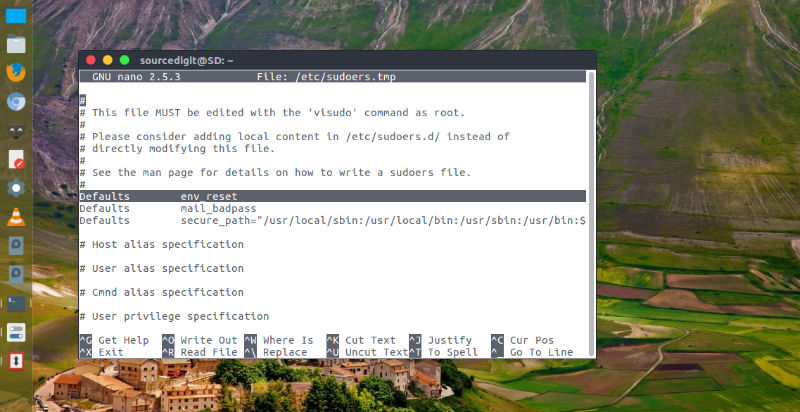
sudo-visudo

Once the /etc/sudoers.tmp file is open, search for Defaults env_reset and modify it. Search for the line that reads Defaults env_reset and change it to Defaults env_reset,pwfeedback.

Once you have made the change, save and exit. Press Ctrl + X and then type a “Y.” Please read the instruction at the bottom of the window to save and exit.

Now restart the terminal and you should be able to see the password as asterisks when you type in your password.

Tags: How to Make Password Asterisks Visible in the Terminal in Linux, How To Make Passwords Visible in Linux, How To Make Passwords Visible in Ubuntu, How To Make Sudo Command Passwords Visible in Ubuntu, Make Password Asterisks Visible in Linux Terminal, Make Password Asterisks Visible in Ubuntu, Make Password Visible in Ubuntu Terminal, Make Passwords Visible in Terminal Ubuntu, Make Passwords Visible in Ubuntu, Make Passwords Visible in Ubuntu 16.04, Make Passwords Visible in Ubuntu 16.10, Make Passwords Visible in Ubuntu Terminal, Make Sudo Command Passwords Visible in the Terminal, Ubuntu 14.04, Ubuntu 16.04 Make Passwords Visible, Ubuntu 16.10 Make Passwords Visible, Ubuntu Terminal Make Password Visible

Primary Sidebar

Latest Posts

Delete Directory And Contents Recursively Without Prompt On Linux

Check User Login History In Ubuntu Linux Command Line

Use Locate Command To Find File In Linux Terminal By Name

How To Change Terminal Color In Ubuntu Command Line

How To Run Fsck Manually In Linux To Fix Unexpected Inconsistency

How To Fix Broken Packages On Ubuntu From Terminal

Re Execute The Previous Command In Linux Ubuntu Command Line

How Much RAM Is Needed For Ubuntu PC

How To Find Large Files And Directories In Linux Command Line

How To Use Clear Command History In Linux Terminal

© 2026 Source Digit • Linux, Ubuntu Tutorials & News, Technology, Gadgets & Gizmos

  • Home
  • About
  • Privacy Policy
  • Terms & Conditions
  • Contact Us
  • Sitemap