
• Skip to primary navigation
  • Skip to main content
  • Skip to primary sidebar
Source Digit

Source Digit

Linux, Ubuntu Tutorials & News, Technology, Gadgets & Gizmos

  • Home
  • How To
  • Ubuntu
  • Instagram
  • Blogging
  • Android
  • WordPress
  • +More
    • Cloud Computing
    • Gadgets
    • Social Media
    • Technology
  • Write for Us
Home / How To / Install LinSSID Graphical Wireless Scanner Tool for Ubuntu & Linux Mint

Install LinSSID Graphical Wireless Scanner Tool for Ubuntu & Linux Mint

By Sourabh / January 2, 2015 Category: How To, Ubuntu

How to install LinSSID on Ubuntu 14.10, Ubuntu 14.04 and Linux Mint. LinSSID is a free graphical wireless scanner tool for Ubuntu/Linux Mint systems.

LinSSID is similar to iwScanner and Inssider (for MS Windows). It is a powerful application for wireless scanning designed from scratch using C++, Qwt, and Qt languages. LinSSID displays the information available in graphical format – displays a table of all of the local wireless networks, displays charts of the signal strength of each network by channel number. LinSSID also works with more than one wireless device, but only one device can be selected at a time.

Install LinSSID Graphical Wireless Scanner Tool
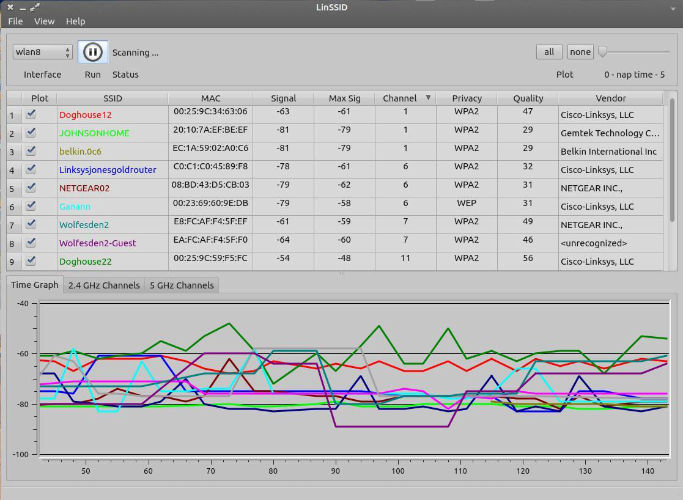

LinSSID-Wireless-Scanner-Tool-screen

The LinSSID graphical wireless scanner tool is available for 64-bit (amd64) and 32-bit (i386) Linux systems. LinSSID may be installed either by downloading source, or adding a PPA for Debian/Ubuntu systems.

To install LinSSID in Ubuntu 14.10 Utopic/14.04 Trusty/12.04 Precise/Linux Mint 17.1/17/13 open Terminal (Press Ctrl+Alt+T) and copy the following commands in the Terminal:

sudo add-apt-repository ppa:wseverin/ppa
sudo apt-get update
sudo apt-get install linssid

Please note that LinSSID requires root privilege to run. The best method is to launch LinSSID as a regular user and let it ask for a password.

Tags: Command Line Wireless Scanner Tool For Linux Ubuntu, Install LinSSID Graphical Wireless Scanner Tool, Install LinSSID Wireless Scanner Tool on Linux, Install LinSSID Wireless Scanner Tool on Linux Mint, Install LinSSID Wireless Scanner Tool on Ubuntu 14.04, Install LinSSID Wireless Scanner Tool on Ubuntu 14.10, Linux Mint, Ubuntu 14.04, Ubuntu 14.10, Wireless Scanner Tool For Ubuntu

Primary Sidebar

Latest Posts

Delete Directory And Contents Recursively Without Prompt On Linux

Check User Login History In Ubuntu Linux Command Line

Use Locate Command To Find File In Linux Terminal By Name

How To Change Terminal Color In Ubuntu Command Line

How To Run Fsck Manually In Linux To Fix Unexpected Inconsistency

How To Fix Broken Packages On Ubuntu From Terminal

Re Execute The Previous Command In Linux Ubuntu Command Line

How Much RAM Is Needed For Ubuntu PC

How To Find Large Files And Directories In Linux Command Line

How To Use Clear Command History In Linux Terminal

© 2026 Source Digit • Linux, Ubuntu Tutorials & News, Technology, Gadgets & Gizmos

  • Home
  • About
  • Privacy Policy
  • Terms & Conditions
  • Contact Us
  • Sitemap