
• Skip to primary navigation
  • Skip to main content
  • Skip to primary sidebar
Source Digit

Source Digit

Linux, Ubuntu Tutorials & News, Technology, Gadgets & Gizmos

  • Home
  • How To
  • Ubuntu
  • Instagram
  • Blogging
  • Android
  • WordPress
  • +More
    • Cloud Computing
    • Gadgets
    • Social Media
    • Technology
  • Write for Us
Home / How To / Install Cool Retro Term 0.9 On Ubuntu 14.04, Ubuntu 14.10 & Derivatives

Install Cool Retro Term 0.9 On Ubuntu 14.04, Ubuntu 14.10 & Derivatives

By Sourabh / January 4, 2015 Category: How To, Ubuntu

How to install Cool Retro Term 0.9 on Ubuntu 14.04, Ubuntu 14.04 & Derivatives. You can install Cool Retro Term 0.9 on Fedora 20, Arch Linux and Manjaro System.

Install Cool Retro Term 0.9 On Ubuntu 14.04 & Derivatives
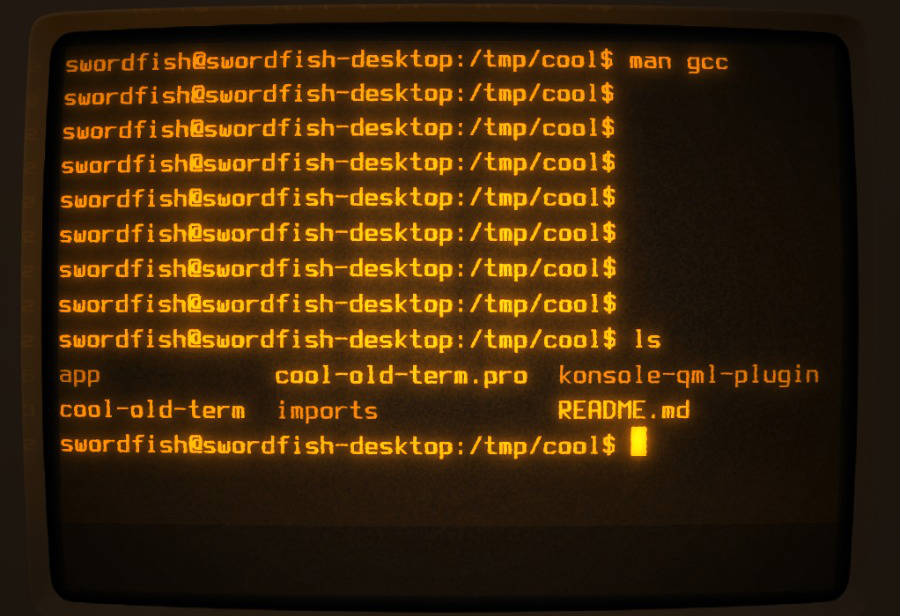

cool-retro-term-ubuntu

Open Terminal and run the following commands to install Cool Old Term 0.9 on Ubuntu 14.04.


sudo apt-get install build-essential qmlscene qt5-qmake qt5-default qtdeclarative5-dev qtdeclarative5-controls-plugin qtdeclarative5-qtquick2-plugin libqt5qml-graphicaleffects qtdeclarative5-dialogs-plugin qtdeclarative5-localstorage-plugin qtdeclarative5-window-plugin
cd ~
git clone https://github.com/Swordifish90/cool-old-term.git
cd cool-old-term/konsole-qml-plugin
qmake
make
sudo make install

To launch the terminal emulator, run the following commands:

cd ..
./cool-old-term

Install Cool Retro Term 0.9 On Ubuntu 14.10

For Ubuntu 14.10, Cool Retro Term 0.9 is available via PPA, so installing it is easy. Just add the ppa to your system, update the local repository index and install the cool-retro-term package:

sudo add-apt-repository ppa:noobslab/apps
sudo apt-get update
sudo apt-get install cool-retro-term

Install Cool Retro Term 0.9 On Fedora 20

To install Cool Retro Term 0.9 on Fedora 20, we have to add the repository to our sources and install the cool-retro-term package:

sudo wget http://download.opensuse.org/repositories/home:/KAMiKAZOW:/Fedora/Fedora_20/home:KAMiKAZOW:Fedora.repo -O
/etc/yum.repos.d/home:KAMiKAZOW:Fedora.repo
sudo yum install cool-retro-term

The Arch Linux and Manjaro users can install Cool Retro Term 0.9 package directly via the AUR:

yaourt -S aur/cool-retro-term-git

Tags: Cool Retro Term Terminal Emulator, How To Install Cool Retro Term 0.9 On Ubuntu, Install Cool Retro Term 0.9 On Arch Linux, Install Cool Retro Term 0.9 On Fedora, Install Cool Retro Term 0.9 On Ubuntu 14.04, Install Cool Retro Term Terminal on Linux Ubuntu, Ubuntu 14.04, Ubuntu 14.10

Primary Sidebar

Latest Posts

How Much RAM Is Needed For Ubuntu PC

How To Find Large Files And Directories In Linux Command Line

How To Use Clear Command History In Linux Terminal

Linux Command To Check RAM Size In Ubuntu Terminal In GB

How To Install Proprietary Drivers In Linux Ubuntu Using Terminal

How To Shutdown Linux With A 15 Minute Delay And Message

Free AI Courses With Certificate For Beginners In India

Best AI Plugins For WordPress To Use In 2026

3 Commands To Check USB Connection In Linux Terminal

Linux Terminal Commands for Beginners With Examples

© 2026 Source Digit • Linux, Ubuntu Tutorials & News, Technology, Gadgets & Gizmos

  • Home
  • About
  • Privacy Policy
  • Terms & Conditions
  • Contact Us
  • Sitemap