
• Skip to primary navigation
  • Skip to main content
  • Skip to primary sidebar
Source Digit

Source Digit

Linux, Ubuntu Tutorials & News, Technology, Gadgets & Gizmos

  • Home
  • How To
  • Ubuntu
  • Instagram
  • Blogging
  • Android
  • WordPress
  • +More
    • Cloud Computing
    • Gadgets
    • Social Media
    • Technology
  • Write for Us
Home / How To / How to Install Dropbox 3.0.4 On Ubuntu 14.04, Ubuntu 14.10 & Derivatives

How to Install Dropbox 3.0.4 On Ubuntu 14.04, Ubuntu 14.10 & Derivatives

By Sourabh / January 4, 2015 Category: How To, Ubuntu

How to Install Dropbox 3.0.4 on Ubuntu 14.04, Ubuntu 14.10 and Derivatives. Download Dropbox .deb installer or install Dropbox via Terminal (command line). Once installed, you can receive future Dropbox Updates on Ubuntu systems.

Dropbox is a free cloud-hosting service for Desktop PC (Windows, MAC, Linux), Android, iOS, BlackBerry OS and web browsers.

Install Dropbox via .deb Installer

Click on the link below (on image) to download and install the Dropbox .deb installer package. Please select the right OS configuration (32 bit or 64 bit) before downloading the package.
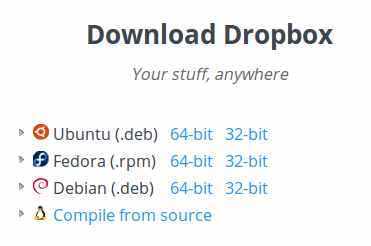

Download-Install-Dropbox-Ubuntu

Install Dropbox 3.0.4 on 32 Bit Systems


cd ~
wget https://dl-web.dropbox.com/u/17/dropbox-lnx.x86-3.0.4.tar.gz
tar -xzvf dropbox-lnx.x86-3.0.4.tar.gz
~/.dropbox-dist/dropboxd

Install Dropbox 3.0.4 on 64 Bit Systems


cd ~
wget https://dl-web.dropbox.com/u/17/dropbox-lnx.x86_64-3.0.4.tar.gz
tar -xvf dropbox-lnx.x86_64-3.0.4.tar.gz
~/.dropbox-dist/dropboxd

If you wish to uninstall and remove Dropbox, run the following comamnd. The following command works on both 32 bit and 64 bit Linux Systems:

rm -rf ~/.dropbox-dist/dropboxd

Tags: How To Install Dropbox 3 In Ubuntu 14.04, How To Install Dropbox 3 In Ubuntu 14.10, How To Install Dropbox 3.0.4 On Linux, How To Install Dropbox 3.0.4 On Linux Mint, How To Install Dropbox 3.0.4 On Ubuntu 14.01, How To Install Dropbox 3.0.4 On Ubuntu 14.04, Install Dropbox 3 in Linux Ubuntu, Install Dropbox via command line, Ubuntu 14.04, Ubuntu 14.10

Primary Sidebar

Latest Posts

How Much RAM Is Needed For Ubuntu PC

How To Find Large Files And Directories In Linux Command Line

How To Use Clear Command History In Linux Terminal

Linux Command To Check RAM Size In Ubuntu Terminal In GB

How To Install Proprietary Drivers In Linux Ubuntu Using Terminal

How To Shutdown Linux With A 15 Minute Delay And Message

Free AI Courses With Certificate For Beginners In India

Best AI Plugins For WordPress To Use In 2026

3 Commands To Check USB Connection In Linux Terminal

Linux Terminal Commands for Beginners With Examples

© 2026 Source Digit • Linux, Ubuntu Tutorials & News, Technology, Gadgets & Gizmos

  • Home
  • About
  • Privacy Policy
  • Terms & Conditions
  • Contact Us
  • Sitemap