
• Skip to primary navigation
  • Skip to main content
  • Skip to primary sidebar
Source Digit

Source Digit

Linux, Ubuntu Tutorials & News, Technology, Gadgets & Gizmos

  • Home
  • How To
  • Ubuntu
  • Instagram
  • Blogging
  • Android
  • WordPress
  • +More
    • Cloud Computing
    • Gadgets
    • Social Media
    • Technology
  • Write for Us
Home / Cloud Computing / How To Install TeamViewer 10 On Ubuntu 14.10, Ubuntu 14.04

How To Install TeamViewer 10 On Ubuntu 14.10, Ubuntu 14.04

By Sourabh / January 12, 2015 Category: Cloud Computing, How To, Ubuntu

How to install Teamviewer 10 on Ubuntu systems. You can install Teamviewer 10 on 32 bit Ubuntu and 64 bit Ubuntu systems.

TeamViewer is a popular application for remote control and desktop sharing. It is also used for online meetings and file transfer. Teamviewer is available for Windows, Mac OSX, Linux, Android and iPhone.

TeamViewer 10 includes significant performance optimizations. CPU usage optimizations for multi-core processors, HD voice transmission quality, and faster login and load times for the Management Console. TeamViewer 10 provides a complete chat history for all conversations, and create chat groups for ongoing discussions.
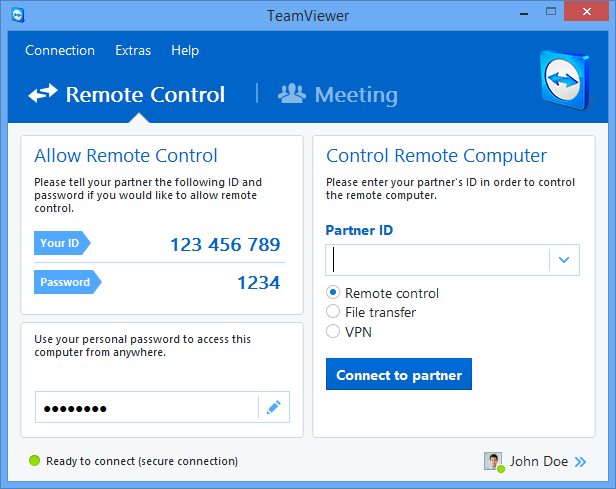

Teamviewer-10-mainwindow
It now comes with one-click video calls and UltraHigh Definition (UHD) 4K display support. Other notable features are:

  • Performance optimizations
  • Central setting policies
  • Master whitelist
  • Chat history and persistent chat groups
  • One-click video calls
  • Add your profile picture
  • Automatically find nearby contacts
  • Ultra High Definition support
  • Real-time session notes
  • Computers & Contacts API
  • Idle session timeout
  • Integration with Dropbox and more
  • Door lock for online meetings
  • Whiteboard for remote control

How to install Teamviewer 10 Beta 32 bit Ubuntu systems


sudo apt-get install gdebi
wget download.teamviewer.com/download/version_10x/teamviewer_linux.deb
sudo gdebi teamviewer_linux.deb

How to install Teamviewer 10 Beta 64 bit Ubuntu systems


sudo dpkg --add-architecture i386
sudo apt-get update
sudo apt-get install gdebi
wget download.teamviewer.com/download/version_10x/teamviewer_linux.deb
sudo gdebi teamviewer_linux.deb

To remove or un-install Teamviewer, run the following command:


sudo apt-get remove teamviewer*

Tags: Download TeamViewer 10 in Ubuntu, How To Install TeamViewer 10 in Ubuntu 14.04, How To Install TeamViewer 10 in Ubuntu 14.10, Install TeamViewer 10 in Linux, Install TeamViewer 10 in Ubuntu, Ubuntu 14.04, Ubuntu 14.10, Ubuntu Install TeamViewer

Primary Sidebar

Latest Posts

How To Check User Permissions In Linux Using Command

Check Which Folder Is Taking More Space In Ubuntu Linux

How to Install Claude Desktop App in Ubuntu Linux

Job Scheduling Using At Command In Linux With Examples

How To Check Permissions Of A Directory In Linux Command

Delete Directory And Contents Recursively Without Prompt On Linux

Check User Login History In Ubuntu Linux Command Line

Use Locate Command To Find File In Linux Terminal By Name

How To Change Terminal Color In Ubuntu Command Line

How To Run Fsck Manually In Linux To Fix Unexpected Inconsistency

© 2026 Source Digit • Linux, Ubuntu Tutorials & News, Technology, Gadgets & Gizmos

  • Home
  • About
  • Privacy Policy
  • Terms & Conditions
  • Contact Us
  • Sitemap