
How to check memory usage in Ubuntu 14.10, Ubuntu 14.04 and Linux systems. Display system memory status in Ubuntu. Useful examples of ‘free’ command to check memory usage in Linux Ubuntu system.
Useful examples of ‘free’ command to check memory usage in Linux Ubuntu system. Free command displays the amount of free and used memory in the system.
This tutorial explains some useful examples of “free” commands with options to get information about total used and available space of physical memory and swap memory. The free command also details the buffers used by kernel in Linux/Unix OS.
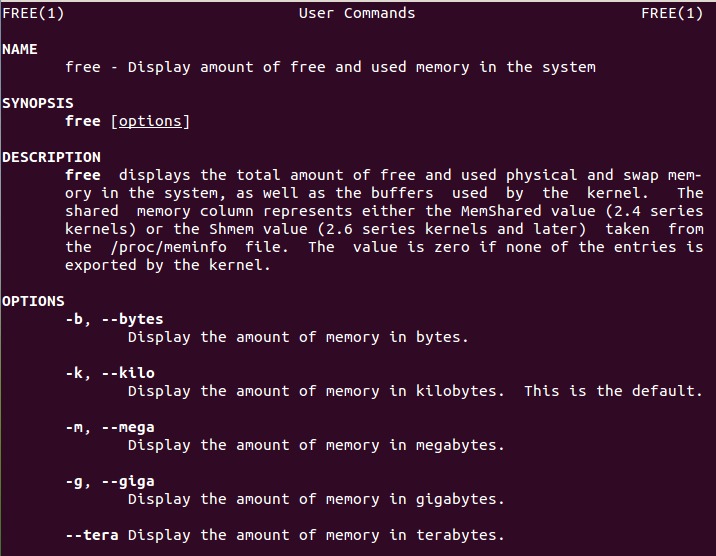
The manpage description of the free command says free displays the total amount of free and used physical and swap memory in the system, as well as the buffers used by the kernel. The shared memory column represents either the MemShared value (2.4 series kernels) or the Shmem value (2.6 series kernels and later) taken from the /proc/meminfo file. The value is zero if none of the entries is exported by the kernel.
Examples of Free Command With Options
The free command displays the amount of free and used memory in the system. The free command has manya rguements or command options. For example, free command used with option -m “free -m” gives the disk usage information in megabytes.
There are several free command options that can be used to display the memory usage in Bytes, Kilobytes, Megabytes, Gigabytes and many more.
1. Display System Memory in Kilobytes

When used alone, without any options, the free command shows the used and available space of physical memory and swap memory in Kilobytes (KB).
free
2. Display Memory in Bytes
Free command used with option -b, display the memory usage in Bytes.
free -b
3. Display Memory in Kilo Bytes
Free command used with option -k, display the memory usage in Kilobytes.
free -k
4. Display Memory in Megabytes
Free command used with option -m, display the memory usage in Megabytes.
free -m
5. Display Memory in Gigabytes
Free command used with option -g, display the memory usage in Gigabytes.
free -g
6. Dispaly Memory Status for Regular Intervals
Free command used with option -s and time in seconds, display the memory usage at regular intervals. For example, the below free command will display the memory usage at every 6 seconds.
free -s 6
7. Show Low and High Memory Statistics
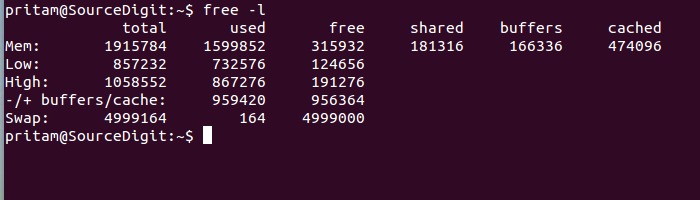
Free command used with option -l, display the detailed memory usage – high and low memory size statistics.
free -l
The free command can also be used to display free and used physical and swap memory and the buffers used by the kernel in the system.