
• Skip to primary navigation
  • Skip to main content
  • Skip to primary sidebar
Source Digit

Source Digit

Linux, Ubuntu Tutorials & News, Technology, Gadgets & Gizmos

  • Home
  • How To
  • Ubuntu
  • Instagram
  • Blogging
  • Android
  • WordPress
  • +More
    • Cloud Computing
    • Gadgets
    • Social Media
    • Technology
  • Write for Us
Home / How To / Install & Upgrade Plank Dock 0.8.1, OS X-style Dock Launcher on Ubuntu Systems

Install & Upgrade Plank Dock 0.8.1, OS X-style Dock Launcher on Ubuntu Systems

By Sourabh / January 29, 2015 Category: How To, Ubuntu

How to install Plank Dock, OS X-style Dock Launcher for Ubuntu 14.10, Ubuntu 14.04 & Linux Mint Systems. Upgrade Plank Dock 0.8.1 in Ubuntu 14.10/14.04/Linux Mint via PPA. Once installed, learn how to configure Plank Dock in in Ubuntu /14.10/14.04/Linux Mint Systems.

You can install or upgrade Plank Dock 0.8.1 for Ubuntu 14.10/14.04 & Linux Mint Systems. The latest version, Plank Dock 0.8.1 has been released with new feature and bug fixes.

Install or Upgrade to Plank 0.8.1
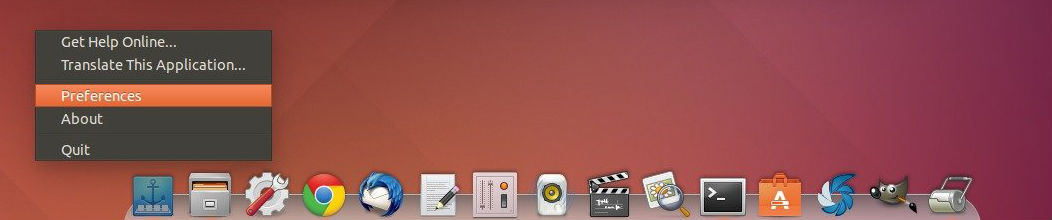

plank-dock-launcher-012
The binary packages have been made into PPA, available for Ubuntu 15.04, Ubuntu 14.10, Ubuntu 14.04, Ubuntu 12.04 and their derivatives.

To add the PPA repository, press Ctrl+Alt+T to open terminal and run:

sudo add-apt-repository ppa:ricotz/docky
sudo apt-get update
sudo apt-get install plank

You can install Plank Dock for Ubuntu 12.04 (Precise Pangolin) and later or once installed, update Plank as a package from either the official repositories or one of the official PPAs. To update or upgrade the Plank Dock, run the following command in the Terminal:

sudo apt-get update
sudo apt-get upgrade

Autostart Plank Dock at Login & Change Other Preferences

You can autostart the Plank Dock at login. To do so, open Startup Applications utility from the Dash and add plank into the list.
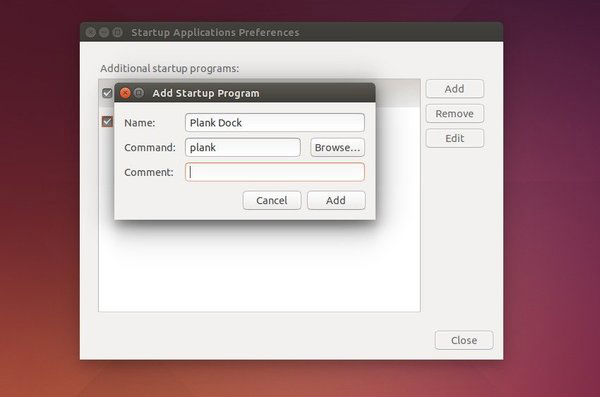

plank-autostart

Not only the autostart, you can also configure the dock.

Images via UbuntuHandbook

Tags: Install OS X-style Dock Launcher on Ubuntu 14.04, Install OS X-style Dock Launcher on Ubuntu 14.10, Install Plank Dock 0.8.1 on Ubuntu 14.04, Install Plank Dock 0.8.1 on Ubuntu 14.10, Install Plank Dock 0.8.1 OS X-style Dock Launcher on Ubuntu 14.04, Install Plank Dock 0.8.1 OS X-style Dock Launcher on Ubuntu 14.10, Plank Dock 0.8.1 OS X-style Dock Launcher, Plank Dock OS X-style Dock Launcher Linux Ubuntu, Upgrade Plank Dock 0.8.1 on Ubuntu 14.04, Upgrade Plank Dock 0.8.1 on Ubuntu 14.10

Primary Sidebar

Latest Posts

How To Run Fsck Manually In Linux To Fix Unexpected Inconsistency

How To Fix Broken Packages On Ubuntu From Terminal

Re Execute The Previous Command In Linux Ubuntu Command Line

How Much RAM Is Needed For Ubuntu PC

How To Find Large Files And Directories In Linux Command Line

How To Use Clear Command History In Linux Terminal

Linux Command To Check RAM Size In Ubuntu Terminal In GB

How To Install Proprietary Drivers In Linux Ubuntu Using Terminal

How To Shutdown Linux With A 15 Minute Delay And Message

Free AI Courses With Certificate For Beginners In India

© 2026 Source Digit • Linux, Ubuntu Tutorials & News, Technology, Gadgets & Gizmos

  • Home
  • About
  • Privacy Policy
  • Terms & Conditions
  • Contact Us
  • Sitemap