
How to install Elementary Tweaks 0.2 on Elementary OS 0.3 Freya. Elementary Tweaks Tool is used to customize Elementary OS 0.3 setting – system and user. It is mainly used to adjust various “hidden” settings of the Elementary OS 0.3.
From elementary Tweaks, users can access the following settings:
- Appearance: change the window, GTK, icon and cursor themes, change the window buttons layout;
- change fonts;
- disable animations or change various animations duration;
- change focused/unfocused window shadows;
- Plank: change the dock’s screen position, alignment, theme, hide delay and hide mode, icon size, enable Plank for the current workspace only, lock items and more;
- Files: disable single click, change date format and sidebar icon size;
- Slingshot: change the number of rows and columns;
- add/remove Cerbere watched processes (Cerbere monitors a predefined list of processes and relaunches them if they end);
- Terminal: change opacity and color scheme;
- more.
Install Elementary Tweaks in Elementary OS 0.3 Freya
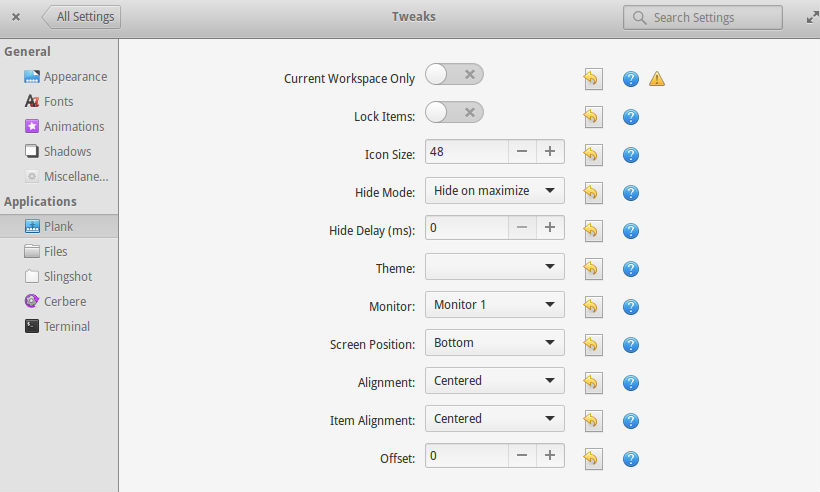
Image via webupd8
The Elementary Tweaks PPA is available at: ppa:mpstark/elementary-tweaks-daily. To install the Elementary Tweaks via PPA in Elementary OS 0.3 Freya, run the following commands:
sudo add-apt-repository ppa:mpstark/elementary-tweaks-daily

sudo apt-get update

sudo apt-get install elementary-tweaks
Install Elementary Tweaks in Elementary OS 0.2 Luna
sudo apt-add-repository ppa:versable/elementary-update
sudo apt-get update
sudo apt-get install elementary-tweaks
Uninstall Elementary Tweaks
To uninstall and remove Elementary Tweaks, run the following commands:
sudo apt-get remove elementary-tweaks
To use Elementary Tweaks, open System Settings and go start Tweaks. Since elementary Tweaks is available as a Switchboard plug (System Settings), it doesn’t show up in the menu and instead, you’ll find it in System Settings > Tweaks: