
• Skip to primary navigation
  • Skip to main content
  • Skip to primary sidebar
Source Digit

Source Digit

Linux, Ubuntu Tutorials & News, Technology, Gadgets & Gizmos

  • Home
  • How To
  • Ubuntu
  • Instagram
  • Blogging
  • Android
  • WordPress
  • +More
    • Cloud Computing
    • Gadgets
    • Social Media
    • Technology
  • Write for Us
Home / How To / Create a Bootable USB Stick on Ubuntu 15.04 “Vivid Vervet”

Create a Bootable USB Stick on Ubuntu 15.04 “Vivid Vervet”

By Sourabh / April 22, 2015 Category: How To, Ubuntu

How to create a bootable USB stick on Ubuntu? Create a USB stick – bootable Ubuntu USB flash drive to install Ubuntu. On Ubuntu you can create bootable USB stick from ISO file.

To create a USB stick from which you can install Ubuntu, you must first download Ubuntu. Once you have download the the Ubuntu, follow the instructions given below:

1. Insert a USB stick with at least 2GB of free space.
2. Open the dash and search for Startup Disk Creator.
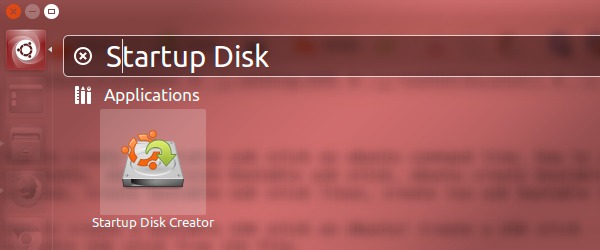
Create a Bootable USB Stick on Ubuntu
3. Select the Startup Disk Creator to launch the app.
4. Click ‘Other’ to choose the downloaded ISO file (Source disc image (.iso) or CD).
5. Select the file and click ‘Open’.
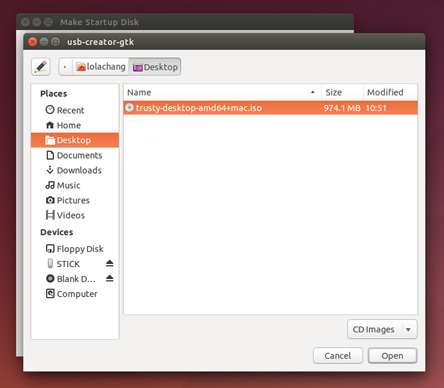
image-createausbstickonubuntu-2

6. Select the USB stick in the bottom box (Disk to use) and click ‘Make Startup Disk’.
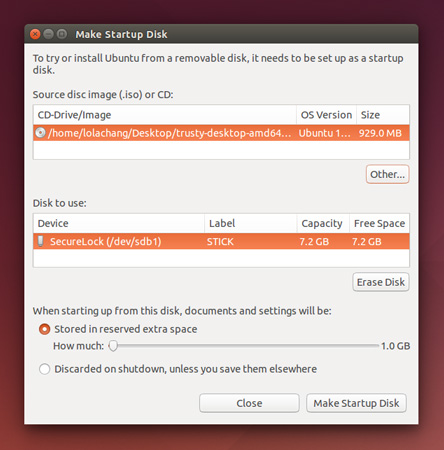

image-createausbstickonubuntu-3

7. That’s it! Once the process completes, you’ll get a bootable USB falsh drive.

Simply restart your computer and begin installing Ubuntu.

Tags: Create a Bootable Ubuntu 15.04 USB Stick, Create a Bootable Ubuntu USB Stick, Create a Bootable USB Stick on Ubuntu, Create a Bootable USB Stick on Ubuntu 15.04, Create a Bootable USB Stick on Ubuntu 15.04 "Vivid Vervet", Create Bootable USB Stick Install Ubuntu 15.04, Creating an Ubuntu Live USB from CD, How to Create a Bootable USB Stick on Ubuntu, How to Create a Bootable USB Stick on Ubuntu 15.04, Install Ubuntu 15.04, Install Ubuntu 15.04 From CD ISO, Install Ubuntu 15.04 From USB Flash Drive, Install Ubuntu 15.04 From USB Stick, Ubuntu 15.04 "Vivid Vervet", Ubuntu 15.04 installation from a USB, USB Stick Install Ubuntu 15.04

Primary Sidebar

Latest Posts

Job Scheduling Using At Command In Linux With Examples

How To Check Permissions Of A Directory In Linux Command

Delete Directory And Contents Recursively Without Prompt On Linux

Check User Login History In Ubuntu Linux Command Line

Use Locate Command To Find File In Linux Terminal By Name

How To Change Terminal Color In Ubuntu Command Line

How To Run Fsck Manually In Linux To Fix Unexpected Inconsistency

How To Fix Broken Packages On Ubuntu From Terminal

Re Execute The Previous Command In Linux Ubuntu Command Line

How Much RAM Is Needed For Ubuntu PC

© 2026 Source Digit • Linux, Ubuntu Tutorials & News, Technology, Gadgets & Gizmos

  • Home
  • About
  • Privacy Policy
  • Terms & Conditions
  • Contact Us
  • Sitemap