
• Skip to primary navigation
  • Skip to main content
  • Skip to primary sidebar
Source Digit

Source Digit

Linux, Ubuntu Tutorials & News, Technology, Gadgets & Gizmos

  • Home
  • How To
  • Ubuntu
  • Instagram
  • Blogging
  • Android
  • WordPress
  • +More
    • Cloud Computing
    • Gadgets
    • Social Media
    • Technology
  • Write for Us
Home / How To / Install HomeBank 5.0.2 (Personal Finance Software) On Ubuntu 15.04, Ubuntu 14.04 & Ubuntu 14.10

Install HomeBank 5.0.2 (Personal Finance Software) On Ubuntu 15.04, Ubuntu 14.04 & Ubuntu 14.10

By Sourabh / May 8, 2015 Category: How To, Ubuntu

Install HomeBank 5.0.2 on Ubuntu 15.04, Ubuntu 14.10 and Ubuntu 14.04 Systems. HomeBank is a free personal finance software and money management application for Ubuntu Systems.

HomeBank software assists to manage personal accounting. It is designed to easy to use and be able to analyse all the personal finance in detail using powerful filtering tools and beautiful graphs.

HomeBank 5.0.2 Features:
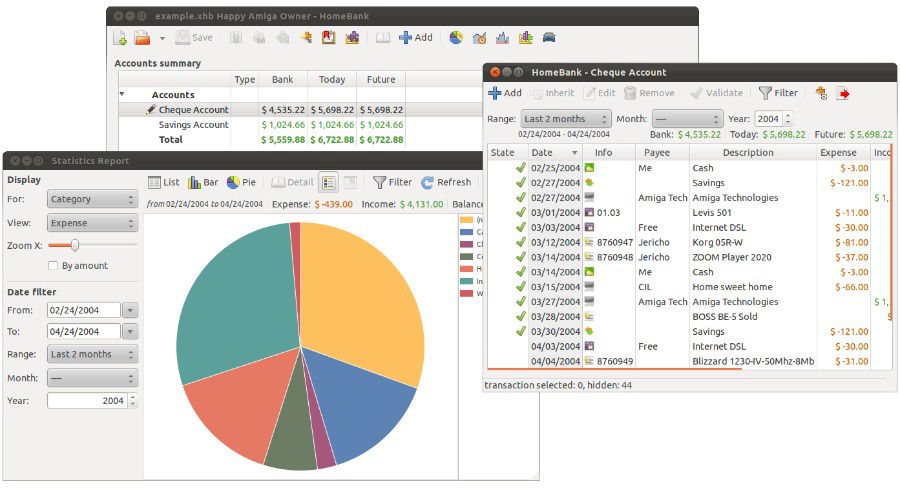
HomeBank-Ubuntu

  • Cross platform, supports GNU/Linux, Microsoft Windows, Mac OS X
  • Import easily from Intuit Quicken, Microsoft Money or other software
  • Import bank statements (OFX, QIF, CSV, QFX)
  • Duplicate transaction detection
  • Automatic cheque numbering
  • Various account types : Bank, Cash, Asset, Credit card, Liability
  • Scheduled transaction
  • Category split
  • Internal transfer
  • Month/Annual budget
  • Dynamic powerful reports
  • Automatic category/payee assignment
  • Vehicule cost
  • Translated in around 56 languages

Install HomeBank 5.0.2 on Ubuntu

Run the following commands in Terminal to install HomeBank 5.0.2 on Ubuntu Systems:

sudo add-apt-repository ppa:mdoyen/homebank
sudo apt-get update
sudo apt-get install homebank

If you wish to uninstall and remove HomeBank from Ubuntu Systems:

sudo apt-get remove homebank

Tags: HomeBank Official PPA, Install HomeBank 5.0.2 on Ubuntu, Install HomeBank 5.0.2 On Ubuntu 14.04, Install HomeBank 5.0.2 On Ubuntu 14.10, Install HomeBank 5.0.2 On Ubuntu 15.04, Ubuntu 14.04, Ubuntu 14.10, Ubuntu 15.04

Primary Sidebar

Latest Posts

Delete Directory And Contents Recursively Without Prompt On Linux

Check User Login History In Ubuntu Linux Command Line

Use Locate Command To Find File In Linux Terminal By Name

How To Change Terminal Color In Ubuntu Command Line

How To Run Fsck Manually In Linux To Fix Unexpected Inconsistency

How To Fix Broken Packages On Ubuntu From Terminal

Re Execute The Previous Command In Linux Ubuntu Command Line

How Much RAM Is Needed For Ubuntu PC

How To Find Large Files And Directories In Linux Command Line

How To Use Clear Command History In Linux Terminal

© 2026 Source Digit • Linux, Ubuntu Tutorials & News, Technology, Gadgets & Gizmos

  • Home
  • About
  • Privacy Policy
  • Terms & Conditions
  • Contact Us
  • Sitemap