• Skip to primary navigation
  • Skip to main content
  • Skip to primary sidebar
Source Digit

Source Digit

Linux, Ubuntu Tutorials & News, Technology, Gadgets & Gizmos

  • Home
  • How To
  • Ubuntu
  • Instagram
  • Blogging
  • Android
  • WordPress
  • +More
    • Cloud Computing
    • Gadgets
    • Social Media
    • Technology
  • Write for Us
Home / How To / How To Set Menus To ‘Always Show’ In Ubuntu 15.04

How To Set Menus To ‘Always Show’ In Ubuntu 15.04

By Sourabh / May 21, 2015 Category: How To, Ubuntu

Enable Ubuntu 15.04 Unity “Always Show Menus” feature and set menus to ‘Always Show’ in Ubuntu 15.04. How to set “App Menus” to “Always Show” in Ubuntu 15.04 (Unity 7.3).

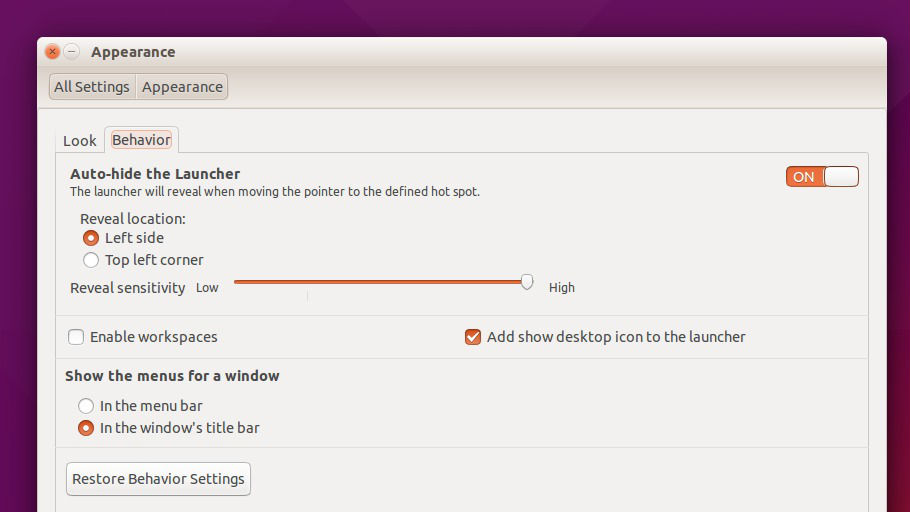
In Ubuntu 15.04, you can decide and set where app menus will be shown. To decide the app menus location, follow the steps given below:

  • Go to ‘System Settings > Appearance’
  • Select the ‘Behavior’ tab

Menu-Ubuntu-

  • Find the section headed: ‘Show the Menus for a Window’
  • Click ‘In the window’s title bar’ option
Menu-Ubuntu-2
It’s done. You don’t have to restart the system as the change is applied immediately.

Set App Menus To “Always Show”

One of Ubuntu 15.04’s notable feature is Menu Setting – App Menus to “Always Show”. The feature is however not immediately accessible to general users and needs to be enabled.

The settings can be applied using the Dconf-editor Tool. To make things easier, run the following command into the Terminal:

gsettings set com.canonical.Unity always-show-menus true

To revert/undo the changes and restore thedefault app menus behavior, run the following comamnd.

gsettings set com.canonical.Unity always-show-menus false

When you do so, you set app menus to hide until mouse over.

Tags: Always Show Menus in Ubuntu 15.04, Always Show Menus Unity Feature Lands In Ubuntu 15.04, Customize Menu Settings in Ubuntu 15.04, Customize Menu Settings in Ubuntu 15.04 "Vivid Vervet., Customize Ubuntu 15.04 "Vivid Vervet., New Unity "Always Show Menus" Feature, Set “App Menus” to “Always Show” in Ubuntu 15.04 (Unity 7.3), Set App Menus To "Always Show" Ubuntu 15.04, Set Menus To ‘Always Show’ Enable Ubuntu 15.04 Unity "Always Show Menus" Feature, Set Ubuntu Menus to ‘Always Show’ Ubuntu 15.04, Show Menus in Ubuntu 15.04, Ubuntu 15.04, Ubuntu 15.04 "Vivid Vervet", Ubuntu 15.04 Always Show Menus, Ubuntu 15.04 Customize Menu Settings, Ubuntu 15.04 Menu Settings, Ubuntu 15.04 Set App Menus To "Always Show", Unity To Get An Option To Always Show The Menus

Primary Sidebar

Latest Posts

Delete Directory And Contents Recursively Without Prompt On Linux

Check User Login History In Ubuntu Linux Command Line

Use Locate Command To Find File In Linux Terminal By Name

How To Change Terminal Color In Ubuntu Command Line

How To Run Fsck Manually In Linux To Fix Unexpected Inconsistency

How To Fix Broken Packages On Ubuntu From Terminal

Re Execute The Previous Command In Linux Ubuntu Command Line

How Much RAM Is Needed For Ubuntu PC

How To Find Large Files And Directories In Linux Command Line

How To Use Clear Command History In Linux Terminal

© 2026 Source Digit • Linux, Ubuntu Tutorials & News, Technology, Gadgets & Gizmos

  • Home
  • About
  • Privacy Policy
  • Terms & Conditions
  • Contact Us
  • Sitemap