
• Skip to primary navigation
  • Skip to main content
  • Skip to primary sidebar
Source Digit

Source Digit

Linux, Ubuntu Tutorials & News, Technology, Gadgets & Gizmos

  • Home
  • How To
  • Ubuntu
  • Instagram
  • Blogging
  • Android
  • WordPress
  • +More
    • Cloud Computing
    • Gadgets
    • Social Media
    • Technology
  • Write for Us
Home / How To / Install Birdie Twitter Client On Ubuntu 15.04 and Ubuntu 14.04

Install Birdie Twitter Client On Ubuntu 15.04 and Ubuntu 14.04

By Sourabh / May 30, 2015 Category: How To, Ubuntu

How to install Birdie Twitter Client on Ubuntu 15.04, Ubuntu 14.04 and Linux Mint. Birdie is a beautiful Twitter client for Linux Ubuntu. Birdie is the best Twitter client available for Linux Ubuntu.

Birdie provide official packages for Ubuntu, Fedora, openSUSE, elementary OS and Arch Linux.

Birdie comes with the following features:

  • Birdie provides a seamless integration with most modern GNU/Linux Desktop Environments and feels like a first-class app.
  • Birdie is fast, easy to use and works great. It provides all the basic Twitter features and allows you to enjoy Twitter right on your desktop.
  • Birdie is built by volunteers. All the source code is licensed under the GPLv3 and freely available for anyone to use, modify or share.

Install Birdie Twitter Client on Ubuntu

You can install Birdie Twitter Client on Ubuntu 15.04, Ubuntu 14.04 and Linux Mint Systems. The Birdie PPA can be added to Ubuntu to install Birdie Twitter client. Run the following commands in Terminal:


sudo add-apt-repository ppa:birdie-team/stable
sudo apt-get update
sudo apt-get install birdie

For other versions such as Fedora, openSUSE, elementary OS and Arch Linux, you can download the .deb executables and install it manually.

Once installed, you can open the Birdie app via Dash. For the first time users, it will ask you to login and confirm the Twitter access by the Birdie app.
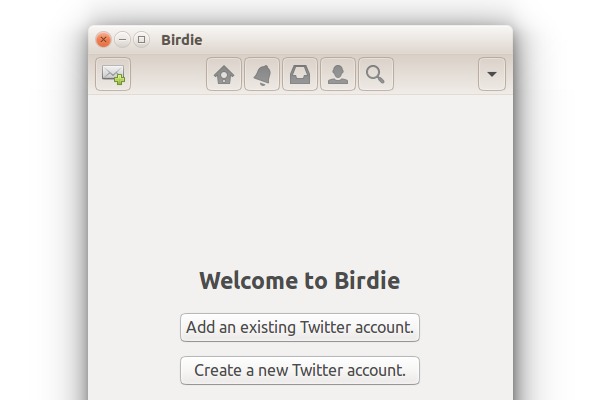
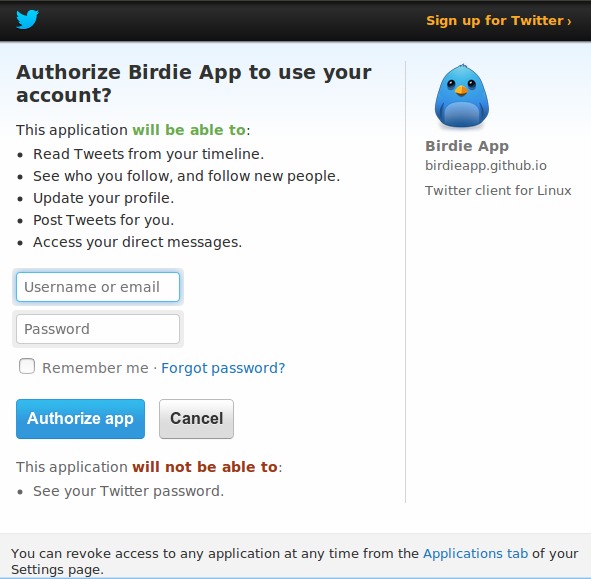
Birdie-01


Birdie-03

To uninstall and remove Birdie app from Ubuntu Systems, run the following command:


sudo apt-get remove birdie

Tags: Birdie Twitter Client PPA, Install Birdie On Ubuntu, Install Birdie On Ubuntu 14.04, Install Birdie On Ubuntu 15.04, Install Birdie Twitter Client on Linux Ubuntu, Install Birdie Twitter Client on Ubuntu, Install Birdie Twitter Client on Ubuntu 14.04, Install Birdie Twitter Client on Ubuntu 15.04, Ubuntu 14.04, Ubuntu 15.04, Ubuntu Install Birdie Twitter Client, Ubuntu PPA Birdie Twitter Client

Primary Sidebar

Latest Posts

Delete Directory And Contents Recursively Without Prompt On Linux

Check User Login History In Ubuntu Linux Command Line

Use Locate Command To Find File In Linux Terminal By Name

How To Change Terminal Color In Ubuntu Command Line

How To Run Fsck Manually In Linux To Fix Unexpected Inconsistency

How To Fix Broken Packages On Ubuntu From Terminal

Re Execute The Previous Command In Linux Ubuntu Command Line

How Much RAM Is Needed For Ubuntu PC

How To Find Large Files And Directories In Linux Command Line

How To Use Clear Command History In Linux Terminal

© 2026 Source Digit • Linux, Ubuntu Tutorials & News, Technology, Gadgets & Gizmos

  • Home
  • About
  • Privacy Policy
  • Terms & Conditions
  • Contact Us
  • Sitemap