
Install Nemo File Manager on Ubuntu 15.04 and Ubuntu 14.04. You can install Nemo 2.6 with Unity Patches and without Cinnamon Dependencies in Ubuntu Systems.
Nemo 2.6 has added a plugin manager which allows easily enabling and disabling Nemo actions, extensions and scripts. It also comes with an improved thumbnail generation and an improved Preferences dialog.
Nemo is the default Cinnamon file manager, the official file manager for the Linux Mint operating system running the Cinnamon desktop environment.
The Nemo WebUpd8 PPA comes with various extensions ported from Nautilus.
Install Nemo File Manager in Ubuntu
Please note that do not install and use the WebUpd8 PPA, if you’re using Linux Mint or Cinnamon in Ubuntu. Any Cinnamon PPAs must be removed before using the WebUpd8 Nemo PPA even if Cinnamon is not installed.
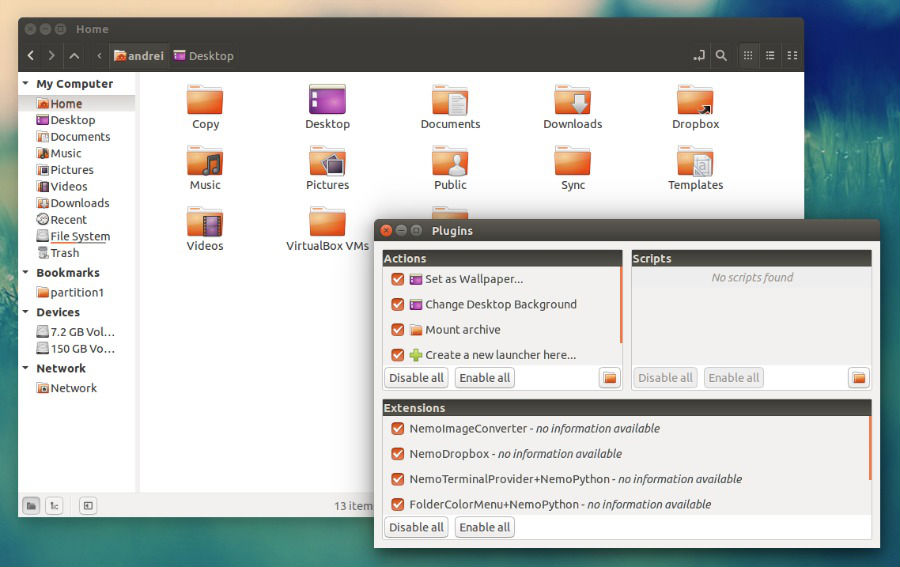
Install Nemo 2.6 WebUpd8 PPA
The Nemo 2.6 WebUpd8 PPA can be installed on Ubuntu 15.04, Ubuntu 14.04 and Ubuntu 14.10. To add the PPA and install the latest Nemo with Unity patches, run the following commands:
sudo add-apt-repository ppa:webupd8team/nemo

sudo apt-get update

sudo apt-get install nemo nemo-fileroller
Once insatlled, to launch Nemo, search for “Nemo” in Dash and clik on it. You must note that if no application called “Nemo” is shown, click on the application called files displayed in Dash. Also to start Nemo, don’t search for “Files”.
By default, Nemo only displays thumbnails for files smaller than 1 MB in size. Luckily you can change this and enable thumbnails for files larger than 1 MB. To change this setting, open Nemo, select Edit > Preferences. Under the “Preview” tab, go to “Other Previewable Files”, and select set “Only for files smaller than” to the file-size you want to display.
Un-install Nemo
If you want to un-install and remove Nemo, run the following command:
sudo apt-get remove nemo nemo-*

sudo rm /etc/apt/sources.list.d/webupd8team-nemo-*.list