
• Skip to primary navigation
  • Skip to main content
  • Skip to primary sidebar
Source Digit

Source Digit

Linux, Ubuntu Tutorials & News, Technology, Gadgets & Gizmos

  • Home
  • How To
  • Ubuntu
  • Instagram
  • Blogging
  • Android
  • WordPress
  • +More
    • Cloud Computing
    • Gadgets
    • Social Media
    • Technology
  • Write for Us
Home / How To / Install MATE 1.10 Desktop Environment on Ubuntu 15.04, Ubuntu 14.04 & Derivatives

Install MATE 1.10 Desktop Environment on Ubuntu 15.04, Ubuntu 14.04 & Derivatives

By Sourabh / June 14, 2015 Category: How To, Ubuntu

Install MATE 1.10 Desktop Environment on Linux Ubuntu 15.04, Ubuntu 14.04, Ubuntu 14.10, Linux Mint and Derivatives. The Mate Desktop is shipped by default on Fedora, Arch Linux, Linux Mint and BSD Systems.
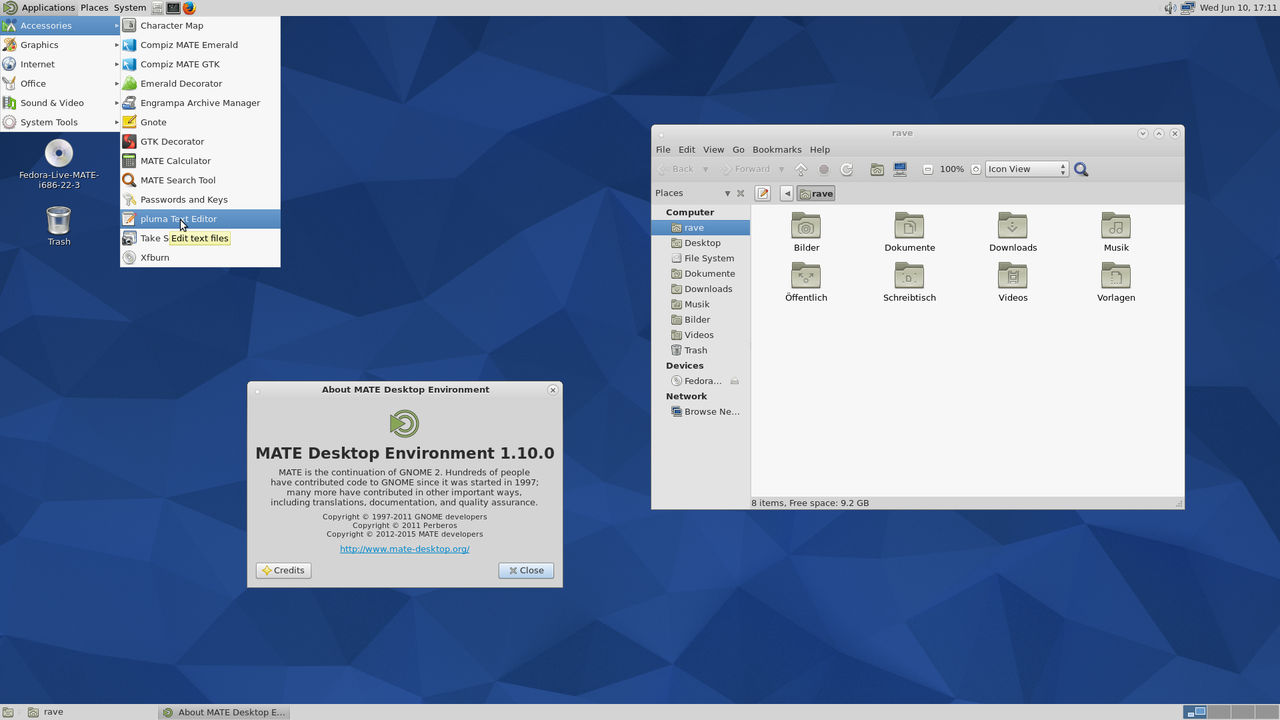
mate-1-10-ubuntu

The recently released Mate Desktop 1.10 has been released with new features and bug-fixes. Some of the prominent changes and features are:

  • Every component of MATE can now be built with GTK2 and GTK3.
    • GTK3 support is still considered experimental
    • Arch Linux and Fedora currently offer alternative GTK3 builds.
  • [GSoC 2014] Caja now has an extension manager so plugin can be enabled/disabled at run-time.
  • [GSoC 2014] Atril now supports ePub.
  • [GSoC 2014] libmatemixer, an audio mixer library for MATE desktop, has been introduced.
    • Provides an abstract API allowing access to mixer functionality available in the PulseAudio, ALSA and OSS sound systems.
  • Static code analysis has resulted in many memory leaks being plugged.
  • Theme support has been expanded to GTK 3.8 to 3.16 including CSD and pop-over support.

Install Mate 1.10.0 on Ubuntu Systems

Terminal commands to install the Mate Desktop Environment on Linux Ubuntu Systems:

$ sudo apt-add-repository ppa:ubuntu-mate-dev/ppa
$ sudo apt-get update
$ sudo apt-get install mate-desktop-environment

If you wish to uninstall and remove the Mate Desktop Environment from Ubuntu Systems, run the following Terminal commands:

$ sudo apt-get install ppa-purge
$ sudo ppa-purge ppa:ubuntu-mate-dev/ppa

If the above commands doesn’t work, you can try installing Mate Desktop on Ubuntu 14.04 and Ubuntu 14.10 using the following commands:

Install Mate 1.10.0 on Ubuntu 14.10

$ sudo apt-add-repository ppa:ubuntu-mate-dev/ppa
$ sudo apt-add-repository ppa:ubuntu-mate-dev/utopic-mate
$ sudo apt-get update

Install Mate 1.10.0 on Ubuntu 14.04

$ sudo apt-add-repository ppa:ubuntu-mate-dev/ppa
$ sudo apt-add-repository ppa:ubuntu-mate-dev/trusty-mate
$ sudo apt-get update

Tags: Download MATE 1.10 Desktop Environment, Install MATE 1.10 Desktop Environment, Install Mate 1.10.0 on Linux Mint 17 Systems, Install Mate 1.10.0 on Linux Mint 17.1, Install Mate 1.10.0 on Ubuntu 14.10, Install Mate 1.10.0 on Ubuntu 15.04, Install Mate 1.10.0 on Ubuntu Systems, Install MATE Desktop Environment, Linux Ubuntu MATE 1.10 Desktop Environment, MATE 1.10 Desktop Environment, MATE 1.10 Desktop Environment PPA, MATE 1.10 Desktop Environment Ubuntu, MATE 1.10 Desktop Environment Ubuntu 14.04, MATE 1.10 Desktop Environment Ubuntu 14.10, MATE Desktop Environment, MATE Desktop Environment Linux Ubuntu, Mate Desktop Environment Ubuntu, Mate Desktop Environment Ubuntu 15.04, PPA MATE 1.10 Desktop Environment, Ubuntu 14.04, Ubuntu 14.10

Primary Sidebar

Latest Posts

How Much RAM Is Needed For Ubuntu PC

How To Find Large Files And Directories In Linux Command Line

How To Use Clear Command History In Linux Terminal

Linux Command To Check RAM Size In Ubuntu Terminal In GB

How To Install Proprietary Drivers In Linux Ubuntu Using Terminal

How To Shutdown Linux With A 15 Minute Delay And Message

Free AI Courses With Certificate For Beginners In India

Best AI Plugins For WordPress To Use In 2026

3 Commands To Check USB Connection In Linux Terminal

Linux Terminal Commands for Beginners With Examples

© 2026 Source Digit • Linux, Ubuntu Tutorials & News, Technology, Gadgets & Gizmos

  • Home
  • About
  • Privacy Policy
  • Terms & Conditions
  • Contact Us
  • Sitemap