
• Skip to primary navigation
  • Skip to main content
  • Skip to primary sidebar
Source Digit

Source Digit

Linux, Ubuntu Tutorials & News, Technology, Gadgets & Gizmos

  • Home
  • How To
  • Ubuntu
  • Instagram
  • Blogging
  • Android
  • WordPress
  • +More
    • Cloud Computing
    • Gadgets
    • Social Media
    • Technology
  • Write for Us
Home / How To / How To Install digiKam 4.10 in (K)Ubuntu 15.04, (K)Ubuntu 14.10 and (K)Ubuntu 14.04

How To Install digiKam 4.10 in (K)Ubuntu 15.04, (K)Ubuntu 14.10 and (K)Ubuntu 14.04

By Sourabh / June 17, 2015 Category: How To, Ubuntu

pgrade to digiKam 4.10 in (K)Ubuntu. Install digiKam 4.10 in (K)Ubuntu 15.04, (K)Ubuntu 14.10 and (K)Ubuntu 14.04. digiKam is an advanced digital photo management application for Linux, Windows, and Mac-OSX.

With DigiKam you can :

  • import pictures
  • organize your collection
  • view items
  • edit and enhance
  • create (slideshows, calendar, print, …)
  • share your creations (using social web services, email, your own web allery, …)
  • Organization of Photos in Albums and sub-Albums. Comments can be added to Albums. Tags can be added to Albums
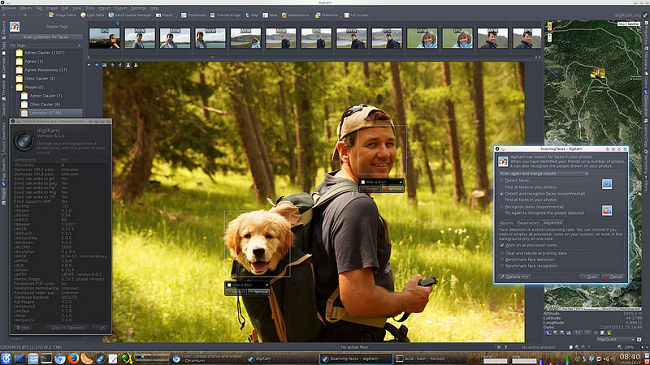
digikam-01

The latest release of digiKamĀ  software (digiKam 4.4.0) includes the following new features:

  • Slideshow support multi-monitors computer and use a new OSD widget. Users can also change Tags and Labels through keyboard shortcuts.
  • New keyboard shortcut to switch on/off color managed view for thumbnails and preview.
  • New keyboard shortcuts to improve usability while photo review (as to switch focus on text edit widget, or to toggle tags view). It’s also possible to navigate between pictures using PageUp/PageDown while editing properties through captions/tags sidebar.

Install or Upgrade digiKam 4.10 in (K)Ubuntu Systems

1. For (K)Ubuntu 15.04, (K)Ubuntu 14.10, they can install digiKam 4.4.0 via the following commands:


sudo add-apt-repository ppa:philip5/extra
sudo apt-get update
sudo apt-get install digikam showfoto

2. For (K)Ubuntu 14.04 users who have upgraded to KDE 4.14 using Kubuntu Backports PPA, they can install digiKam 4.4.0 via the following commands:


sudo add-apt-repository ppa:philip5/kubuntu-backports
sudo apt-get update
sudo apt-get install digikam showfoto

Tags: (K)Ubuntu 14.04, digiKam 4.10 Photo Management Software, digiKam 4.10 PPA, Install digiKam 4.10 in (K)Ubuntu, Install digiKam 4.10 in (K)Ubuntu 14.04, Install digiKam 4.10 in (K)Ubuntu 14.10, Install digiKam 4.10 in (K)Ubuntu 15.04, Kubuntu 14.10, KUbuntu 15.04, Ubuntu PPA digiKam 4.10, Upgrade digiKam 4.10 in (K)Ubuntu 14.04, Upgrade digiKam 4.10 in (K)Ubuntu 14.10, Upgrade digiKam 4.10 in (K)Ubuntu 15.04

Primary Sidebar

Latest Posts

Job Scheduling Using At Command In Linux With Examples

How To Check Permissions Of A Directory In Linux Command

Delete Directory And Contents Recursively Without Prompt On Linux

Check User Login History In Ubuntu Linux Command Line

Use Locate Command To Find File In Linux Terminal By Name

How To Change Terminal Color In Ubuntu Command Line

How To Run Fsck Manually In Linux To Fix Unexpected Inconsistency

How To Fix Broken Packages On Ubuntu From Terminal

Re Execute The Previous Command In Linux Ubuntu Command Line

How Much RAM Is Needed For Ubuntu PC

© 2026 Source Digit • Linux, Ubuntu Tutorials & News, Technology, Gadgets & Gizmos

  • Home
  • About
  • Privacy Policy
  • Terms & Conditions
  • Contact Us
  • Sitemap