
• Skip to primary navigation
  • Skip to main content
  • Skip to primary sidebar
Source Digit

Source Digit

Linux, Ubuntu Tutorials & News, Technology, Gadgets & Gizmos

  • Home
  • How To
  • Ubuntu
  • Instagram
  • Blogging
  • Android
  • WordPress
  • +More
    • Cloud Computing
    • Gadgets
    • Social Media
    • Technology
  • Write for Us
Home / How To / Install YakYak (Google Hangouts Client) on Ubuntu 15.04 and Ubuntu 14.04

Install YakYak (Google Hangouts Client) on Ubuntu 15.04 and Ubuntu 14.04

By Sourabh / July 2, 2015 Category: How To, Ubuntu

Google Hangouts unofficial client for Linux Ubuntu Systems. Install YakYak Beta 3 (Google Hangouts Client) on Ubuntu 15.04, Ubuntu 14.04, Ubuntu 14.10 and Derivatives.

YakYak is an open-source, cross-platform, unofficial Google Hangouts client for Linux Desktop. Below are the main features of YakYak:

  • Send/receive chat messages
  • Create/change conversations (rename, add people)
  • Leave/delete conversation
  • Notifications
  • Toggle notifications on/off
  • Drag-drop, copy-paste or attach-button for image upload.
  • Hangupsbot sync room aware (no bot name, proper user pics)
  • Show inline images
  • Send presence/focus/typing/activeclient to behave like a proper client
  • History scrollback
  • Video/audio integration (open in chrome)
  • Focus/typing indications (mainly a design issue. keep it clean)

What doesn’t it do (yet?):

  • Have a serious icon (this is being adressed)
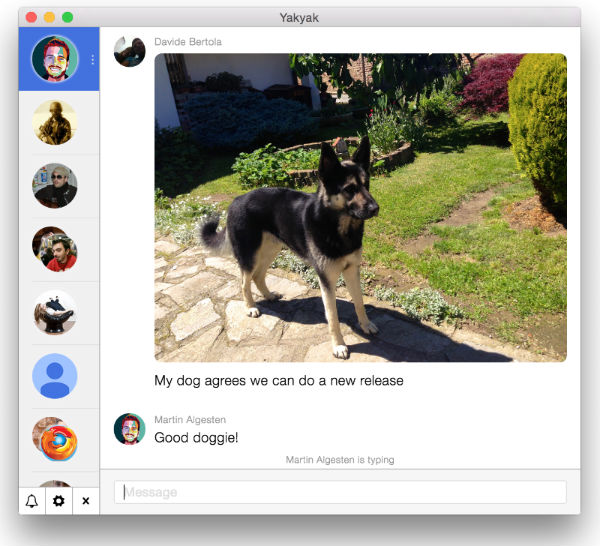
Yak-Yak-01

 Install YakYak (Google Hangouts Client)

Please note that YakYak is not available via any repository or PPA. YakYak 3 can be installed via the zip archive from github. Download the zip archive, exctact it and install it. Run the following commands to do so:

Install YakYak on 32 bit Linux systems:

$ wget https://github.com/yakyak/yakyak/releases/download/v0.2.0/yakyak-linux-ia32.zip
$ unzip yakyak-linux-ia32.zip
$ cd linux-ia32
$ ./yakyak

Install YakYak on 64 bit Linux systems:

$ wget https://github.com/yakyak/yakyak/releases/download/v0.2.0/yakyak-linux-x64.zip
$ unzip yakyak-linux-x64.zip
$ cd linux-x64
$ ./yakyak

Tags: Google Hangouts Client Ubuntu, Install Google Hangouts Client on Ubuntu, Install Google Hangouts Client on Ubuntu 14.04, Install Google Hangouts Client on Ubuntu 14.10, Install Google Hangouts Client on Ubuntu 15.04, Install YakYak (Google Hangouts Client), Install YakYak Beta 3 (Google Hangouts Client) on Ubuntu, Install YakYak Beta 3 on Ubuntu, Install YakYak Beta 3 on Ubuntu 14.04, Install YakYak Beta 3 on Ubuntu 14.10, Install YakYak Beta 3 on Ubuntu 15.04, Linux Desktop chat client for Google Hangouts, Linux Ubuntu Google Hangouts Client, Ubuntu 15.04 Google Hangouts Client, Ubuntu Desktop chat client for Google Hangouts, Ubuntu Google Hangouts Client, YakYak Beta 3 (Google Hangouts Client)

Primary Sidebar

Latest Posts

Delete Directory And Contents Recursively Without Prompt On Linux

Check User Login History In Ubuntu Linux Command Line

Use Locate Command To Find File In Linux Terminal By Name

How To Change Terminal Color In Ubuntu Command Line

How To Run Fsck Manually In Linux To Fix Unexpected Inconsistency

How To Fix Broken Packages On Ubuntu From Terminal

Re Execute The Previous Command In Linux Ubuntu Command Line

How Much RAM Is Needed For Ubuntu PC

How To Find Large Files And Directories In Linux Command Line

How To Use Clear Command History In Linux Terminal

© 2026 Source Digit • Linux, Ubuntu Tutorials & News, Technology, Gadgets & Gizmos

  • Home
  • About
  • Privacy Policy
  • Terms & Conditions
  • Contact Us
  • Sitemap