
Download LibreOffice 5.0 RC4 on Linux Ubuntu. Install LibreOffice 5.0 RC4 on Ubuntu 15.04, Ubuntu 14.04, Ubuntu 14.10 and Derivatives. LibreOffice 5.0 RC4 is the latest update for LibreOffice 5.0 version.
LibreOffice 5.0 is the biggest and most important release of the LibreOffice software.
The latest release (LibreOffice 5.0) brings Emoji and in-word replacement support, style previews in the sidebar and word-compatible text highlighting.
Emoji and in-word replacement support
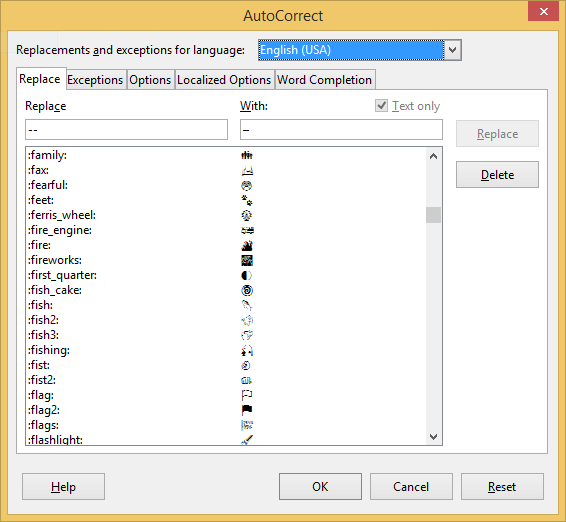
Modern graphical operating systems have default Unicode 6 support with several Emojis and other useful special characters. LibreOffice 5 has got a new AutoCorrect extension to simplify Emoji and other Unicode character input using de facto standard Emoji shortcodes, and other keywords surrounded by colons.
For example: typing the following shortnames in Writer, :keyboard: will be replaced by (U+2328) and camera by (U+1F4F7).
You can see full shortcode list in Tools > AutoCorrect > AutoCorrect Options… > Replace
Other notable changes are style previews in the sidebar and word-compatible text highlighting. Styles & Formatting deck of the Sidebar now displays a preview of the available styles. For text highlighting feature, both highlighting and shading are preserved during import / export of Microsoft Word documents.
Other supported features are:
Emoji and in-word replacement support
Style previews in the Sidebar
Word-compatible text highlighting
Crop an image
Better calculation of displayed page number
Table Management
Toolbar improvements
DOC improvements
OOXML improvements
RTF improvements
Image Drag and Drop
Optional RSIDs
Install LibreOffice on Ubuntu and Debian Systems
Run the following commands to install LibreOffice on 32 bit Ubuntu and Debian systems:
$ wget http://download.documentfoundation.org/libreoffice/testing/5.0.0/deb/x86/LibreOffice_5.0.0.4_Linux_x86_deb.tar.gz

$ tar -xzvf LibreOffice_5.0.0.4_Linux_x86_deb.tar.gz

$ cd LibreOffice_5.0.0.4_Linux_x86_deb/DEBS

$ sudo dpkg -i *.deb
Run the following commands to install LibreOffice on 64 bit Ubuntu and Debian systems:
$ wget http://download.documentfoundation.org/libreoffice/testing/5.0.0/deb/x86_64/LibreOffice_5.0.0.4_Linux_x86-64_deb.tar.gz

$ tar -xzvf LibreOffice_5.0.0.4_Linux_x86-64_deb.tar.gz

$ cd LibreOffice_5.0.0.4_Linux_x86-64_deb/DEBS

$ sudo dpkg -i *.deb
If you wish to uninstall and remove LibreOffice from 32/64 bit Ubuntu and Debian systems, run the command given below:
$ sudo apt-get remove libreoffice*
Please Note
- The Linux and Mac packages can be installed in parallel to LibreOffice 4.4, but not run simultaneously – documents will be opened in the version you’ve started first.
- The Windows package will update a previously installed version of LibreOffice
- LibreOffice 5.0 will be made available as 64bit version in addition to the 32bit version. Installing the 64bit version requires Windows Vista or newer, the 32bit Version runs on Windows XP or newer.