
• Skip to primary navigation
  • Skip to main content
  • Skip to primary sidebar
Source Digit

Source Digit

Linux, Ubuntu Tutorials & News, Technology, Gadgets & Gizmos

  • Home
  • How To
  • Ubuntu
  • Instagram
  • Blogging
  • Android
  • WordPress
  • +More
    • Cloud Computing
    • Gadgets
    • Social Media
    • Technology
  • Write for Us
Home / Uncategorized / Find & Delete Duplicate Files/Directories in Linux Ubuntu 15.04 & Ubuntu 14.04

Find & Delete Duplicate Files/Directories in Linux Ubuntu 15.04 & Ubuntu 14.04

By Sourabh / August 11, 2015 Category: Uncategorized

Find and delete duplicate files/directories in Linux Ubuntu. Install fdupes CLI (Command Line) tool to find and remove duplicate files in Ubuntu 15.04, Ubuntu 14.04 and Derivatives.

fdupes is a powerful CLI tool that can find duplicate files in a given set of directories. In simple words, fdupes is a program for identifying or deleting duplicate files residing within specified directories. It searches the given path for duplicate files. Such files are found by comparing file sizes and MD5 signatures, followed by a byte-by-byte comparison. Fdupes is a Linux utility written by Adrian Lopez in C programming Language.

Install fdupes on Linux Ubuntu Systems

Fdupes CLI Tool can be installed on Ubuntu systems by running the following command:

$ sudo apt-get install fdupes

The same command will also work on Ubuntu Derivatives and on Debian based systems (Linux Mint). To install fdupes on CentOS/RHEL and Fedora systems, replace the “sudo apt-get” with “yum” and “dnf” in the above command. Please note that the default package manager yum is replaced by dnf on Fedora 22 and higher versions.

How To Use Fdupes Command

Once installed, here’s how to use fdupes command on Linux Ubuntu Systems. The best way to learn more about the command in using the man page/help. To get all the information and usage details on fdupes, run the command “fdupes” using ‘-h’ parameter (see below).

$ fdupes -h

Before start using the fdupes CLI tool, please note the following points:

  • When using -d or –delete, care should be taken to insure against accidental data loss.
  • When used together with options -s or –symlink, a user could accidentally preserve a symlink while deleting the file it points to.
  • When specifying a particular directory more than once, all files within that directory will be listed as their own duplicates, leading to data loss should a user preserve a file without its “duplicate” (the file itself).

Below is the usage format of the fdupes command:
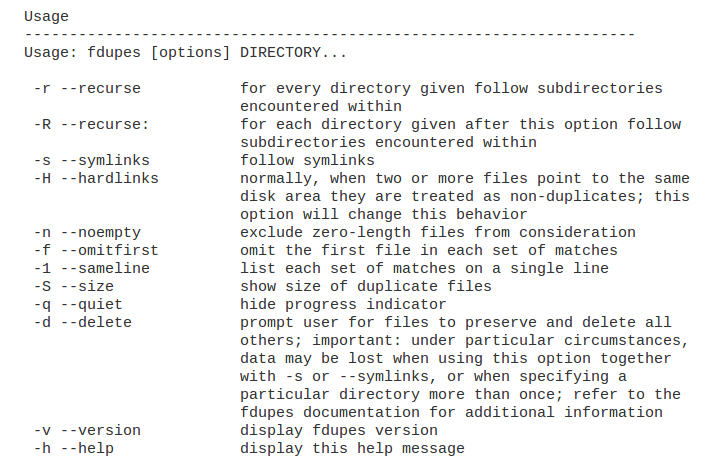
use-fdupes-ubuntu

The fdupes can be used to search for duplicate files or directories within the folder recursively or in regular way. The fdupes command parameter -d can be used to delete the duplicate files while preserving a copy of ir. Please be cautious while using the command else you may delete vital files and data which is required by the system. THE PROCESS (FIND AND DELETE DUPLICATE FILES/DIRECTORIES) IS UNRECOVERABLE AND CANNOT BE UNDONE OR UNDO.

You can also print the output of ‘fdupes’ command to a text file which can be used to check and decide what files/directories to delete or not.

Tags: Delete duplicate directories in Linux, Delete duplicate directories in Ubuntu, Delete duplicate directories in Ubuntu 14.04, Delete duplicate directories in Ubuntu 15.04, Delete duplicate files in Linux, Delete duplicate files in Ubuntu, fdupes command Find and delete duplicate directories in Linux, fdupes command Find and delete duplicate directories in Ubuntu, fdupes command Find and delete duplicate files in Linux, fdupes command Find and delete duplicate files in Ubuntu, fdupes command Linux, fdupes command Ubuntu, Find and delete duplicate directories in Linux, Find and delete duplicate directories in Ubuntu, Find and delete duplicate directories in Ubuntu 14.04, Find and delete duplicate directories in Ubuntu 15.04, Find and delete duplicate files in Linux, Find and delete duplicate files in Ubuntu, Find duplicate directories in Linux, Find duplicate directories in Ubuntu, Find duplicate directories in Ubuntu 14.04, Find duplicate directories in Ubuntu 15.05, Find duplicate files in Linux, Find duplicate files in Ubuntu, How to use fdupes command Ubuntu, How to use fdupes Linux command, How to use fdupes Ubuntu command, Install fdupes command Linux, Install fdupes command Ubuntu, Install fdupes on Linux, Install fdupes on Ubuntu, Linux fdupes command, Linux Find and delete duplicate directories, Linux Find and delete duplicate files, Linux Install fdupes command, Ubuntu 15.04 Find and delete duplicate directories, Ubuntu 15.04 Find and delete duplicate files, Ubuntu fdupes command, Ubuntu Find and delete duplicate directories, Ubuntu Find and delete duplicate files, Ubuntu Install fdupes command

Primary Sidebar

Latest Posts

Delete Directory And Contents Recursively Without Prompt On Linux

Check User Login History In Ubuntu Linux Command Line

Use Locate Command To Find File In Linux Terminal By Name

How To Change Terminal Color In Ubuntu Command Line

How To Run Fsck Manually In Linux To Fix Unexpected Inconsistency

How To Fix Broken Packages On Ubuntu From Terminal

Re Execute The Previous Command In Linux Ubuntu Command Line

How Much RAM Is Needed For Ubuntu PC

How To Find Large Files And Directories In Linux Command Line

How To Use Clear Command History In Linux Terminal

© 2026 Source Digit • Linux, Ubuntu Tutorials & News, Technology, Gadgets & Gizmos

  • Home
  • About
  • Privacy Policy
  • Terms & Conditions
  • Contact Us
  • Sitemap