
• Skip to primary navigation
  • Skip to main content
  • Skip to primary sidebar
Source Digit

Source Digit

Linux, Ubuntu Tutorials & News, Technology, Gadgets & Gizmos

  • Home
  • How To
  • Ubuntu
  • Instagram
  • Blogging
  • Android
  • WordPress
  • +More
    • Cloud Computing
    • Gadgets
    • Social Media
    • Technology
  • Write for Us
Home / How To / Install Laptop Mode Tools; Get More Battery Life on Linux Ubuntu Laptops

Install Laptop Mode Tools; Get More Battery Life on Linux Ubuntu Laptops

By Sourabh / September 28, 2015 Category: How To, Ubuntu

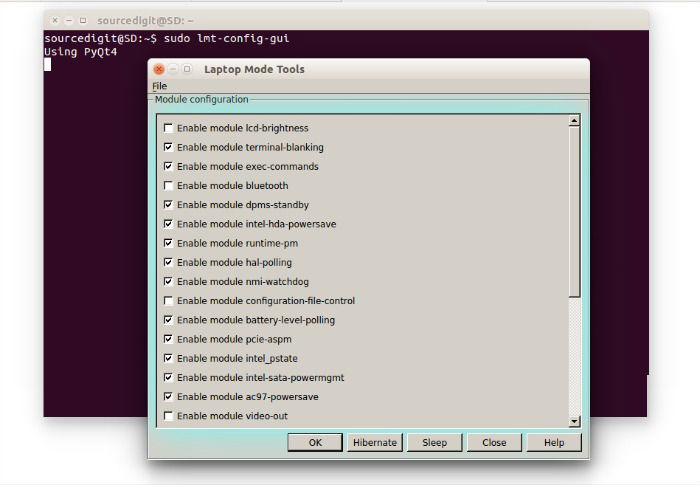
Get more battery life on Linux Ubuntu laptops. Install Laptop Mode Tools on Ubuntu 15.04 and Ubuntu 14.04. Increase battery life on Linux laptops using the Laptop Mode Tools (LPT).

Laptop Mode Tools is an application that enables the users to extend their battery life by enabling the Laptop Mode Linux Kernel and doing a bunch other tweaks.

Laptop Mode Tools is a laptop power saving package for Linux systems. It allows you to extend the battery life of your laptop, in several ways. It is the primary way to enable the Laptop Mode feature of the Linux kernel, which lets your hard drive spin down. In addition, it allows you to tweak a number of other power-related settings using a simple configuration file.
laptop-tool-ubuntu-03

Laptop Mode Tools 1.68.1

1.68.1 — Sun Sep 27 14:00:13 IST 2015

  • Update details about runtime-pm in manpage
  • Revert “Drop out reload”
  • Log error more descriptively
  • Write to common stderr. Do not hardcode a specific one
  • Call lmt-udev in lmt-poll. Don’t call the laptop_mode binary directly.
    Helps in a lot of housekeeping
  • Direct stderr/stdout to journal
  • Fix stdout descriptor
  • Install the new .timer and poll service
  • Use _sbindir for RPM

Install Laptop Mode Tools on Ubuntu

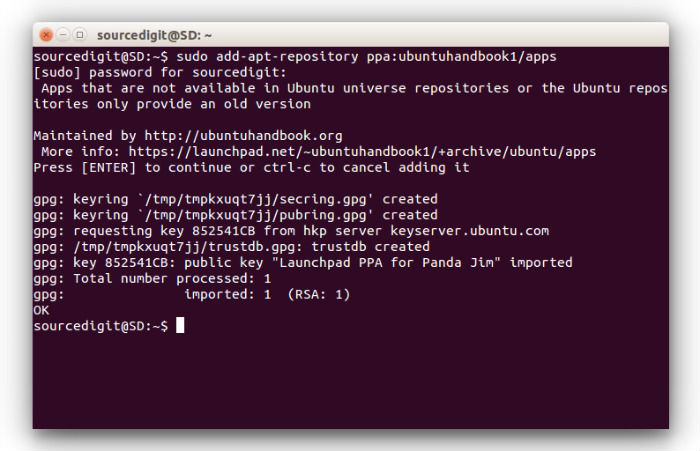
Install Laptop Mode Tools 1.68.1 on Ubuntu, via PPA. Open Terminal and run the following commands to install the latest version of Laptop Mode Tools on Ubuntu 15.04, Ubuntu 14.04 and Derivatives:
laptop-tool-ubuntu-01

$ sudo add-apt-repository ppa:ubuntuhandbook1/apps
$ sudo apt-get update
$ sudo apt-get install laptop-mode-tools

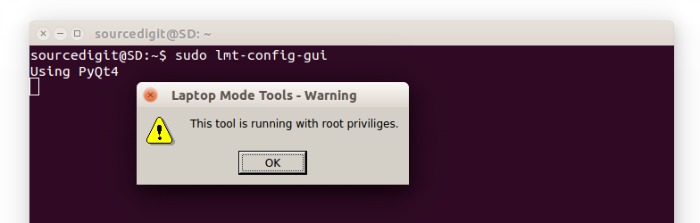
Once installed, run the following command to enable access to the configuration file:

$ sudo lmt-config-gui
laptop-tool-ubuntu-02

If you aren’t happy, you can uninstall the Laptop Mode Tools 1.68.1 from Ubuntu Systems. Run the following command to uninstall the Laptop Mode Tools 1.68.1 on Ubuntu:

$ sudo apt-get remove laptop-mode-tools

Tags: Download Laptop Mode Tools 1.68.1 on Ubuntu, Download Laptop Mode Tools 1.68.1 Ubuntu 14.04, Download Laptop Mode Tools 1.68.1 Ubuntu 15.04, Download Laptop Mode Tools 1.68.1 Ubuntu 15.10, Download Laptop Mode Tools on Ubuntu, Extend Linux Laptop's Battery Life, Extend Linux Ubuntu Laptop's Battery Life, Extend Ubuntu Laptop's Battery Life, Get More Battery Life Linux Laptop, Get More Battery Life Linux Ubuntu Laptop, Get More Battery Life on Linux Laptops, Get More Battery Life on Linux Ubuntu Laptops, Get More Battery Life on Ubuntu Laptops, Get More Battery Life Ubuntu 14.04 Laptop, Get More Battery Life Ubuntu 15.04 Laptop, Get More Battery Life Ubuntu 15.10 Laptop, Get More Battery Life Ubuntu Laptop, Increase Battery Life on Linux Laptops, Increase Battery Life on Linux Ubuntu Laptops, Increase Battery Life on Ubuntu Laptops, Install Laptop Mode Tools, Install Laptop Mode Tools 1.68.1 on Ubuntu, Install Laptop Mode Tools 1.68.1 Ubuntu 14.04, Install Laptop Mode Tools 1.68.1 Ubuntu 15.04, Install Laptop Mode Tools 1.68.1 Ubuntu 15.10, Install Laptop Mode Tools Linux, Install Laptop Mode Tools Linux Ubuntu, Install Laptop Mode Tools on Ubuntu, Install Laptop Mode Tools Ubuntu, Laptop Mode Tools 1.68.1, Laptop Mode Tools PPA Ubuntu, Laptop Mode Tools Ubuntu PPA, Save Battery Life on Linux Laptops, Save Battery Life on Linux Ubuntu Laptops, Save Battery Life on Ubuntu Laptops, Save Battery Power on Ubuntu 14.04 Laptop, Save Battery Power on Ubuntu 15.04 Laptop, Save Battery Power on Ubuntu 15.10 Laptop, Save Battery Power on Ubuntu Laptop, Save Linux Laptop's Battery Life, Save Linux Ubuntu Laptop's Battery Life, Save Ubuntu 14.04 Laptop's Battery Life, Save Ubuntu 15.04 Laptop's Battery Life, Save Ubuntu 15.10 Laptop's Battery Life, Save Ubuntu Laptop's Battery Life, Ubuntu Download Laptop Mode Tools, Ubuntu Install Laptop Mode Tools, Ubuntu PPA Laptop Mode Tools

Primary Sidebar

Latest Posts

Use Locate Command To Find File In Linux Terminal By Name

How To Change Terminal Color In Ubuntu Command Line

How To Run Fsck Manually In Linux To Fix Unexpected Inconsistency

How To Fix Broken Packages On Ubuntu From Terminal

Re Execute The Previous Command In Linux Ubuntu Command Line

How Much RAM Is Needed For Ubuntu PC

How To Find Large Files And Directories In Linux Command Line

How To Use Clear Command History In Linux Terminal

Linux Command To Check RAM Size In Ubuntu Terminal In GB

How To Install Proprietary Drivers In Linux Ubuntu Using Terminal

© 2026 Source Digit • Linux, Ubuntu Tutorials & News, Technology, Gadgets & Gizmos

  • Home
  • About
  • Privacy Policy
  • Terms & Conditions
  • Contact Us
  • Sitemap