
• Skip to primary navigation
  • Skip to main content
  • Skip to primary sidebar
Source Digit

Source Digit

Linux, Ubuntu Tutorials & News, Technology, Gadgets & Gizmos

  • Home
  • How To
  • Ubuntu
  • Instagram
  • Blogging
  • Android
  • WordPress
  • +More
    • Cloud Computing
    • Gadgets
    • Social Media
    • Technology
  • Write for Us
Home / How To / Install Pyton-pip on Ubuntu 15.10, Ubuntu 15.04 & Ubuntu 14.04

Install Pyton-pip on Ubuntu 15.10, Ubuntu 15.04 & Ubuntu 14.04

By Sourabh / October 8, 2015 Category: How To, Ubuntu

Download and install Python-pip on Ubuntu. Install Pip on Ubuntu 15.10, Ubuntu 15.04 and Ubuntu 14.04. Python-pip installation commands (Terminal) for Linux Ubuntu Systems.

pip is a package management system used to install and manage software packages written in Python. It is widely belived that pip is a recursive acronym for “Pip Installs Packages” or “Pip Installs Python.”

Please note that pip is included with Python. Python 2.7.9 and later (on the python2 series), and Python 3.4 and later include pip by default.

Install python-pip on Ubuntu

Before you install pip on Ubuntu, update the system.  Open Terminal and run the following commands to install pip on Ubuntu:

sudo apt-get update
sudo apt-get upgrade
apt-get -y install python-pip
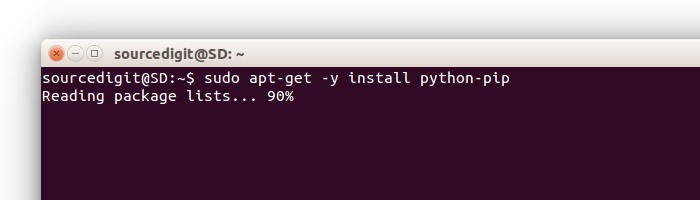
install-pip-ubuntu

Once installed, run the following command to check the version of Pip that has been installed:

pip -V
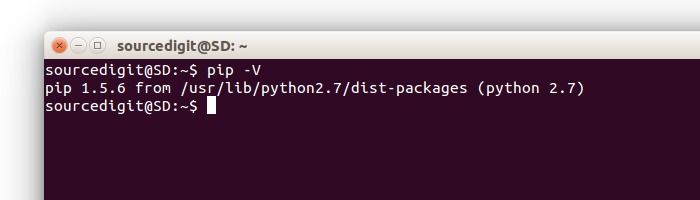
 

pip-version-ubuntu

If you need any help regarding the pip usage you can view the list of helpful commands:

pip --help
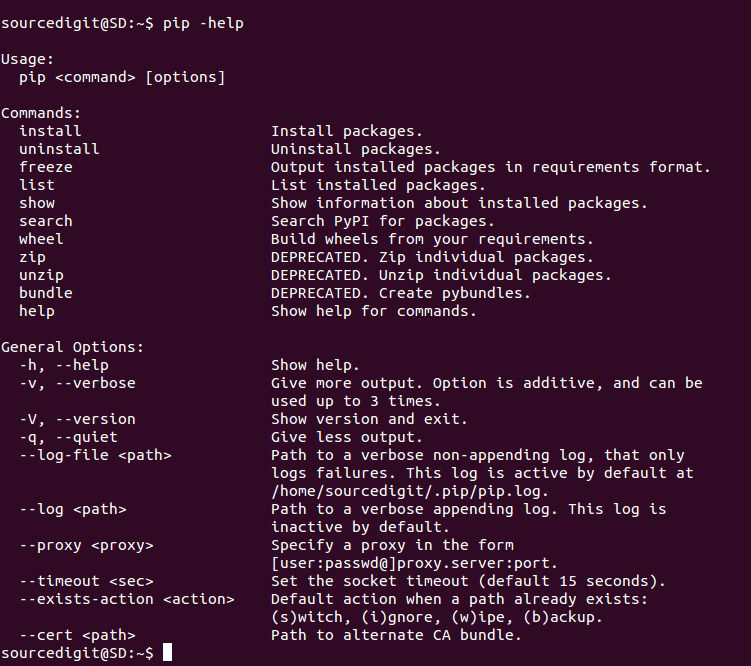
pip-ubuntu-help

How to use pip command

After installing python-pip package, the pip command will be available on system. There are multiple options available with pip command:

To install new python package type:


pip install packageName

To uninstall python package installed by pip type:


$ pip install SomePackage # latest version
$ pip install SomePackage==1.0.4 # specific version
$ pip install 'SomePackage>=1.0.4' # minimum version

To search python package type:


pip search packageName

Method 2: Install pip on Ubuntu

To install pip, securely download get-pip.py. Then run the following (which may require administrator access):

python get-pip.py

If setuptools is not already installed, get-pip.py will install setuptools for you. To upgrade an existing setuptools, run pip install -U setuptools. Additionally, get-pip.py supports using the pip install options and the general options. Below are some examples:

Install from local copies of pip and setuptools:

python get-pip.py --no-index --find-links=/local/copies

Install to the user site:

python get-pip.py --user

Install behind a proxy:

python get-pip.py --proxy="[user:passwd@]proxy.server:port"

Upgrade pip on Linux:

pip install -U pip

Download

pip-7.1.2-py2.py3-none-any.whl (md5, pgp)

pip-7.1.2.tar.gz (md5, pgp)

Credit

  • http://pip.readthedocs.org/en/stable/user_guide/
  • http://pip.readthedocs.org/en/stable/quickstart/

Tags: Check pip verion on Ubuntu, Check python pip verion on Ubuntu, Download pip on Ubuntu 14.04, Download pip on Ubuntu 14.10, Download pip on Ubuntu 15.04, Download pip on Ubuntu 15.10, Download python-pip on Ubuntu 14.04, Download python-pip on Ubuntu 14.10, Download python-pip on Ubuntu 15.04, Download python-pip on Ubuntu 15.10, Example pip on Ubuntu, Example python pip on Ubuntu, Help pip on Ubuntu, Help python pip on Ubuntu, How to use pip on Ubuntu, How to use python pip on Ubuntu, Install pip on Ubuntu 14.04, Install pip on Ubuntu 14.10, Install pip on Ubuntu 15.04, Install pip on Ubuntu 15.10, Install python-pip on Ubuntu 14.04, Install python-pip on Ubuntu 14.10, Install python-pip on Ubuntu 15.04, Install python-pip on Ubuntu 15.10, pip on Ubuntu, pip on Ubuntu 14.04, pip on Ubuntu 14.10, pip on Ubuntu 15.04, pip on Ubuntu 15.10, pip on Ubuntu Terminal, python pip on Ubuntu, python-pip on Ubuntu 14.04, python-pip on Ubuntu 14.10, python-pip on Ubuntu 15.04, python-pip on Ubuntu 15.10, Ubuntu pip, Ubuntu python pip, Upgrade pip on Ubuntu, Upgrade python pip on Ubuntu, Use pip on Ubuntu, Use python pip on Ubuntu

Primary Sidebar

Latest Posts

How To Check User Permissions In Linux Using Command

Check Which Folder Is Taking More Space In Ubuntu Linux

How to Install Claude Desktop App in Ubuntu Linux

Job Scheduling Using At Command In Linux With Examples

How To Check Permissions Of A Directory In Linux Command

Delete Directory And Contents Recursively Without Prompt On Linux

Check User Login History In Ubuntu Linux Command Line

Use Locate Command To Find File In Linux Terminal By Name

How To Change Terminal Color In Ubuntu Command Line

How To Run Fsck Manually In Linux To Fix Unexpected Inconsistency

© 2026 Source Digit • Linux, Ubuntu Tutorials & News, Technology, Gadgets & Gizmos

  • Home
  • About
  • Privacy Policy
  • Terms & Conditions
  • Contact Us
  • Sitemap