
• Skip to primary navigation
  • Skip to main content
  • Skip to primary sidebar
Source Digit

Source Digit

Linux, Ubuntu Tutorials & News, Technology, Gadgets & Gizmos

  • Home
  • How To
  • Ubuntu
  • Instagram
  • Blogging
  • Android
  • WordPress
  • +More
    • Cloud Computing
    • Gadgets
    • Social Media
    • Technology
  • Write for Us
Home / How To / Install The Latest Version of Firefox in Ubuntu 15.10, via Terminal (Apt-Get)

Install The Latest Version of Firefox in Ubuntu 15.10, via Terminal (Apt-Get)

By Sourabh / October 30, 2015 Category: How To, Ubuntu

Install Firefox in Ubuntu, via Terminal (Apt-Get). How to update Firefox in Ubuntu, using Command Line (Terminal). Install the latest version of Firefox in Ubuntu 15.10, Ubuntu 14.04, Ubuntu 15.04, Ubuntu 14.10 and Derivatives.

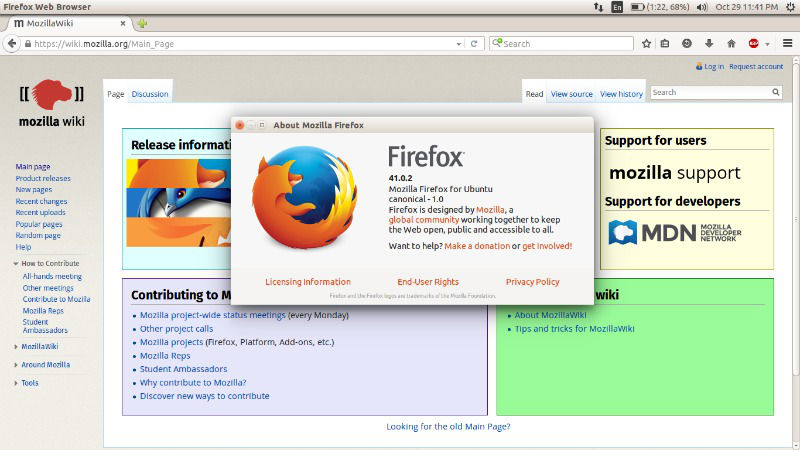
Firefox 41.0.2 is the latest version of Mozilla Firefox Internet browser. The latest version, Firefox 41.0.2, brings fixes and security updates.
firefox-0

What’s New in Firefox 41.0

  • New – Reference: Release notes for Firefox 41.0
  • Fixed – Fix a startup crash with some Intel Media Accelerator 3150 graphic cards
  • Fixed – Fix a graphic crash, occurring occasionally on Facebook
  • Fixed – Fix a regression in the bookmark creation
  • Fixed – Fix potential hangs with Flash plugins
  • Fixed – Fix a startup crash related to Yandex toolbar and Adblock Plus
  • Fixed – Crash when serializing a principal with unknown app id

Install Firefox 41.0.2 on Ubuntu

Run the following commands in Terminal to install the latest version of Firefox web browser on 32 bit Linux Ubuntu systems:

$ wget https://ftp.mozilla.org/pub/mozilla.org/firefox/releases/41.0.2/linux-i686/en-US/firefox-41.0.2.tar.bz2
$ tar -xjvf firefox-41.0.2.tar.bz2
$ sudo rm -rf /opt/firefox*
$ sudo mv firefox /opt/firefox
$ sudo ln -sf /opt/firefox/firefox /usr/bin/firefox

Run the following commands in Terminal to install the latest version of Firefox web browser on 64 bit Linux Ubuntu systems:

$ wget https://ftp.mozilla.org/pub/mozilla.org/firefox/releases/41.0.2/linux-x86_64/en-US/firefox-41.0.2.tar.bz2
$ tar -xjvf firefox-41.0.2.tar.bz2
$ sudo rm -rf /opt/firefox*
$ sudo mv firefox /opt/firefox
$ sudo ln -sf /opt/firefox/firefox /usr/bin/firefox

Firefox web browser can also be installed via Ubuntu Software Center or via the official Firefox website. Once installed, type firefox in Terminal and press enter to open Firefox. You can also open firefox via Ubuntu Dash or Menu.

How to update Firefox in Ubuntu using Terminal

You can easily update the Firefox to the current release. You can know about the latest version of Firefox from URL https://wiki.mozilla.org/RapidRelease/Calendar

How to update Firefox in Ubuntu [Security package updates]

$ sudo add-apt-repository ppa:ubuntu-mozilla-security/ppa
$ sudo apt-get update
$ sudo apt-get install firefox

How to update Firefox in Ubuntu [ Daily updates ]

$ sudo add-apt-repository ppa:ubuntu-mozilla-daily/ppa
$ sudo apt-get update
$ sudo apt-get install firefox

Tags: Actualizar Firefox Ubuntu Terminal, How To Update Firefox In Ubuntu 14.04, How To Update Firefox In Ubuntu 14.10, How To Update Firefox In Ubuntu 15.04, How To Update Firefox In Ubuntu 15.10, How To Update Firefox In Ubuntu Using Terminal, Instalar Firefox Ubuntu Terminal, Install Firefox 2 Ubuntu, Install Firefox 2.0 Ubuntu, Install Firefox 3 Ubuntu, Install Firefox Beta Ubuntu, Install Firefox Command Line Ubuntu, Install Firefox Plugins Ubuntu, Install Firefox Ubuntu Apt-Get, Install Firefox Ubuntu Command Line, Install Firefox Ubuntu Terminal, Install Latest Firefox in Ubuntu 14.04, Install Latest Firefox in Ubuntu 14.10, Install Latest Firefox in Ubuntu 15.04, Install Latest Firefox in Ubuntu 15.10, Install Mozilla Firefox in Ubuntu 14.04, Install Mozilla Firefox in Ubuntu 14.10, Install Mozilla Firefox in Ubuntu 15.04, Install Mozilla Firefox in Ubuntu 15.10, Open Firefox In Ubuntu Terminal, Update Latest Firefox in Ubuntu 14.04, Update Latest Firefox in Ubuntu 14.10, Update Latest Firefox in Ubuntu 15.04, Update Latest Firefox in Ubuntu 15.10, Update Mozilla Firefox in Ubuntu 14.04, Update Mozilla Firefox in Ubuntu 14.10, Update Mozilla Firefox in Ubuntu 15.04, Update Mozilla Firefox in Ubuntu 15.10

Primary Sidebar

Latest Posts

How To Run Fsck Manually In Linux To Fix Unexpected Inconsistency

How To Fix Broken Packages On Ubuntu From Terminal

Re Execute The Previous Command In Linux Ubuntu Command Line

How Much RAM Is Needed For Ubuntu PC

How To Find Large Files And Directories In Linux Command Line

How To Use Clear Command History In Linux Terminal

Linux Command To Check RAM Size In Ubuntu Terminal In GB

How To Install Proprietary Drivers In Linux Ubuntu Using Terminal

How To Shutdown Linux With A 15 Minute Delay And Message

Free AI Courses With Certificate For Beginners In India

© 2026 Source Digit • Linux, Ubuntu Tutorials & News, Technology, Gadgets & Gizmos

  • Home
  • About
  • Privacy Policy
  • Terms & Conditions
  • Contact Us
  • Sitemap