
Install the latest release of Firefox in Ubuntu Systems. Download and install Firefox 42 in Ubuntu 15.10, Ubuntu 14.04, Ubuntu 15.04 and Linux Mint and Derivatives.
Firefox 42 now offers a more private browsing experience. It comes with a powerful new feature in Firefox Private Browsing called Tracking Protection. It has also been released with a new Control Center in Firefox that contains site security and privacy controls in a single place in your address bar. The other most notable feature is indicator added to tabs that play audio with one-click muting.
Private Browsing with Tracking Protection in Firefox for Windows, Mac, Android and Linux actively blocks content like ads, analytics trackers and social share buttons that may record your behavior without your knowledge across sites.
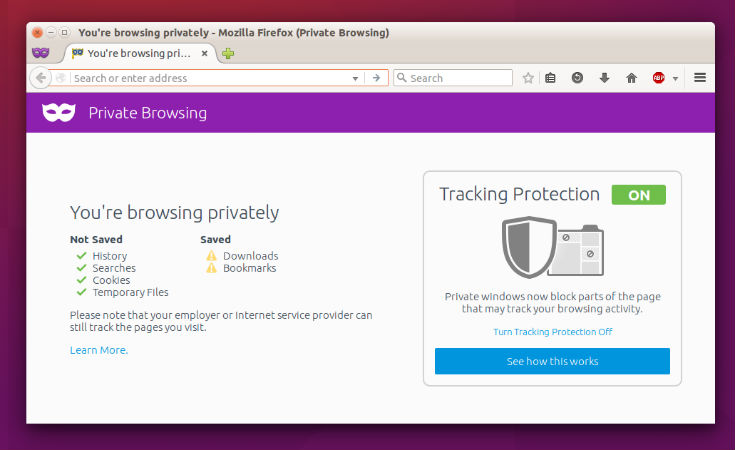
Here’s the summary of the most notable features released with Firefox 42:
- Private Browsing with Tracking Protection blocks certain Web elements that could be used to record your behavior across sites
- Control Center that contains site security and privacy controls
- Indicator added to tabs that play audio with one-click muting
- WebRTC improvements such as IPV6 support.
- Login Manager improvements with improved heuristics to save usernames and passwords.
- Edit and show all logins in line, Copy/Paste usernames/passwords from the Context menu
- Migration imports your passwords to Firefox from Google Chrome for Windows and Internet Explorer; import anytime from the Login Manager
Install Firefox on Linux Ubuntu Systems

Open Terminal and run the following commands to install Firefox on 32 bit Linux Ubuntu Systems:
$ wget https://ftp.mozilla.org/pub/mozilla.org/firefox/releases/42.0/linux-i686/en-US/firefox-42.0.tar.bz2

$ tar -xjvf firefox-42.0.tar.bz2

$ sudo rm -rf /opt/firefox*

$ sudo mv firefox /opt/firefox

$ sudo ln -sf /opt/firefox/firefox /usr/bin/firefox
Open Terminal and run the following commands to install Firefox on 64 bit Linux Ubuntu Systems:
$ wget https://ftp.mozilla.org/pub/mozilla.org/firefox/releases/42.0/linux-x86_64/en-US/firefox-42.0.tar.bz2

$ tar -xjvf firefox-42.0.tar.bz2

$ sudo rm -rf /opt/firefox*

$ sudo mv firefox /opt/firefox

$ sudo ln -sf /opt/firefox/firefox /usr/bin/firefox
Once installed, you can open / start Firefox from Ubuntu Dash or via Terminal. Open Terminal, type firefox and press enter.