
• Skip to primary navigation
  • Skip to main content
  • Skip to primary sidebar
Source Digit

Source Digit

Linux, Ubuntu Tutorials & News, Technology, Gadgets & Gizmos

  • Home
  • How To
  • Ubuntu
  • Instagram
  • Blogging
  • Android
  • WordPress
  • +More
    • Cloud Computing
    • Gadgets
    • Social Media
    • Technology
  • Write for Us
Home / How To / Install SimpleScreenRecorder on Ubuntu 15.10 & Ubuntu 14.04

Install SimpleScreenRecorder on Ubuntu 15.10 & Ubuntu 14.04

By Sourabh / November 17, 2015 Category: How To, Ubuntu

Ubuntu – How to record screen video and audio. Install SimpleScreenRecorder on Ubuntu 15.10 and Ubuntu 14.04. Record screen on Linux Ubuntu Systems. SimpleScreenRecorder is a Linux program that have been created to record screen, programs and games. The SimpleScreenRecorder supports X11 and OpenGL and has a Qt-based GUI. The application can be used to the entire screen or part of it. The best part, the screen recording can be paused and resumed at any time.

record-screen-ubuntu

Features

  • Graphical user interface (Qt-based).
  • Faster than VLC and ffmpeg/avconv.
  • Records the entire screen or part of it, or records OpenGL applications directly (similar to Fraps on Windows).
  • Synchronizes audio and video properly (a common issue with VLC and ffmpeg/avconv).
  • Reduces the video frame rate if your computer is too slow (rather than using up all your RAM like VLC does).
  • Fully multithreaded: small delays in any of the components will never block the other components, resulting is smoother video and better performance on computers with multiple processors.
  • Pause and resume recording at any time (either by clicking a button or by pressing a hotkey).
  • Shows statistics during recording (file size, bit rate, total recording time, actual frame rate, …).
  • Can show a preview during recording, so you don’t waste time recording something only to figure out afterwards that some setting was wrong.
  • Uses libav/ffmpeg libraries for encoding, so it supports many different codecs and file formats (adding more is trivial).
  • Can also do live streaming (experimental).
  • Sensible default settings: no need to change anything if you don’t want to.
  • Tooltips for almost everything: no need to read the documentation to find out what something does.

Install SimpleScreenRecorder on Ubuntu

Open Terminal and run the following commands to install SimpleScreenRecorder on Ubuntu Systems:

$ sudo add-apt-repository ppa:maarten-baert/simplescreenrecorder
$ sudo apt-get update
$ sudo apt-get install simplescreenrecorder

screen-recorder-ubuntu

Once installed, the app can be opened via Ubuntu Dash.
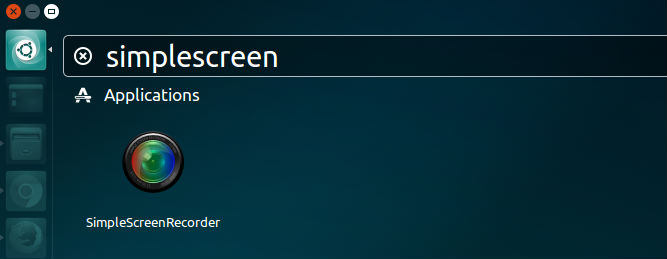
open-screen

simplescreenrecorder


If you aren’t happy and wish to uninstall SimpleScreenRecorder from Ubuntu Systems, run the command:

$ sudo apt-get remove simplescreenrecorder

Tags: Camstudio Ubuntu, Download Simple Screen Recorder on Ubuntu, Download SimpleScreenRecorder on Ubuntu, Install Simple Screen Recorder on Ubuntu, Install Simple Screen Recorder on Ubuntu 14.04, Install Simple Screen Recorder on Ubuntu 14.10, Install Simple Screen Recorder on Ubuntu 15.04, Install Simple Screen Recorder on Ubuntu 15.10, Install SimpleScreenRecorder on Ubuntu, Install SimpleScreenRecorder on Ubuntu 14.04, Install SimpleScreenRecorder on Ubuntu 14.10, Install SimpleScreenRecorder on Ubuntu 15.04, Install SimpleScreenRecorder on Ubuntu 15.10, Install SimpleScreenRecorder on Ubuntu 15.10 and Ubuntu 14.04, Print Screen Ubuntu, Record My Desktop, Record Screen Linux, Simple Screen Recorder on Ubuntu, SimpleScreenRecorder on Ubuntu, Ubuntu Record Screen Gif, Ubuntu Record Screen Video, Ubuntu Record Screen Video And Audio, Ubuntu Screen Capture

Primary Sidebar

Latest Posts

Delete Directory And Contents Recursively Without Prompt On Linux

Check User Login History In Ubuntu Linux Command Line

Use Locate Command To Find File In Linux Terminal By Name

How To Change Terminal Color In Ubuntu Command Line

How To Run Fsck Manually In Linux To Fix Unexpected Inconsistency

How To Fix Broken Packages On Ubuntu From Terminal

Re Execute The Previous Command In Linux Ubuntu Command Line

How Much RAM Is Needed For Ubuntu PC

How To Find Large Files And Directories In Linux Command Line

How To Use Clear Command History In Linux Terminal

© 2026 Source Digit • Linux, Ubuntu Tutorials & News, Technology, Gadgets & Gizmos

  • Home
  • About
  • Privacy Policy
  • Terms & Conditions
  • Contact Us
  • Sitemap