
• Skip to primary navigation
  • Skip to main content
  • Skip to primary sidebar
Source Digit

Source Digit

Linux, Ubuntu Tutorials & News, Technology, Gadgets & Gizmos

  • Home
  • How To
  • Ubuntu
  • Instagram
  • Blogging
  • Android
  • WordPress
  • +More
    • Cloud Computing
    • Gadgets
    • Social Media
    • Technology
  • Write for Us
Home / How To / How To Create Collage in Ubuntu 15.10 Using PhotoCollage

How To Create Collage in Ubuntu 15.10 Using PhotoCollage

By Sourabh / March 11, 2016 Category: How To, Ubuntu

Collage maker for Ubuntu. Create collage in Ubuntu using PhotoCollage. Terminal commands to install PhotoCollage on Ubuntu 15.10, Ubuntu 14.04 and Ubuntu Derivatives.

collage-ubuntu

PhotoCollage is a wonderful collage maker sotware for Linux Ubuntu Systems. Using PhotoCollage app, users can create collage on Ubuntu Systems. Users can easily create collages and customize the images, via the preferences menu. Users can set the width, color, height and size of the image and border.

PhotoCollage provides a library to create photo layouts and posters, and a GTK graphical user interface. PhotoCollage is written in Python (compatible with versions 2 and 3) and requires the Python Imaging Library (PIL).

Features:

  • generate random new layouts until one suits the user
  • choose border color and width
  • possible to swap photos in the generated grid
  • save high-resolution image
  • works even with a large number of photos (> 100)
  • integrates into the GNOME environment
  • available in English, French, German and Czech

Install PhotoCollage on Ubuntu
install-collage

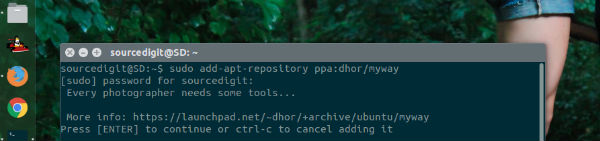
PhotoCollage 1.3 can be installed on Ubuntu 15.10, Ubuntu 15.04, Ubuntu 14.10, Ubuntu 14.04, Linux Mint and Ubuntu Derivatives. Run the following commands to install PhotoCollage:

$ sudo add-apt-repository ppa:dhor/myway
$ sudo apt-get update
$ sudo apt-get install photocollage

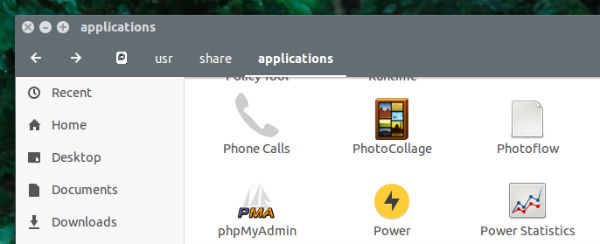
Once installed, open PhotoCollage app via Ubuntu Dash or via Applications folder.
open-collage

If you aren’t happy with the app, you can uninstall the PhotoCollage app by running the following command:

$ sudo apt-get remove photocollage

Tags: Collage Maker For Ubuntu, Create Collage in Ubuntu Using PhotoCollage, Install Photo Collage Linux Ubuntu, Install Photo Collage Ubuntu, Make A Photo Collage Easily in Ubuntu 14.04, Make A Photo Collage Easily in Ubuntu 14.10, Make A Photo Collage Easily in Ubuntu 15.04, Make A Photo Collage Easily in Ubuntu 15.10, Make Collages In Linux With PhotoCollage App, Montage Photo Ubuntu, Photo Collage Ubuntu 14.04, Photo Collage Ubuntu 14.10, Photo Collage Ubuntu 15.04, Photo Collage Ubuntu 15.10, Photo Collage Ubuntu PPA, Ubuntu PPA Photo Collage

Primary Sidebar

Latest Posts

Delete Directory And Contents Recursively Without Prompt On Linux

Check User Login History In Ubuntu Linux Command Line

Use Locate Command To Find File In Linux Terminal By Name

How To Change Terminal Color In Ubuntu Command Line

How To Run Fsck Manually In Linux To Fix Unexpected Inconsistency

How To Fix Broken Packages On Ubuntu From Terminal

Re Execute The Previous Command In Linux Ubuntu Command Line

How Much RAM Is Needed For Ubuntu PC

How To Find Large Files And Directories In Linux Command Line

How To Use Clear Command History In Linux Terminal

© 2026 Source Digit • Linux, Ubuntu Tutorials & News, Technology, Gadgets & Gizmos

  • Home
  • About
  • Privacy Policy
  • Terms & Conditions
  • Contact Us
  • Sitemap