
• Skip to primary navigation
  • Skip to main content
  • Skip to primary sidebar
Source Digit

Source Digit

Linux, Ubuntu Tutorials & News, Technology, Gadgets & Gizmos

  • Home
  • How To
  • Ubuntu
  • Instagram
  • Blogging
  • Android
  • WordPress
  • +More
    • Cloud Computing
    • Gadgets
    • Social Media
    • Technology
  • Write for Us
Home / How To / How To Install Nomacs Image Viewer On Linux Ubuntu 15.10

How To Install Nomacs Image Viewer On Linux Ubuntu 15.10

By Sourabh / December 21, 2015 Category: How To, Ubuntu

How to install Nomacs image viewer on Linux Ubuntu 15.10, Ubuntu 14.04, Ubuntu 15.04 and Ubuntu 14.10. Nomacs image viewer  can be used for viewing all common image formats including RAW and psd images.
nomac-02

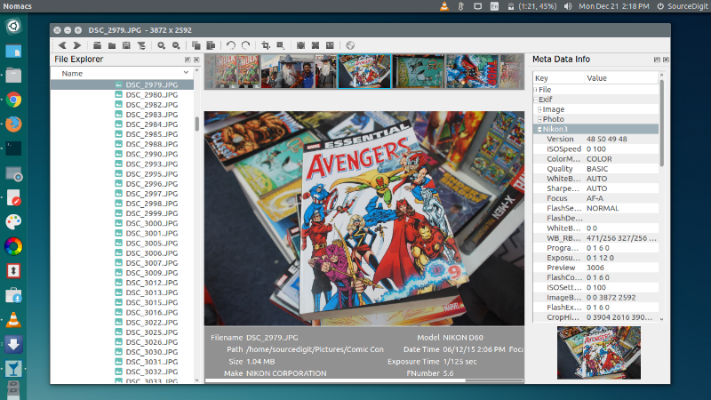
Nomacs features semi-transparent widgets that display additional information such as thumbnails, metadata or histogram. It is able to browse images in zip or MS Office files which can be extracted to a directory. Metadata stored with the image can be displayed and you can add notes to images. A thumbnail preview of the current folder is included as well as a file explorer panel which allows switching between folders. Within a directory you can apply a file filter, so that only images are displayed whose filenames have a certain string or match a regular expression. Activating the cacher allows for instantly switching between images.

Nomacs includes image manipulation methods for adjusting brightness, contrast, saturation, hue, gamma, exposure. It has a pseudo color function which allows creating false color images. A unique feature of Nomacs is the synchronization of multiple instances. With this feature you can easily compare images by zooming and/or panning at the exactly same position or even by overlaying them with different opacities.

Install Nomac on Ubuntu
nomac-cli

Nomacs 3.0 is out. In the past months we updated all nomacs dependencies and build systems. Along with these changes, nomacs ships with a new installer on Windows. In addition to these changes, we worked on these features:

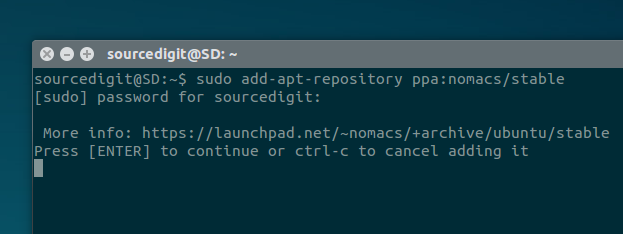
Run the following commands in Terminal to install Nomacs:

sudo add-apt-repository ppa:nomacs/stable
sudo apt-get update
sudo apt-get install nomacs

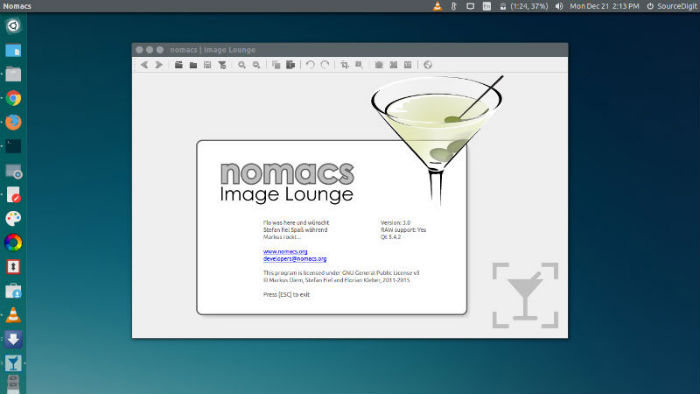
Once installed, open Nomac via Ubuntu Dash or Menu.
nomac-01

If you want to uninstall and remove the Nomac image viewer, run the command given below:

sudo apt-get remove nomacs

Tags: Install Nomacs Image Editor Ubuntu, Install Nomacs Image Editor Ubuntu 14.04, Install Nomacs Image Editor Ubuntu 14.10, Install Nomacs Image Editor Ubuntu 15.04, Install Nomacs Image Editor Ubuntu 15.10, Install Nomacs Image Viewer Ubuntu, Install Nomacs Image Viewer Ubuntu 14.04, Install Nomacs Image Viewer Ubuntu 14.10, Install Nomacs Image Viewer Ubuntu 15.04, Install Nomacs Image Viewer Ubuntu 15.10, Nomacs Image Editor, Nomacs Image Editor Linux Ubuntu, Nomacs Image Editor Ubuntu, Nomacs Image Editor Ubuntu PPA, Nomacs Image Viewer, Nomacs Image Viewer Linux Ubuntu, Nomacs Image Viewer Ubuntu, Nomacs Image Viewer Ubuntu PPA

Primary Sidebar

Latest Posts

How To Run Fsck Manually In Linux To Fix Unexpected Inconsistency

How To Fix Broken Packages On Ubuntu From Terminal

Re Execute The Previous Command In Linux Ubuntu Command Line

How Much RAM Is Needed For Ubuntu PC

How To Find Large Files And Directories In Linux Command Line

How To Use Clear Command History In Linux Terminal

Linux Command To Check RAM Size In Ubuntu Terminal In GB

How To Install Proprietary Drivers In Linux Ubuntu Using Terminal

How To Shutdown Linux With A 15 Minute Delay And Message

Free AI Courses With Certificate For Beginners In India

© 2026 Source Digit • Linux, Ubuntu Tutorials & News, Technology, Gadgets & Gizmos

  • Home
  • About
  • Privacy Policy
  • Terms & Conditions
  • Contact Us
  • Sitemap