
• Skip to primary navigation
  • Skip to main content
  • Skip to primary sidebar
Source Digit

Source Digit

Linux, Ubuntu Tutorials & News, Technology, Gadgets & Gizmos

  • Home
  • How To
  • Ubuntu
  • Instagram
  • Blogging
  • Android
  • WordPress
  • +More
    • Cloud Computing
    • Gadgets
    • Social Media
    • Technology
  • Write for Us
Home / How To / Install Deepin Music Player 14.12.1 on Ubuntu 15.10

Install Deepin Music Player 14.12.1 on Ubuntu 15.10

By Sourabh / December 22, 2015 Category: How To, Ubuntu

Deepin Music Player or Ubuntu Linux Systems. How to install Deepin Music Player 14.12.1 on Ubuntu 15.10, Ubuntu 15.04, Ubuntu 14.04, Ubuntu 14.10 and Ubuntu Derivatives. Deepin Music Player is an awesome music player with brilliant and tweakful UI which is based on gstreamer, with features likes search music by pinyin, quanpin, colorful lyrics supports, and more powerfull functions you will found. The Deepin Music Player is the default auido video player on Deepin Linux.

deepin-music-ubuntu

The Deepin Music Player has a customizable user interface. It uses gstreamer frond-end and displays the lyrics during the playback. The music player comes with FM radio function and online streaming. Other prominenet features are conversion between audio formats.

Deepin Music Player 14.12.1 is the latest version available of the Deepin Music Player. It is used as a default music player on Deepin 14.x System.

Install Deepin Music Player 14.12.1

Open Terminal and run the following commands to install Deepin Music Player 14.12.1 on Linux Ubuntu Systems, via Noobslab PPA http://www.noobslab.com/

$ sudo apt-add-repository ppa:noobslab/deepin-sc
$ sudo apt-get update
$ sudo apt-get install deepin-music

Once installed, you can open the Deepin Music Player rom Ubuntu Dash or Menu.
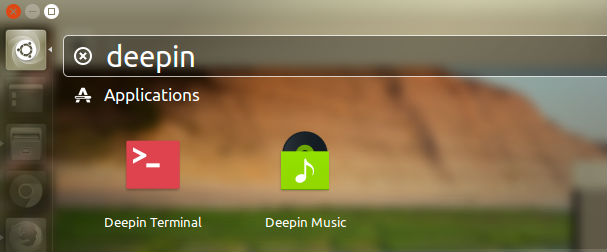
deepin-linux

If you want to uninstall and remove the Deepin Music Player, run the command given below:

$ sudo apt-get remove deepin-music

Tags: Deepin Audio Player For Linux Mint, Deepin Audio Player For Ubuntu, Deepin Music Player For Linux Mint, Deepin Music Player For Ubuntu, Deepin Music Player PPA Ubuntu, Deepin Music Player Ubuntu, Deepin Music Player Ubuntu 14.04, Deepin Music Player Ubuntu 14.10, Deepin Music Player Ubuntu 15.04, Deepin Music Player Ubuntu 15.10, Deepin Music Player Ubuntu PPA, Download Deepin Music Player Ubuntu, Install Deepin Music Player Ubuntu, Ubuntu Deepin Music Player

Primary Sidebar

Latest Posts

Delete Directory And Contents Recursively Without Prompt On Linux

Check User Login History In Ubuntu Linux Command Line

Use Locate Command To Find File In Linux Terminal By Name

How To Change Terminal Color In Ubuntu Command Line

How To Run Fsck Manually In Linux To Fix Unexpected Inconsistency

How To Fix Broken Packages On Ubuntu From Terminal

Re Execute The Previous Command In Linux Ubuntu Command Line

How Much RAM Is Needed For Ubuntu PC

How To Find Large Files And Directories In Linux Command Line

How To Use Clear Command History In Linux Terminal

© 2026 Source Digit • Linux, Ubuntu Tutorials & News, Technology, Gadgets & Gizmos

  • Home
  • About
  • Privacy Policy
  • Terms & Conditions
  • Contact Us
  • Sitemap