
• Skip to primary navigation
  • Skip to main content
  • Skip to primary sidebar
Source Digit

Source Digit

Linux, Ubuntu Tutorials & News, Technology, Gadgets & Gizmos

  • Home
  • How To
  • Ubuntu
  • Instagram
  • Blogging
  • Android
  • WordPress
  • +More
    • Cloud Computing
    • Gadgets
    • Social Media
    • Technology
  • Write for Us
Home / How To / How To Install Webmin 1.7.80 (Admin Tool) on Linux Ubuntu Systems

How To Install Webmin 1.7.80 (Admin Tool) on Linux Ubuntu Systems

By Sourabh / January 4, 2016 Category: How To, Ubuntu

Download Webmin admin configuration tool for Ubuntu Linux Systems. How to install Webmin configuration tool on Ubuntu 15.10, Ubuntu 14.04, Ubuntu 15.04, Ubuntu 14.10 and Ubuntu Derivatives. Webmin is a powerful browser-based configuration tool that can be used to easily manage user accounts, disk quotas, services and configuration files. The best of all, the Webmin configuration tool is used to manage Apache servers, DNS and file sharing.
webmin-ubuntu

Webmin 1.7.80 is the latest version of the Download Webmin admin tool. Webmin 1.7.80 release update includes updates to the Filemin file manager and Authentic theme, and the German, Catalan, Polish and Norwegian translations. It also supports SSL certificate requests from Let’s Encrypt, MySQL 5.7, automatic DNS records in partial reverse domains, and includes a bunch of other bugfixes and small features. You can get it from the Webmin downloads page, or from our YUM or APT repositories.

Run the following commands to install Webmin admin tool on Ubuntu, Debian and Derivatives:

$ sudo apt-get install gdebi
$ wget sourceforge.net/projects/webadmin/files/webmin/1.780/webmin_1.780_all.deb
$ sudo gdebi webmin_1.780_all.deb

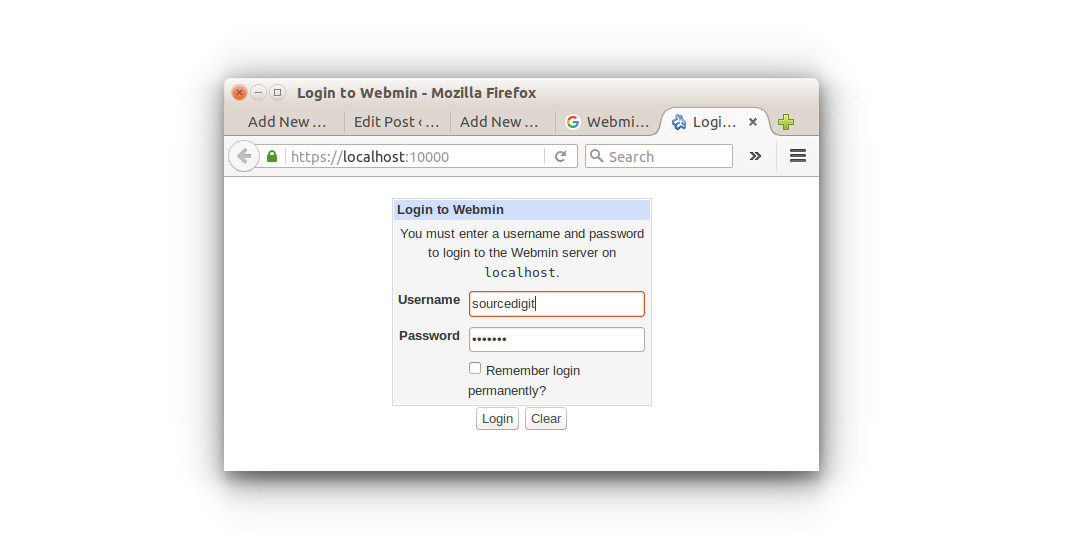
Once you have installed Webmin, open and access Webmin tool from your web browser. Open web browser and type https://localhost:10000 to acess Webmin.

If you want to uninstall and remove the webmin admin configuration tool, run the command given below:

$ sudo apt-get remove webmin

Tags: Download Webmin 1.7.80, Download Webmin admin tool on Ubuntu, Download Webmin configuration tool on Ubuntu, Install Webmin 1.7.80, Install Webmin 1.7.80 on Linux, Install Webmin 1.7.80 on Ubuntu, Install Webmin admin tool on Ubuntu, Install Webmin configuration tool on Ubuntu, Install Webmin Ubuntu 14.04, Install Webmin Ubuntu 14.10, Install Webmin Ubuntu 15.04, Install Webmin Ubuntu 15.10, Install Webmin Ubuntu PPA, Ubuntu PPA Webmin, UBuntu Webmin admin tool, Ubuntu Webmin configuration tool, Webmin 1.7.80, Webmin admin tool on Ubuntu, Webmin configuration tool on Ubuntu, Webmin Ubuntu 14.04, Webmin Ubuntu 14.10, Webmin Ubuntu 15.04, Webmin Ubuntu 15.10, Webmin Ubuntu PPA

Primary Sidebar

Latest Posts

Delete Directory And Contents Recursively Without Prompt On Linux

Check User Login History In Ubuntu Linux Command Line

Use Locate Command To Find File In Linux Terminal By Name

How To Change Terminal Color In Ubuntu Command Line

How To Run Fsck Manually In Linux To Fix Unexpected Inconsistency

How To Fix Broken Packages On Ubuntu From Terminal

Re Execute The Previous Command In Linux Ubuntu Command Line

How Much RAM Is Needed For Ubuntu PC

How To Find Large Files And Directories In Linux Command Line

How To Use Clear Command History In Linux Terminal

© 2026 Source Digit • Linux, Ubuntu Tutorials & News, Technology, Gadgets & Gizmos

  • Home
  • About
  • Privacy Policy
  • Terms & Conditions
  • Contact Us
  • Sitemap