
Ubuntu 15.04 (Vivid Vervet) reaches End of Life on 4 February 2016, Thursday. Here’s how to upgrade to Ubuntu 15.10 from Ubuntu 15.04 or Ubuntu 14.04. Ubuntu 15.04 (Vivid Vervet) was released on April 23, 2015.
Adam Conrad adconrad at ubuntu.com Thu Jan 14 00:37:14 UTC 2016
Ubuntu announced its 15.04 (Vivid Vervet) release almost 9 months ago, on April 23, 2015. As a non-LTS release, 15.04 has a 9-month support cycle and, as such, the support period is now nearing its end and Ubuntu 15.04 will reach end of life on Thursday, February 4th. At that time, Ubuntu Security Notices will no longer include information or updated packages for Ubuntu 15.04. The supported upgrade path from Ubuntu 15.04 is via Ubuntu 15.10.
Instructions and caveats for the upgrade may be found at: https://help.ubuntu.com/community/WilyUpgrades
Ubuntu 15.10 continues to be actively supported with security updates and select high-impact bug fixes. Announcements of security updates for Ubuntu releases are sent to the ubuntu-security-announce mailing list, information about which may be found at: https://lists.ubuntu.com/mailman/listinfo/ubuntu-security-announceSince its launch in October 2004 Ubuntu has become one of the most highly regarded Linux distributions with millions of users in homes, schools, businesses and governments around the world. Ubuntu is Open Source software, costs nothing to download, and users are free to customise or alter their software in order to meet their needs.
On behalf of the Ubuntu Release Team,
Adam Conrad
Ubuntu release end of life
When an Ubuntu release reaches its “end of life” it receives no further maintenance updates, including critical security upgrades. We highly recommend that you upgrade to a recent version of Ubuntu at this point.
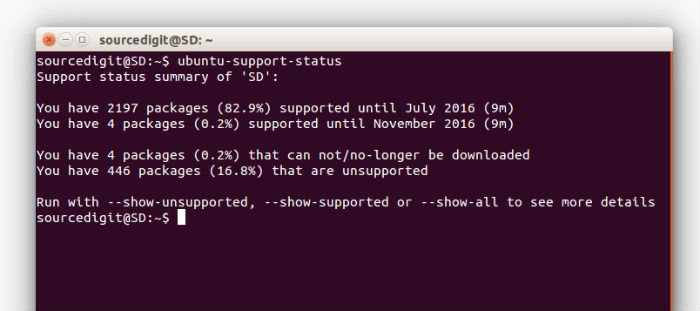
This command will print the exact status of your system.
$ ubuntu-support-status
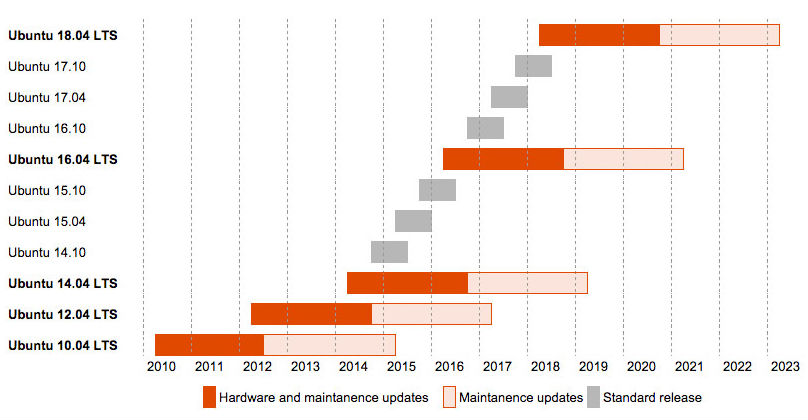
Standard Ubuntu releases are supported for 9 months and Ubuntu LTS (Long Term Support) releases are supported for five years on both the desktop and the server. During that time, there will be security fixes and other critical updates. The Ubuntu support lifecycle is as follows:
| Version | Code name | Docs | Release date | End of life date |
| Ubuntu 16.04 LTS | Xenial Xerus | April 2016 | ||
| Ubuntu 15.10 | Wily Werewolf | Rel | October 22, 2015 | July 2016 |
| Ubuntu 15.04 | Vivid Vervet | Rel | April 23, 2015 | February 4, 2016 |
| Ubuntu 14.04.3 LTS | Trusty Tahr | Changes | August 6, 2015 | HWE August 2016 |
| Ubuntu 14.04.2 LTS | Trusty Tahr | Changes | February 20, 2015 | HWE August 2016 |
| Ubuntu 14.04.1 LTS | Trusty Tahr | Changes | July 24, 2014 | April 2019 |
| Ubuntu 14.04 LTS | Trusty Tahr | Rel | April 17, 2014 | |
| Ubuntu 12.04.5 LTS | Precise Pangolin | Rel | August 7, 2014 | April 2017 |
| Ubuntu 12.04.4 LTS | Precise Pangolin | Changes | February 6, 2014 | HWE August 8, 2014 |
| Ubuntu 12.04.3 LTS | Precise Pangolin | Changes | August 23, 2013 | HWE August 8, 2014 |
| Ubuntu 12.04.2 LTS | Precise Pangolin | Changes | February 14, 2013 | HWE August 8, 2014 |
| Ubuntu 12.04.1 LTS | Precise Pangolin | Changes | August 24, 2012 | |
| Ubuntu 12.04 LTS | Precise Pangolin | Tech / Rel | April 26, 2012 |
Upgrade from 15.04 to 15.10
You can easily upgrade over the network with the following procedure. Follow the steps given below to upgrade Ubuntu Desktops 15.04 to 15.10:
How To Upgrade From Ubuntu 15.04 to Ubuntu 15.10
Upgrading to Ubuntu 15.10 from previous Ubuntu version is really easy. There are two ways to upgrade, CLI/Terminal and UI/Graphical Method.
Graphical Method (UI)
Please backup all you essential data before upgrade. Once you have stored all your essential data safely, follow the steps given below to upgrade to Ubuntu 15.10:
- Open “Update Manager” from Ubuntu Dash. Open and search for “Update Manager” in Ubuntu Dash and then click to open it. In Update Manager window, click on “Settings” tab.
- You can also open “Software & Updates.” Click “Other Software” tab and disable all Third-Party PPAs (screenshot below).
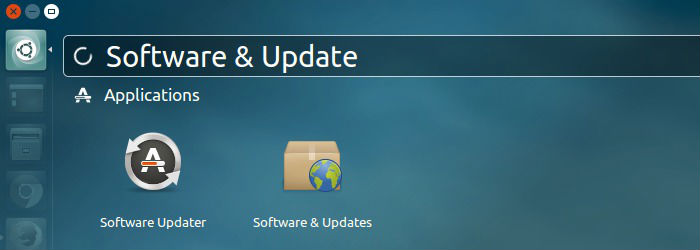
- You must disable PPAs. During the update process, some PPAs may cause the upgrade operation fail.
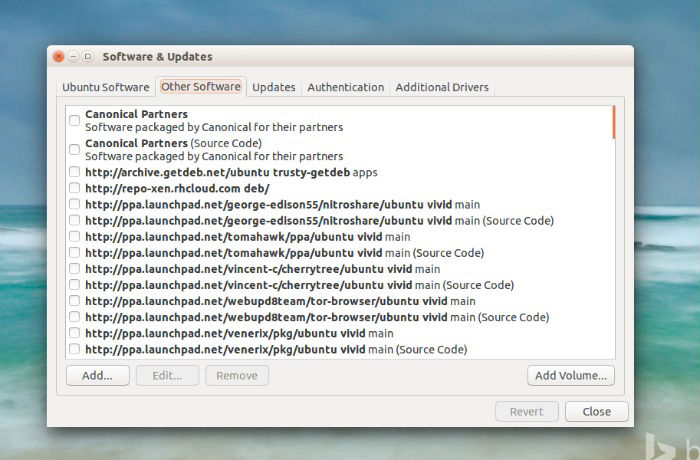
- Now go to “Updates” Tab and click “Notify me of a new Ubuntu Version” and then select “For any new Version.” When done, click OK and exit the Update Manager / Software & Updates.
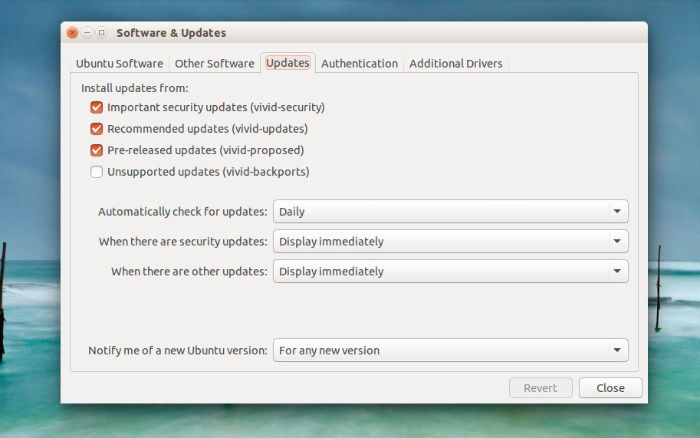
- Now start “Update Manager” again and Click on “Upgrade” Button. That’s it.
Terminal / CLI Method to Upgrade
Open terminal from the Unity Dash, App Launcher, or via Ctrl+Alt+T shortcut key. When it opens, run command to update your system:
sudo apt-get update

sudo apt-get dist-upgrade
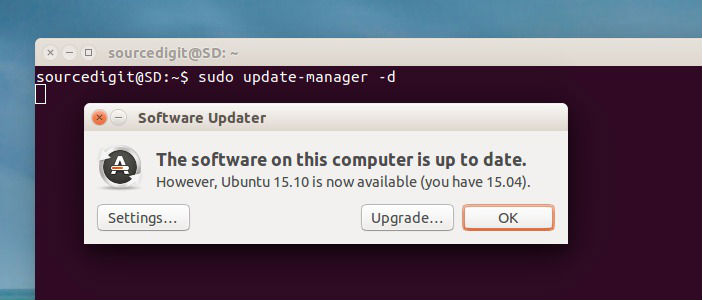
Now run the following commands to launch Software Updater:
sudo update-manager -d
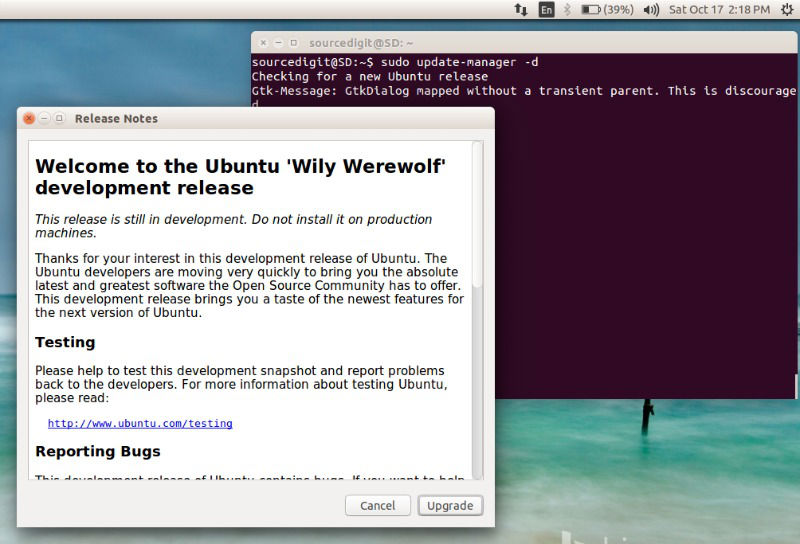
You can also run the following set of commands:
sudo apt-get update

sudo do-release-upgrade -d

sudo apt-get dist-upgrade -d
Now launch Software Updater via below command:
sudo update-manager -d
As soon as you run the command, a window would pop-up and prompt you that a newer version of Ubuntu 15.10 is available for upgrade / download.
Simply click the Upgrade button and follow the on-screen instructions. The upgrade process will take some time (depending on the Internet speed) and it is advised to plug in to power source (or have enough battery to last for an hour or so).
Once the upgrade is complete, please restart the computer to complete the upgrade process.