
Install LiVES 2.6.0 Video Editor and VJ Tool on Linux Ubuntu 15.10, Ubuntu 15.04, Ubuntu 14.04 and Ubuntu 14.10 Systems. LiVES is a Video Editing System. It is designed to be simple to use, yet powerful. It is small in size, yet it has many advanced features.
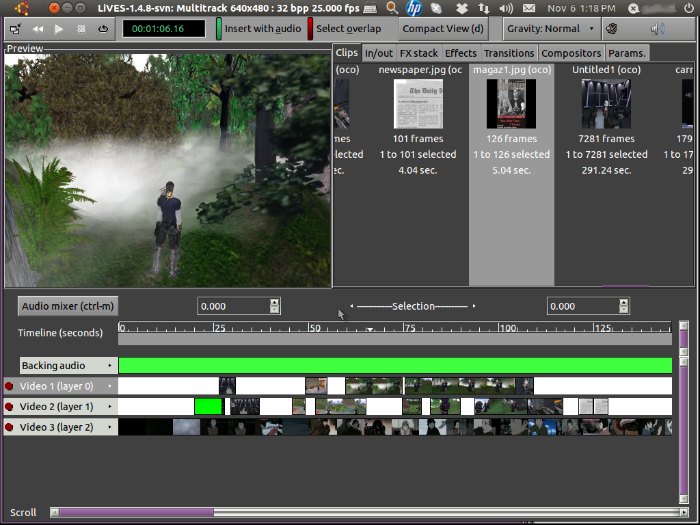
LiVES mixes realtime video performance and non-linear editing in one professional quality application. It will let you start editing and making video right away, without having to worry about formats, frame sizes, or framerates. It is a very flexible tool which is used by both professional VJ’s and video editors – mix and switch clips from the keyboard, use dozens of realtime effects, trim and edit your clips in the clip editor, and bring them together using the multitrack timeline. You can even record your performance in real time, and then edit it further or render it straight away.
For the more technically minded, the application is frame and sample accurate, and it can be controlled remotely or scripted for use as a video server. And it supports all of the latest free standards.
LiVES is good enough to be used as a VJ tool for professional performances, and as a video editor is capable of creating dazzling clips in a huge variety of formats.
Below are some of the most notable features of the LiVES video editing software:
Video
- Loading and editing of almost any video format (via mplayer decoder).
- Some formats can be opened instantly using decoder plugins (e.g. webm, wmv, flv, dv and ogg/theora).
- Smooth playback at variable frame rates, forward and in reverse. Display framerate can be controlled independently of playback framerate.
- Frame accurate cutting and pasting within and between clips.
- Saving/re-encoding of clips, selections, and individual frames.
- Lossless backup/restore.
- Streaming input and output.
- Support for live firewire cameras and TV cards
- Real time blending of clips (various chroma and luma blends).
- Can handle in/out streams in LiVES to LiVES or yuv4mpeg format. Streams can be piped from stdout into other applications.
- Supports fixed and variable framerates. Playback rate can be smoothly adjusted independant of display rate.
- Ability to ‘scratch’ with video – that is to move smoothly backwards and forwards through it, and to record yourself doing so.
- Playback can use LiVES’ own internal player, there is also a high performance fullscreen SDL playback plugin, and a new openGL playback plugin
- Internal support for RGB24, RGBA32, YUVA, YUV, YUV422, YUV420 (jpeg and mpeg), YUYV, YUV411, and UYVY palettes; one step conversion with chroma super and subsampling is implemented.
- Clamped and unclamped YUV is supported.
- Ability to edit many filetypes and sources including remotely located files (with mplayer/ffmpeg libraries), and directories of images.
- Real time capture/recording of interactive (via mouseclicks) external windows.
- Encode to any of the 50+ output formats which are now supported (e.g. mjpeg, mpeg4, mpeg1/2, h264, VCD, SVCD, DVD, ogg/mp4 ogm, Matroska mkv, dv, swf, Ogg Theora, Dirac, MNG, Snow, xvid, and even animated GIF and PDF!)
- Encoder formats can easily be extended through the encoder plugin API.
- LiVES will suggest the best settings for saving to each format.
- Resampling of video (time stretching) to any frame rate (1 to 200 fps – accurate to 8 decimal places); option to auto-resample or speed up/slow down between clips.
- Ability to instantly alter the playback speed of video and audio independently.
- Rotation, resizing and trimming of video clips.
- Deinterlacing, subtitle removal. Auto deinterlacing for dv can be enabled.
- Instant saving/loading of clips for performances/presentations.
Audio
- Can load mp3, vorbis, mod, it, xm and wav files.
- LiVES can also load tracks directly off CD to use with your video (using cdda2wav).
- Ability to save audio selections, and append audio.
- Sound can be trimmed to fit video selections.
- Sample accurate cutting and pasting of audio within and between clips.
- Resampling of audio (rate, channels, sample size, signedness and endianness); audio is auto-resampled between clips.
- Supports (auto)inserting of silence and deletion of audio sections.
- Able to record from any external audio source.
- Fade in/fade out feature for clips.
- Audio speed and direction can be smoothly adjusted; both in real time and when rendering.
- Support for LADSPA audio plugins.
Install LiVES 2.6.0 on Ubuntu
LiVES 2.6.0 (1 Feb 2016) is the latest version of the LiVES video editor and VJ tool. It has been released with the following changes:
- Fix crash when applying rendered effects to virtual clips.
- Add h264/aac, wmv2, ffv1 and mjpeg encodings to ffmpeg_encoder.
- Fix memory leak in new style gdkpixbuf converter.
- Fix frame seek bug in avformat decoder with non-zero start time.
- Autoscroll “Show details” when encoding.
- Work around a gtk+ crash bug in GtkTextView with lots of text.
- Show missing libraries in ffmpeg_encoder.
- Show time remaining estimate for encoding for most encoder formats.
- OK / Cancel in the file chooser should immediately cancel any preview (regression).
- Add “Use current clip values” button when entering multitrack.
- Fix memory leak in pulseaudio input analysis.
- Minor GUI improvements.
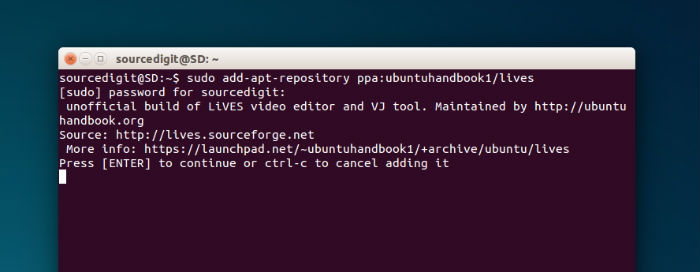
Run the following commands in Terminal to install LiVES 2.6.0 Video Editor and VJ Tool on Linux Ubuntu 15.10, Ubuntu 15.04, Ubuntu 14.04 and Ubuntu 14.10 Systems:
sudo add-apt-repository ppa:ubuntuhandbook1/lives

sudo apt-get update

sudo apt-get install lives
Once installed, open the LiVES editing program from Ubuntu Dash or Menu.
If you want to uninstall and remove the LiVES video editor, run the command given below:
sudo apt-get remove lives