
• Skip to primary navigation
  • Skip to main content
  • Skip to primary sidebar
Source Digit

Source Digit

Linux, Ubuntu Tutorials & News, Technology, Gadgets & Gizmos

  • Home
  • How To
  • Ubuntu
  • Instagram
  • Blogging
  • Android
  • WordPress
  • +More
    • Cloud Computing
    • Gadgets
    • Social Media
    • Technology
  • Write for Us
Home / How To / Install Kodi 16 (XBMC) Media Player on Linux Ubuntu Systems

Install Kodi 16 (XBMC) Media Player on Linux Ubuntu Systems

By Sourabh / February 21, 2016 Category: How To, Ubuntu

Kodi 16 released for Linux Ubuntu Systems. Install Kodi 16, the latest release of Kodi (XBMC) Media Player on Ubuntu 15.10, Ubuntu 14.04 and Derivatives.

Kodi (formerly known as XBMC) is an award-winning free and open source (GPL) software media center for playing videos, music, pictures, games, and more. Kodi runs on Linux, OS X, Windows, iOS, and Android, featuring a 10-foot user interface for use with televisions and remote controls. It allows users to play and view most videos, music, podcasts, and other digital media files from local and network storage media and the internet.
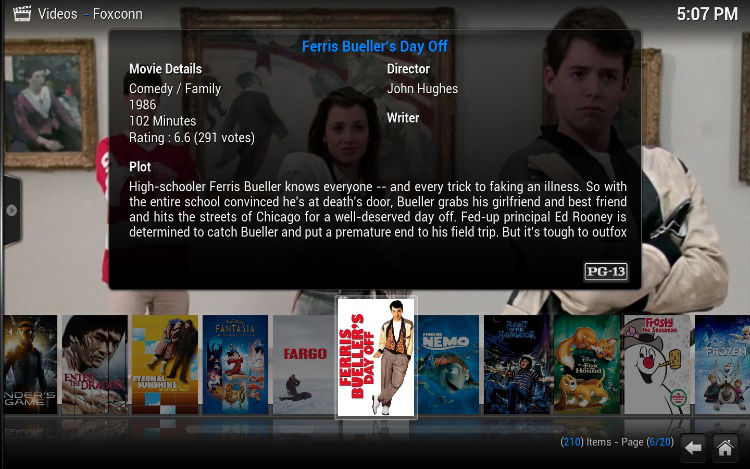
Kodi-Movie

Kodi can play all your music including AAC, MP3, FLAC, OGG, WAV and WMA formats. Kodi can play movies and TV shows too! Supporting all the main video formats and sources, including streamable online media, ISOs, 3D, H.264, HEVC, WEBM. The TV shows library supports episode and season views with posters or banners, watched tags, show descriptions and actors. Not only this, it can import pictures into a library and browse the different views, start a slideshow, sort or filter them all.

Upgrade Kodi in Ubuntu

If you’ve already installed Kodi, you can update it from Software Center. Open Software Updater to upgrade to Kodi 16. To update Kodi when a new version is released use the following commands in the terminal (or via SSH):

sudo apt-get update
sudo apt-get upgrade

Install Kodi in Ubuntu
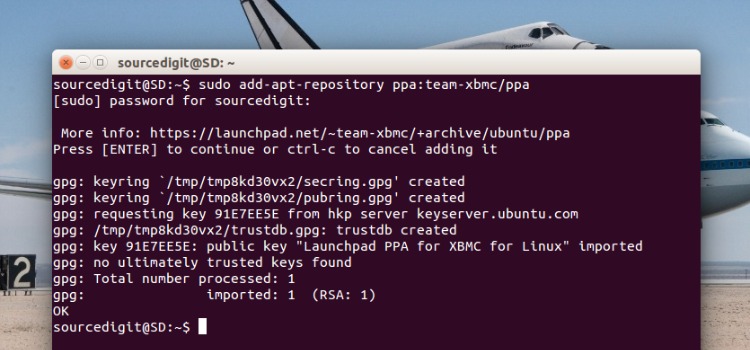
kodi-install-ubuntu

For those who haven’t installed Kodi, run the following commands in Terminal to install Kodi in Ubuntu 15.10, Ubuntu 14.04, Ubuntu 15.04, Ubuntu 14.10 and Derivatives.

sudo add-apt-repository ppa:team-xbmc/ppa
sudo apt-get update
sudo apt-get install kodi

Tags: Install Kodi 16 (XBMC) Media Player on Linux, Install Kodi 16 (XBMC) Media Player on Ubuntu, Install Kodi 16 Media Player on Linux, Install Kodi 16 Media Player on Ubuntu, Install Kodi 16 Ubuntu PPA, Install Kodi on Ubuntu, Install Kodi on Ubuntu 14.04, Install Kodi on Ubuntu 14.10, Install Kodi on Ubuntu 15.04, Install Kodi on Ubuntu 15.10, Kodi 16 Ubuntu PPA, Ubuntu PPA Kodi 16

Primary Sidebar

Latest Posts

Delete Directory And Contents Recursively Without Prompt On Linux

Check User Login History In Ubuntu Linux Command Line

Use Locate Command To Find File In Linux Terminal By Name

How To Change Terminal Color In Ubuntu Command Line

How To Run Fsck Manually In Linux To Fix Unexpected Inconsistency

How To Fix Broken Packages On Ubuntu From Terminal

Re Execute The Previous Command In Linux Ubuntu Command Line

How Much RAM Is Needed For Ubuntu PC

How To Find Large Files And Directories In Linux Command Line

How To Use Clear Command History In Linux Terminal

© 2026 Source Digit • Linux, Ubuntu Tutorials & News, Technology, Gadgets & Gizmos

  • Home
  • About
  • Privacy Policy
  • Terms & Conditions
  • Contact Us
  • Sitemap