
• Skip to primary navigation
  • Skip to main content
  • Skip to primary sidebar
Source Digit

Source Digit

Linux, Ubuntu Tutorials & News, Technology, Gadgets & Gizmos

  • Home
  • How To
  • Ubuntu
  • Instagram
  • Blogging
  • Android
  • WordPress
  • +More
    • Cloud Computing
    • Gadgets
    • Social Media
    • Technology
  • Write for Us
Home / How To / Install XnConvert Batch Image Converter On Ubuntu 16.04

Install XnConvert Batch Image Converter On Ubuntu 16.04

By Sourabh / November 10, 2016 Category: How To, Ubuntu

Batch image converter for Linux Ubuntu. Install XnConvert in Ubuntu 16.04. XnConvert is an image conversion tool for Ubuntu Systems. XnConvert is a free, powerful and multi-platform graphical application that allows users to easily and quickly convert a single or multiple image files from one format to another, under Linux, Windows and Mac systems.
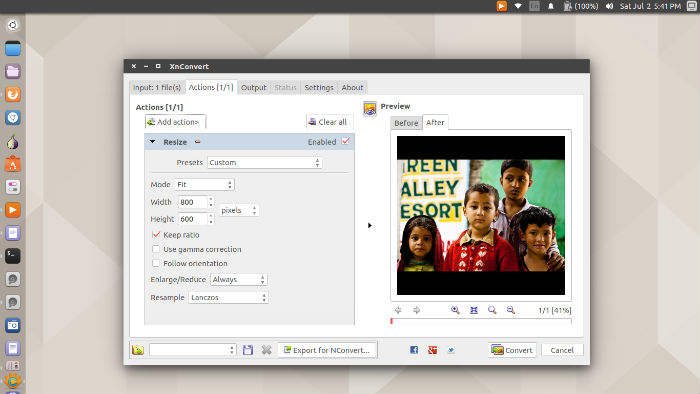
xnconvert-16

XnConvert is compatible with more than 500 formats and Export to about 70 different file formats. XnConvert is a powerful and free cross-platform batch image processor, allowing you to combine over 80 actions. Compatible with 500 formats. It uses the batch processing module of XnViewMP. It comes with a powerful and extensive toolset which offers powerful features in an easy to use interface providing convenient drag & drop functionality.

Install XnConvert 1.73 on Ubuntu

Run the following commands in Terminal to install XnConvert 1.73 on Ubuntu 16.04, Ubuntu 15.04, Ubuntu 14.04 and Ubuntu Derivatives:

On Ubuntu 32 Bit:

wget http://download.xnview.com/XnConvert-linux.deb
sudo dpkg -i XnConvert-linux.deb

On Ubuntu 64 Bit:

wget http://download.xnview.com/XnConvert-linux-x64.deb
sudo dpkg -i XnConvert-linux-x64.deb

Once installed, open the XnConvert from Ubuntu Dash.

Tags: Batch Image Converter, Batch Image-Converter Ubuntu, Batch Image-Converter Ubuntu 16.04, Batch Image-Resizer Ubuntu, Batch Image-Resizer Ubuntu 16.04, Image Conversion Tool Ubuntu 16.04, Install Batch Image Converter On Ubuntu, Install Batch Image Converter On Ubuntu 16.04, Install XnConvert Batch Image Converter On Ubuntu 16.04, Install XnConvert on Ubuntu, Install XnConvert On Ubuntu 16.04, Linux Batch Image-Converter, Linux Batch Image-Resizer, Ubuntu 16.04 Batch Image-Converter, Ubuntu 16.04 Batch Image-Resizer, Ubuntu 16.04 Image Conversion Tool, Ubuntu 16.04 Install XnConvert, Ubuntu Batch Image-Converter, Ubuntu Batch Image-Resizer, Ubuntu Image Conversion Tool, Ubuntu PPA XnConvert, Ubuntu Xnconvert Image Conversion Tool, Xnconvert 1.73 Linux, Xnconvert 1.73 Linux Ubuntu, Xnconvert 1.73 Ubuntu, Xnconvert Image Conversion Tool, Xnconvert Image Conversion Tool Ubuntu, XnConvert On Ubuntu 16.04 PPA, Xnconvert Ubuntu Image Conversion Tool

Primary Sidebar

Latest Posts

Job Scheduling Using At Command In Linux With Examples

How To Check Permissions Of A Directory In Linux Command

Delete Directory And Contents Recursively Without Prompt On Linux

Check User Login History In Ubuntu Linux Command Line

Use Locate Command To Find File In Linux Terminal By Name

How To Change Terminal Color In Ubuntu Command Line

How To Run Fsck Manually In Linux To Fix Unexpected Inconsistency

How To Fix Broken Packages On Ubuntu From Terminal

Re Execute The Previous Command In Linux Ubuntu Command Line

How Much RAM Is Needed For Ubuntu PC

© 2026 Source Digit • Linux, Ubuntu Tutorials & News, Technology, Gadgets & Gizmos

  • Home
  • About
  • Privacy Policy
  • Terms & Conditions
  • Contact Us
  • Sitemap