• Skip to primary navigation
  • Skip to main content
  • Skip to primary sidebar
Source Digit

Source Digit

Linux, Ubuntu Tutorials & News, Technology, Gadgets & Gizmos

  • Home
  • How To
  • Ubuntu
  • Instagram
  • Blogging
  • Android
  • WordPress
  • +More
    • Cloud Computing
    • Gadgets
    • Social Media
    • Technology
  • Write for Us
Home / How To / Install Shadow Flat Icon Theme On Ubuntu 16.04

Install Shadow Flat Icon Theme On Ubuntu 16.04

By Sourabh / July 21, 2016 Category: How To, Ubuntu

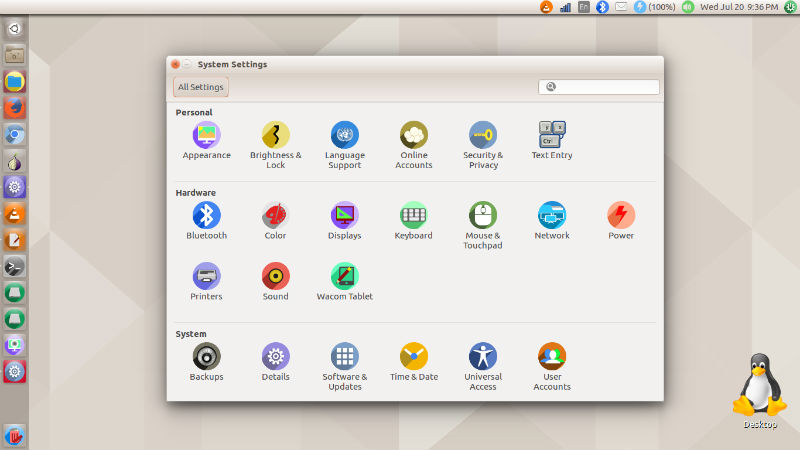
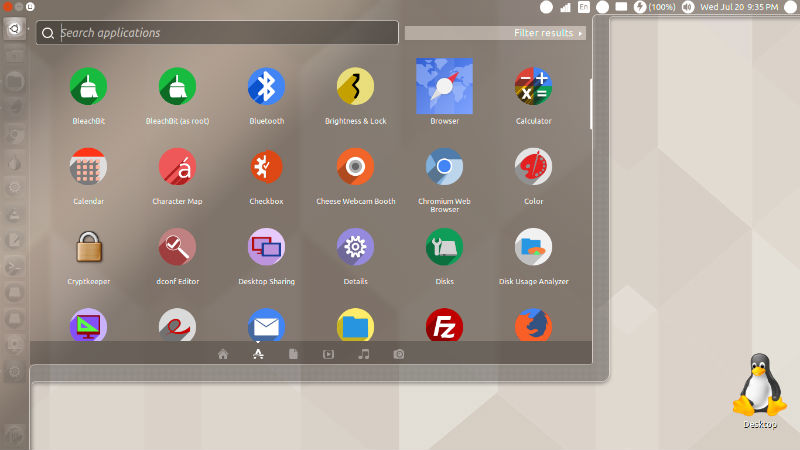
Install Shadow flat icon theme on Ubuntu 16.04. Shadow icon is one of the best icon themes for Ubuntu 16.04. Shadow icon theme is a flat icon-theme for Unity and Gnome 3.10+. The icons have colourful circular base with long shadow.

Major Update: 60 new icons specially for Ubuntu top bar (panel bar).
Major Update: Circular mimetypes: Mimetypes are now circular, for better coherence.

Beside most popular apps, this iconset also includes some uncommon apps, used by very specific groups like xmgrace, xcrysden.

Install Shadow Icon Theme (Manually)
shadow-icons-02

shadow-icons-03

Shadow icon theme can be installed manually. Simply download the Shadow Icon Theme from developer github page and extract the downloaded theme to /usr/share/icon directory. You can either place the theme manually or run the foll0wing commands to extract and place it in icon directory.

$ cd /usr/share/icons
$ sudo wget https://github.com/rudrab/Shadow/archive/v2.tar.gz
$ sudo tar -xzvf v2.tar.gz
$ sudo rm -Rf v2.tar.gz

Once installed, use the theme via Ubuntu Tweak Tool, Unity Tweak Tool or activate the theme from command line:

$ gsettings set org.gnome.desktop.interface icon-theme "shadow"

Please note that there is some problem in Unity’s Adwaita theme. Hence they have created separate index.theme for unity. Unity users are requested to copy index.theme_unity to index.theme.

Users can still use old mimetype icons (and places icons also) by copying square_* directories to the respective directories.

Tags: Best Icon Theme For Ubuntu, Best Icon Theme For Ubuntu 16.04, Flat Icon Theme Ubuntu, Flat Icon Theme Ubuntu 16.04, Install Shadow Flat Icon On Ubuntu, Install Shadow Flat Icon On Ubuntu 16.04, Install Shadow Flat Icon Theme On Ubuntu, Install Shadow Flat Icon Theme On Ubuntu 16.04, Shadow Flat Icon On Ubuntu, Shadow Flat Icon On Ubuntu 16.04, Shadow Flat Icon Theme On Ubuntu, Shadow Flat Icon Theme On Ubuntu 16.04, Shadow Flat Theme On Ubuntu, Shadow Flat Theme On Ubuntu 16.04, Shadow Icon On Ubuntu, Shadow Icon On Ubuntu 16.04, Shadow Icon Theme On Ubuntu, Shadow Icon Theme On Ubuntu 16.04, Shadow Theme On Ubuntu, Shadow Theme On Ubuntu 16.04, Ubuntu 16.04 Flat Icon Theme, Ubuntu 16.04 Shadow Flat Icon Theme, Ubuntu 16.04 Shadow Flat Theme, Ubuntu 16.04 Shadow Icon Theme, Ubuntu Flat Icon Theme, Ubuntu Shadow Flat Icon Theme, Ubuntu Shadow Flat Theme, Ubuntu Shadow Icon Theme

Primary Sidebar

Latest Posts

How To Fix Broken Packages On Ubuntu From Terminal

Re Execute The Previous Command In Linux Ubuntu Command Line

How Much RAM Is Needed For Ubuntu PC

How To Find Large Files And Directories In Linux Command Line

How To Use Clear Command History In Linux Terminal

Linux Command To Check RAM Size In Ubuntu Terminal In GB

How To Install Proprietary Drivers In Linux Ubuntu Using Terminal

How To Shutdown Linux With A 15 Minute Delay And Message

Free AI Courses With Certificate For Beginners In India

Best AI Plugins For WordPress To Use In 2026

© 2026 Source Digit • Linux, Ubuntu Tutorials & News, Technology, Gadgets & Gizmos

  • Home
  • About
  • Privacy Policy
  • Terms & Conditions
  • Contact Us
  • Sitemap