
• Skip to primary navigation
  • Skip to main content
  • Skip to primary sidebar
Source Digit

Source Digit

Linux, Ubuntu Tutorials & News, Technology, Gadgets & Gizmos

  • Home
  • How To
  • Ubuntu
  • Instagram
  • Blogging
  • Android
  • WordPress
  • +More
    • Cloud Computing
    • Gadgets
    • Social Media
    • Technology
  • Write for Us
Home / How To / How To Install Corebird Twitter Client For Linux Ubuntu 16.04

How To Install Corebird Twitter Client For Linux Ubuntu 16.04

By Sourabh / August 1, 2016 Category: How To, Ubuntu

How to Install Corebird Twitter Client on Ubuntu 16.04. Corebird 1.3 is a Twitter client for Ubuntu Linux Desktop. Corebird 1.3 has been released with profile muting, self retweets and support for HLS /.m3u8 videos.

corebird-ubuntu

Corebird 1.3 Twitter Client has been released with the following changes:

  • The build system will now check for gtksink
  • Remove libgee dependency
  • The compose tweet window will now save the current text on cancel
  • Allow self-retweeting
  • Fade loaded inline media in
  • Twitter wont send mp4 urls for their videos anymore starting August 1st, so support HLS videos
  • Query full-length DMs
  • Support muting in profiles

It continues with the changes made with the release of Corebird 1.2.2:

  • Remove margins from the buttons in the topbar. This caused problems with some gtk+ themes
  • gtk+ < 3.20 was more inconsistend with adding style classes to widgets than I thought, so the pre-3.20 fallback css added in 1.2.1 caused the icons in the topbar to have the wrong color

Install Corebird

Open terminal and run the following commands to install Corebird 1.3 on Ubuntu Systems:

$ sudo add-apt-repository ppa:ubuntuhandbook1/corebird
$ sudo apt-get update
$ sudo apt-get install corebird

Set Up Corebird on Ubuntu

Once installed, open Corebird from Ubuntu Dash. Type Corebird and click on it to open the Twitter Client.
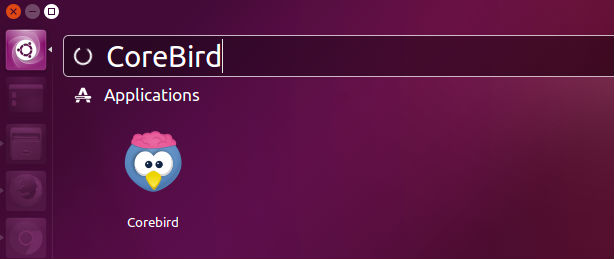
corebird-open

For the first time users, you will be asked to authorise Corebird using your Twitter account. All you need is to authorise your Twitter account to use Corebird. Once done, you are ready to use Corebird.

If you wish to remove and uninstall corebird, run the command given below:

$ sudo apt install ppa-purge
$ sudo ppa-purge ppa:ubuntuhandbook1/corebird

Tags: Corebird Twitter Client For Linux, Corebird Twitter Client For Ubuntu, Install Corebird on Linux, Install Corebird on Ubuntu, Install Corebird on Ubuntu 16.04, Install Twitter Client on Ubuntu, Install Twitter Client on Ubuntu 16.04, Twitter Client For Linux, Twitter Client For Ubuntu, Ubuntu 16.04 Install Corebird, Ubuntu 16.04 Install Twitter Client, Ubuntu 16.04 Install Twitter Client Corebird

Primary Sidebar

Latest Posts

Delete Directory And Contents Recursively Without Prompt On Linux

Check User Login History In Ubuntu Linux Command Line

Use Locate Command To Find File In Linux Terminal By Name

How To Change Terminal Color In Ubuntu Command Line

How To Run Fsck Manually In Linux To Fix Unexpected Inconsistency

How To Fix Broken Packages On Ubuntu From Terminal

Re Execute The Previous Command In Linux Ubuntu Command Line

How Much RAM Is Needed For Ubuntu PC

How To Find Large Files And Directories In Linux Command Line

How To Use Clear Command History In Linux Terminal

© 2026 Source Digit • Linux, Ubuntu Tutorials & News, Technology, Gadgets & Gizmos

  • Home
  • About
  • Privacy Policy
  • Terms & Conditions
  • Contact Us
  • Sitemap