
Install Arc Red GTK Theme on Ubuntu. Arc Red flat theme for Ubuntu Linux, available in three variants – Arc-Red, Arc-Red-Darker and Arc-Red-Dark. It is a red variation of Horst3180’s Arc Theme. This version has a reduced color range, is mostly gray and red. I developed this version especially for all those who use linux on a Thinkpad.
Arc is a flat theme with transparent elements for GTK 3, GTK 2 and Gnome-Shell which supports GTK 3 and GTK 2 based desktop environments like Gnome, Unity, Budgie, Pantheon, XFCE, Mate, etc.
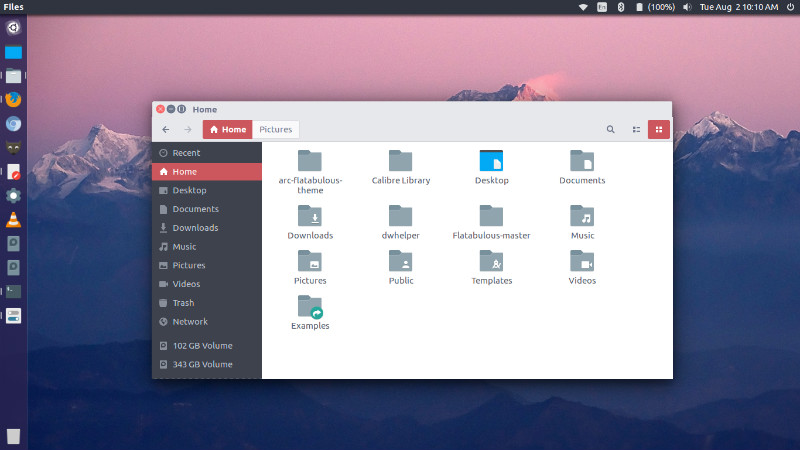
Arc Red is available in three variants:
- Arc-Red
- Arc-Red-Darker
- Arc-Red-Dark
Install Arc Red GTK Theme
Before you begin installing Arc Red theme, remove all the prevesiouly instaleld theme and then install prerequisites for the theme. Run the commands below to do so:
Remove all older versions of the theme from your system before you proceed any further.
$ sudo rm -rf /usr/share/themes/{Arc-Red,Arc-Red-Darker,Arc-Red-Dark}

$ rm -rf ~/.local/share/themes/{Arc-Red,Arc-Red-Darker,Arc-Red-Dark}

$ rm -rf ~/.themes/{Arc-Red,Arc-Red-Darker,Arc-Red-Dark}
Install prerequisites.
To build the theme you’ll need
- autoconf
- automake
- pkg-config or pkgconfig if you use Fedora
- libgtk-3-dev for Debian based distros or gtk3-devel for RPM based distros
- git if you want to clone the source directory
Run the command given below to install all these:
$ sudo apt-get install autoconf automake libgtk-3-dev git
Install Arc Red GTK Theme
Now run the following commands to install Arc Red GTK Theme on Linux Ubuntu Systems:
$ cd /opt

$ sudo git clone https://github.com/mclmzz/arc-theme-Red --depth 1 && cd arc-theme-Red

$ sudo ./autogen.sh --prefix=/usr

$ sudo make install

$ cd ..

$ sudo rm -Rf arc-theme-Red
Once installed, select the Arc Red Theme from Unity Tweak Tool.