
• Skip to primary navigation
  • Skip to main content
  • Skip to primary sidebar
Source Digit

Source Digit

Linux, Ubuntu Tutorials & News, Technology, Gadgets & Gizmos

  • Home
  • How To
  • Ubuntu
  • Instagram
  • Blogging
  • Android
  • WordPress
  • +More
    • Cloud Computing
    • Gadgets
    • Social Media
    • Technology
  • Write for Us
Home / How To / How To Change Sudo Password Timeout In Ubuntu Linux

How To Change Sudo Password Timeout In Ubuntu Linux

By Sourabh / August 13, 2016 Category: How To, Ubuntu

Change Sudo password timeout and increase sudo password remember time. Users can change Sudo timeout on Ubuntu. On Ubuntu, increase Sudo password timeout – how long Sudo waits before it asks password again.

By default, when you run sudo in Ubuntu Linux Systems, the administrative privileges last for only 15 minutes or until the Terminal is closed. So after 15 minutes you will have to type in your password with every command. Luckily this can be changed and the Sudo password timeout can easily be edited. Let us see how?

Change Sudo password timeout
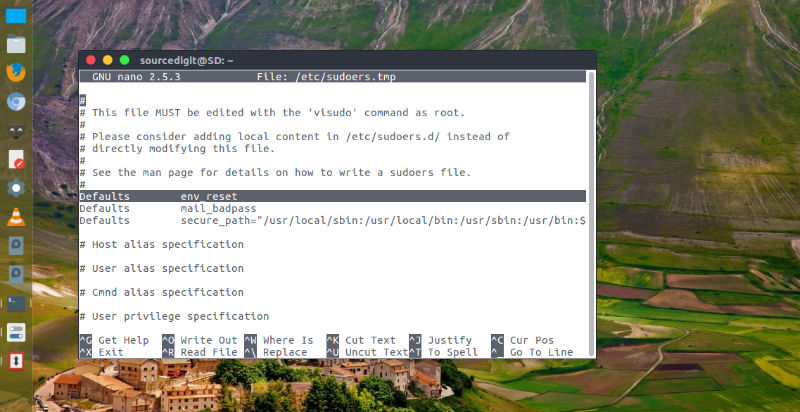
sudo-visudo

To Change Sudo password timeout, open Terminal (press Ctrl+Alt+T) and run the command given below to edit the config file:

sudo visudo

Once the file is opened, scroll down and find out “Defaults env_reset“. This is the command entry that defines the default environment reset time for Sudo. Change it into “Defaults env_reset , timestamp_timeout=X“, where X is the number of minutes after which the sudo password expires. SO if you want to retain the administrative privileges for 30 minutes, replace X with 30. Please note that if you set the time to 0, the Sudo password will always be required to run every single command. Also remember to save the changes.

Tags: "Sudo -I", Change Sudo Default Password Timeout, Change Sudo Password In Ubuntu, Change Sudo Password Linux, Change Sudo Password Mac, Change Sudo Timeout Ubuntu, How to Change How Long sudo Waits Before it Prompts You Again, How To Change Sudo Password In Fedora, How To Change Sudo Password in Ubuntu Linux, Increase Sudo Password Time, Increase Sudo Password Timeout, Linux Password Timeout, Linux Sudo Timeout, Make Sudo Sessions Last Longer In Linux, Set Sudo Timeout, Sudo Default Timeout, Sudo Password Time, Sudo Timeout Centos, Sudo Timeout Mac, Sudo Timestamp_Timeout, Sudo Timestamp_Timeout Not Working, Sudoers Options, Ubuntu Increase Sudo Timeout, Ubuntu Sudo Password Timeout, Ubuntu Timeout Command

Primary Sidebar

Latest Posts

Delete Directory And Contents Recursively Without Prompt On Linux

Check User Login History In Ubuntu Linux Command Line

Use Locate Command To Find File In Linux Terminal By Name

How To Change Terminal Color In Ubuntu Command Line

How To Run Fsck Manually In Linux To Fix Unexpected Inconsistency

How To Fix Broken Packages On Ubuntu From Terminal

Re Execute The Previous Command In Linux Ubuntu Command Line

How Much RAM Is Needed For Ubuntu PC

How To Find Large Files And Directories In Linux Command Line

How To Use Clear Command History In Linux Terminal

© 2026 Source Digit • Linux, Ubuntu Tutorials & News, Technology, Gadgets & Gizmos

  • Home
  • About
  • Privacy Policy
  • Terms & Conditions
  • Contact Us
  • Sitemap