
• Skip to primary navigation
  • Skip to main content
  • Skip to primary sidebar
Source Digit

Source Digit

Linux, Ubuntu Tutorials & News, Technology, Gadgets & Gizmos

  • Home
  • How To
  • Ubuntu
  • Instagram
  • Blogging
  • Android
  • WordPress
  • +More
    • Cloud Computing
    • Gadgets
    • Social Media
    • Technology
  • Write for Us
Home / How To / Install Shotwell 0.23.5 Photo Manager On Ubuntu 16.04/16.10

Install Shotwell 0.23.5 Photo Manager On Ubuntu 16.04/16.10

By Sourabh / August 20, 2016 Category: How To, Ubuntu

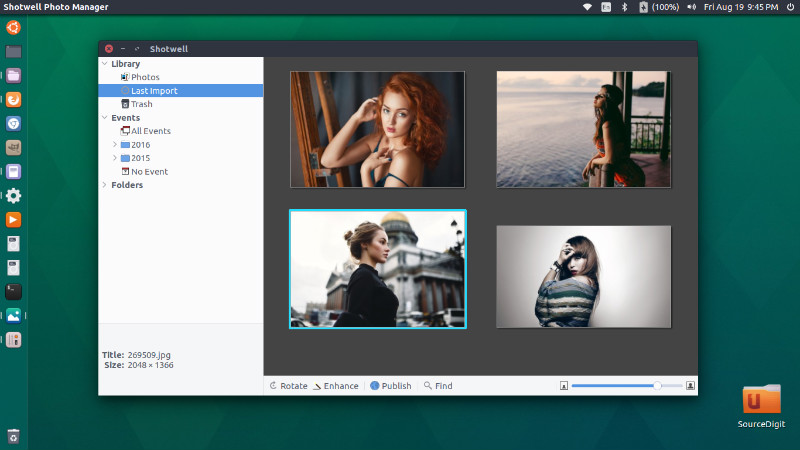
Shotwell photo manager for Linux Ubuntu Systems. Install Shotwell 0.23.5 photo manager on Ubuntu 16.04/16.10, via PPA. Shotwell is the default photo manager and an image organizer on Ubuntu and Fedora.

Shotwell comes with many exciting features:

  • Import from disk or camera
  • Organize by time-based Events, Tags (keywords), Folders, and more
  • View your photos in full-window or fullscreen mode
  • Crop, rotate, color adjust, straighten, and enhance photos
  • Slideshow
  • Video and RAW photo support
  • Share to major Web services, including Facebook, Flickr, and YouTube

Shotwell 0.23.5
shotwell-ubuntu

Shotwell 0.23.5 is the latest version of the Shotwell image manager. It comes with a brand new feature that remove obsolete files and with an option to filter by saved search. Other new Shotwell 0.23.5 features are:

  • Remove obsolete files
  • Plugins: Load icons and GtkBuilder files from GResource
  • Offer a way to hide the bottom toolbar
  • Fix .desktop file generation
  • Use Gtk.MessageDialog’s printf-style API for strings
  • Add SQL indexes to PhotoTable
  • Add Language headers to po files
  • Update INSTALL file
  • Really remove reference to external hmac_sha1
  • Disambiguate strings for time ranges
  • Implement linked tags
  • Make it more clear that something failed if SSL conncetion was not possible
  • Add option to filter by saved search
  • Explicitly link plugins to their dependencies
  • Fix typo in GSettings schema
  • Re-add –disable-extra-plugins configure option
  • Fix settings migrator and thumbnailer path
  • Bump debian compat for proper –libexecdir parameter

Install Shotwell 0.23.5 on Ubuntu 16.04
shotweall-ubuntu
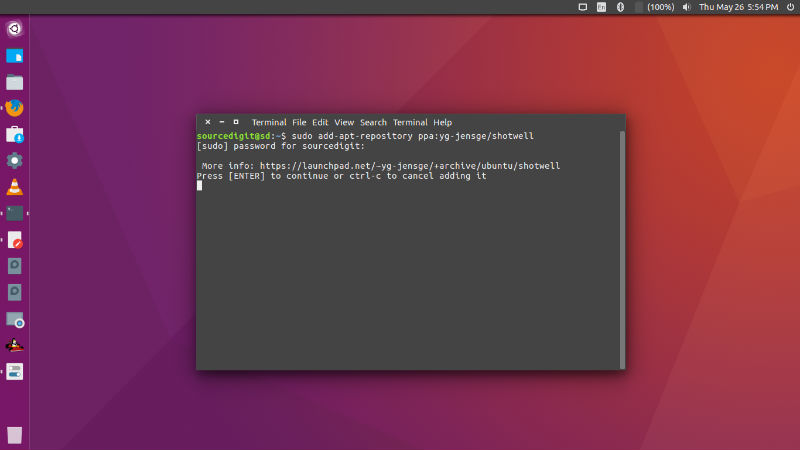
Run the following commands to install Shotwell photo manager:


sudo apt-get remove --purge shotwell shotwell-common
sudo add-apt-repository ppa:yg-jensge/shotwell
sudo apt-get update
sudo apt-get install shotwell

Once installed, open the Shotwell photo manager from Ubuntu Dash or Terminal.

Tags: Install Shotwell Image Manager Ubuntu, Install Shotwell Image Viewer Ubuntu, Install Ubuntu Shotwell Image Manager, Install Ubuntu Shotwell Image Viewer, Shotwell Image Manager, Shotwell Image Manager Ubuntu, Shotwell Image Manager Ubuntu 16.04, Shotwell Image Manager Ubuntu 16.10, Shotwell Image Viewer, Shotwell Image Viewer Ubuntu, Shotwell Image Viewer Ubuntu 16.04, Shotwell Image Viewer Ubuntu 16.10, Ubuntu 16.04 Shotwell Image Manager, Ubuntu 16.04 Shotwell Image Viewer, Ubuntu 16.10 Shotwell Image Manager, Ubuntu 16.10 Shotwell Image Viewer, Ubuntu Shotwell Image Manager, Ubuntu Shotwell Image Viewer

Primary Sidebar

Latest Posts

Delete Directory And Contents Recursively Without Prompt On Linux

Check User Login History In Ubuntu Linux Command Line

Use Locate Command To Find File In Linux Terminal By Name

How To Change Terminal Color In Ubuntu Command Line

How To Run Fsck Manually In Linux To Fix Unexpected Inconsistency

How To Fix Broken Packages On Ubuntu From Terminal

Re Execute The Previous Command In Linux Ubuntu Command Line

How Much RAM Is Needed For Ubuntu PC

How To Find Large Files And Directories In Linux Command Line

How To Use Clear Command History In Linux Terminal

© 2026 Source Digit • Linux, Ubuntu Tutorials & News, Technology, Gadgets & Gizmos

  • Home
  • About
  • Privacy Policy
  • Terms & Conditions
  • Contact Us
  • Sitemap