
• Skip to primary navigation
  • Skip to main content
  • Skip to primary sidebar
Source Digit

Source Digit

Linux, Ubuntu Tutorials & News, Technology, Gadgets & Gizmos

  • Home
  • How To
  • Ubuntu
  • Instagram
  • Blogging
  • Android
  • WordPress
  • +More
    • Cloud Computing
    • Gadgets
    • Social Media
    • Technology
  • Write for Us
Home / Ubuntu / Install Simple Weather Indicator On Ubuntu 16.04

Install Simple Weather Indicator On Ubuntu 16.04

By Sourabh / August 23, 2016 Category: How To, Ubuntu

Ubuntu weather indicator applet for Ubuntu 16.04. Ubuntu weather indicator applet for Ubuntu 16.04. Install Simple weather indicator on Ubuntu. Simple weather indicator is a weather indicator applet for Ubuntu unity and Gnome 3 Desktop. It is developed with Python and uses two web service calls Ip-api.com, Weather-api.madadipouya.com (based on Open Weather Map) to detect user’s location and temperature respectively.
simple-weather-indicator

Simple Weather Indicator updates every ten minutes and automatically fetches the latest weather information using the Internet connection.

Simple Weather Indicator v0.6 is the current release and brings notable changes. Users can now hide location preference and round temperature display. It also features a brand new location detection API.

v0.6 Changelog:

  • New Location detection API
  • Moved to robust API end point with higher uptime
  • Hide location preference
  • Round temperature preference
  • Minor bug fixes

v0.5 Changelog:

  • Preference menu
  • Configuration file
  • Manual coordinates
  • Fahrenheit temperature scale
  • Location detection improvement

Install Simple Weather Indicator

Simple Weather Indicator can be installed on Ubuntu Systems, via DEB file. Follow the link given below to download and install Simple Weather Indicator on Linux Ubuntu Systems.

  • Download Simple Weather Indicator – https://github.com/kasramp/UbuntuIndicatorWeather/

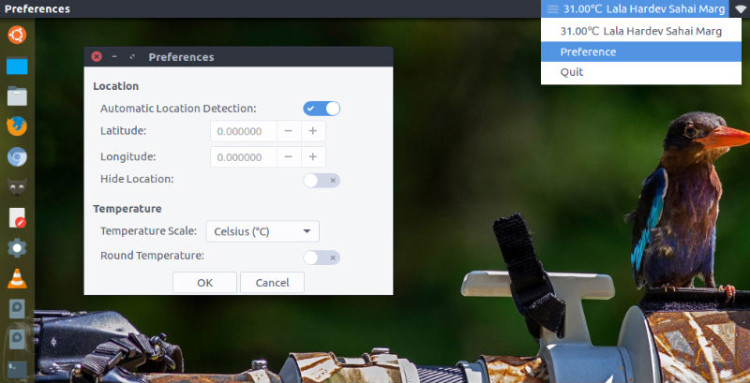
Please note that once installed, system restart is mandatory to use weather indicator. When the system restarts you can see the Simple Weather Indicator on the Ubuntu panel bar (look screenshot above).

To customize the Simple Weather Indicator, click on the applet and select preferences. To quit, click on the indicator and select quit.

Tags: Install Simple Weather Indicator Ubuntu, Install Weather Indicator Ubuntu 16.04, Install Weather Indicator Ubuntu 16.10, Simple Weather Indicator, Simple Weather Indicator Ubuntu, Simple Weather Indicator Ubuntu 16.04, Simple Weather Indicator Ubuntu 16.10, Ubuntu 16.04 Indicator Weather, Ubuntu 16.04 Simple Weather Indicator, Ubuntu 16.04 Weather Indicator, Ubuntu 16.10 Indicator Weather, Ubuntu 16.10 Simple Weather Indicator, Ubuntu 16.10 Weather Indicator, Ubuntu Indicator Weather, Ubuntu Simple Weather Indicator, Ubuntu Weather Indicator, UbuntuIndicatorWeather, Weather Indicator Ubuntu 16.04 Install, Weather Indicator Ubuntu 16.10, Weather Indicator Ubuntu 16.10 Install

Primary Sidebar

Latest Posts

How To Run Fsck Manually In Linux To Fix Unexpected Inconsistency

How To Fix Broken Packages On Ubuntu From Terminal

Re Execute The Previous Command In Linux Ubuntu Command Line

How Much RAM Is Needed For Ubuntu PC

How To Find Large Files And Directories In Linux Command Line

How To Use Clear Command History In Linux Terminal

Linux Command To Check RAM Size In Ubuntu Terminal In GB

How To Install Proprietary Drivers In Linux Ubuntu Using Terminal

How To Shutdown Linux With A 15 Minute Delay And Message

Free AI Courses With Certificate For Beginners In India

© 2026 Source Digit • Linux, Ubuntu Tutorials & News, Technology, Gadgets & Gizmos

  • Home
  • About
  • Privacy Policy
  • Terms & Conditions
  • Contact Us
  • Sitemap