
• Skip to primary navigation
  • Skip to main content
  • Skip to primary sidebar
Source Digit

Source Digit

Linux, Ubuntu Tutorials & News, Technology, Gadgets & Gizmos

  • Home
  • How To
  • Ubuntu
  • Instagram
  • Blogging
  • Android
  • WordPress
  • +More
    • Cloud Computing
    • Gadgets
    • Social Media
    • Technology
  • Write for Us
Home / Ubuntu / Install Kodi v17 “Krypton” Beta 1 on Ubuntu 16.04

Install Kodi v17 “Krypton” Beta 1 on Ubuntu 16.04

By Sourabh / August 26, 2016 Category: How To, Ubuntu

Install Kodi v17 “Krypton” Beta 1 on Ubuntu 16.04. Kodi v17 for Ubuntu 16.04 has been released with Estuary and Estouchy themes, an improved music library and live TV and PVR/DVR improvements.

Kodi, formerly known as XBMC is an open source media center for playing videos, music, pictures, games, and more. Kodi allows users to play and view most videos, music, podcasts, and other digital media files from local and network storage media and the internet.

Kodi can play all your music including AAC, MP3, FLAC, OGG, WAV and WMA formats. Kodi can play movies too. It supports all the main video formats and sources, including streamable online media, ISOs, 3D, H.264, HEVC, WEBM.

Kodi v17 “Krypton” Beta 1
kodi-ubuntu-16

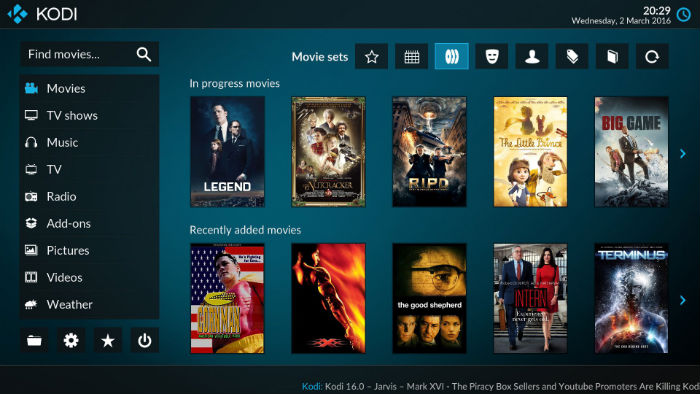
The release announcement says that Kodi 17 features a huge amount of work in areas like video playback, live TV and PVR/DVR, the music library, skinning and more. It features a new default skin, as well as a new default touchscreen skinned, named Estuary and Estouchy, respectively.

The biggest visual change from Kodi 16 to 17 is the new default skin Estuary. Kodi music library has changed. The improved music library now supports better tag reading and scraping, better handling of albums and artists with the addition of adding artist role.

Install Kodi v17 “Krypton” Beta 1 on Ubuntu

Open Terminal and run the following commands to install Kodi v17 “Krypton” Beta 1 on Ubuntu 16.04 Systems:

sudo add-apt-repository ppa:team-xbmc/xbmc-nightly
sudo apt-get update
sudo apt-get install kodi
sudo apt-get install kodi-audioencoder-* kodi-pvr-*

Once installed, open Kodi from Ubuntu Dash or Terminal.

If you aren’t happy with Koid and wish to uninstall and remove Kodi v17 Beta 1, run the commands given below

sudo apt-get remove kodi*
sudo apt-get update

Credit: https://kodi.tv/kodi-v17-krypton-beta-1/

Tags: Install Kodi 17 On Ubuntu, Install Kodi 17 On Ubuntu 16.04, Install Kodi Krypton on Ubuntu, Install Kodi Krypton on Ubuntu 16.04, Install Kodi on Ubuntu 16.10, Install Kodi v17 Krypton on Ubuntu, Install Kodi v17 Krypton on Ubuntu 16.04, Kodi 17 Krypton Ubuntu PPA, Kodi 17 Ubuntu, Kodi 17 Ubuntu 16.04, Kodi 17 Ubuntu PPA, Kodi Krypton Ubuntu 16.04, Kodi Media Center Ubuntu 16.10, Kodi Media Player Ubuntu 16.10, Kodi v17 "Krypton" Beta 1, Kodi v17 Krypton Ubuntu 16.04, Ubuntu 16.10 Kodi Media Center, Ubuntu 16.10 Kodi Media Player, Ubuntu PPA Kodi 17, Ubuntu PPA Kodi 17 Krypton

Primary Sidebar

Latest Posts

How To Fix Broken Packages On Ubuntu From Terminal

Re Execute The Previous Command In Linux Ubuntu Command Line

How Much RAM Is Needed For Ubuntu PC

How To Find Large Files And Directories In Linux Command Line

How To Use Clear Command History In Linux Terminal

Linux Command To Check RAM Size In Ubuntu Terminal In GB

How To Install Proprietary Drivers In Linux Ubuntu Using Terminal

How To Shutdown Linux With A 15 Minute Delay And Message

Free AI Courses With Certificate For Beginners In India

Best AI Plugins For WordPress To Use In 2026

© 2026 Source Digit • Linux, Ubuntu Tutorials & News, Technology, Gadgets & Gizmos

  • Home
  • About
  • Privacy Policy
  • Terms & Conditions
  • Contact Us
  • Sitemap