
• Skip to primary navigation
  • Skip to main content
  • Skip to primary sidebar
Source Digit

Source Digit

Linux, Ubuntu Tutorials & News, Technology, Gadgets & Gizmos

  • Home
  • How To
  • Ubuntu
  • Instagram
  • Blogging
  • Android
  • WordPress
  • +More
    • Cloud Computing
    • Gadgets
    • Social Media
    • Technology
  • Write for Us
Home / Ubuntu / Install Avidemux Video Editor On Ubuntu 16.04

Install Avidemux Video Editor On Ubuntu 16.04

By Sourabh / November 2, 2016 Category: How To, Ubuntu

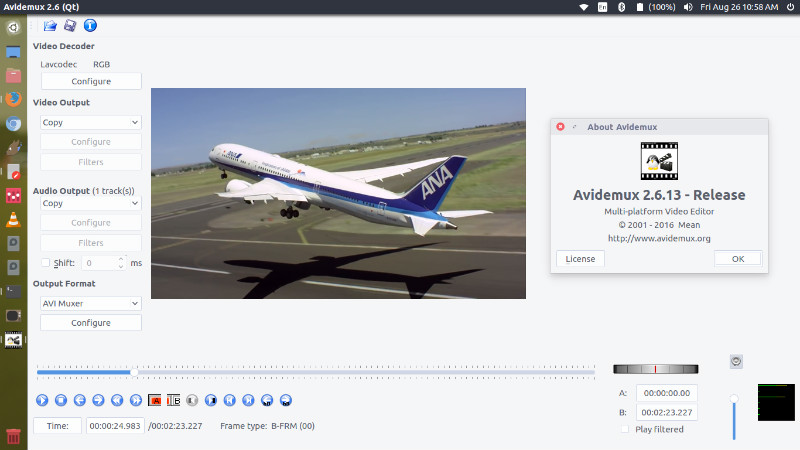
Install Avidemux video editor on Ubuntu 16.04. Avidemux is a free video editor designed for simple cutting, filtering and encoding tasks. It supports many file types, including AVI, DVD compatible MPEG files, MP4 and ASF, using a variety of codecs. Tasks can be automated using projects, job queue and powerful scripting capabilities.

Avidemux 2.6.13 is the latest version of the Avidemux video editor. It has been released with the following changes:

  • updated Toolchain for Win64 and OS X
  • Linux AppImage available (universal linux64 binaries)
  • Update to libav* 3.0.2
  • Improved copy mode for h264/h265 video
  • AAC/ADTS import/export
  • new video filter : ivtcDupeRemover to remove duplicate after 3:2 pulldown
  • Revamped refresh screen
  • ASS/SSA fixes
  • Improved logo filter with alpha channel
  • ShaderLoader, load your openGL shaders as filters
  • Compatibility with newer gcc
  • Partial filter available only for one in/one out video filters
  • Add go fwd/go backward 60 sec buttons

Install Avidemux Video Editor on Ubuntu
avidemux-01

Avidemux Video Editor can be installed on Ubuntu 16.04, Ubuntu 15.04, Ubuntu 14.04, Ubuntu 15.10, Ubuntu 14.10, Linux Mint and other Ubuntu Derivatives. Run the following commands in Terminal to install Avidemux Video Editor on Ubuntu 16.04 Systems:

sudo sh -c 'echo "deb http://archive.getdeb.net/ubuntu xenial-getdeb apps" >> /etc/apt/sources.list.d/getdeb.list'
wget -q -O- http://archive.getdeb.net/getdeb-archive.key | sudo apt-key add -
sudo apt update
sudo apt install avidemux2.6-qt

Once installed, open the Avidemux Video Editor from Ubuntu Dash or Terminal.

Uninstal Avidemux From Ubuntu

If you don’t like the Avidemux video editor and wish to uninstall and remove Avidemux, run the following commands:

sudo apt remove avidemux2.6-qt
sudo apt autoremove
sudo apt-get update

Tags: Avidemux 2.6.13 Ubuntu 16.04, Avidemux Video Editor, Avidemux Video Editor Linux, Avidemux Video Editor Ubuntu, Avidemux Video Editor Ubuntu 16.04, Avidemux Video Editor Ubuntu 16.10, How to Install Avidemux on Ubuntu, Install Avidemux 2.6.13 on Ubuntu 16.04, Install Avidemux on Ubuntu, Install Avidemux Video Editor On Ubuntu 16.04, Install Avidemux Video Editor On Ubuntu 16.10, Install Ubuntu 16.10 Video Editor, Install Video Editor Ubuntu 16.10, Linux Avidemux Video Editor, Ubuntu 16.04 Avidemux Video Editor, Ubuntu 16.10 Avidemux Video Editor, Ubuntu 16.10 Install Video Editor, Ubuntu 16.10 Video Editor, Ubuntu Avidemux Video Editor, Video Editor Ubuntu 16.10

Primary Sidebar

Latest Posts

Delete Directory And Contents Recursively Without Prompt On Linux

Check User Login History In Ubuntu Linux Command Line

Use Locate Command To Find File In Linux Terminal By Name

How To Change Terminal Color In Ubuntu Command Line

How To Run Fsck Manually In Linux To Fix Unexpected Inconsistency

How To Fix Broken Packages On Ubuntu From Terminal

Re Execute The Previous Command In Linux Ubuntu Command Line

How Much RAM Is Needed For Ubuntu PC

How To Find Large Files And Directories In Linux Command Line

How To Use Clear Command History In Linux Terminal

© 2026 Source Digit • Linux, Ubuntu Tutorials & News, Technology, Gadgets & Gizmos

  • Home
  • About
  • Privacy Policy
  • Terms & Conditions
  • Contact Us
  • Sitemap