
How to remove shadow from Ubuntu Unity Desktop icons. Install unity-flatify-icons shell script to flatten Ubuntu Unity’s launcher icons. It’s similar of using Ubuntu flat icons on the Desktop.
We all love Unity, but it uses the background cube for icons on the Unity launcher panel. It looks pretty on Radiance and Ambiance themes, but it doesn’t look that beautiful when the theme is changed.
Luckily, Ubuntu users can easily remove this background cube or shadow from the Ubuntu Unity Desktop icons. unity-flatify-icons shell script to flatten Ubuntu Unity’s launcher icons. unity-flatify-icons shell script is easy to download and install on Ubuntu Systems. You can download the script manually or using the commands and then run it.
Method 1
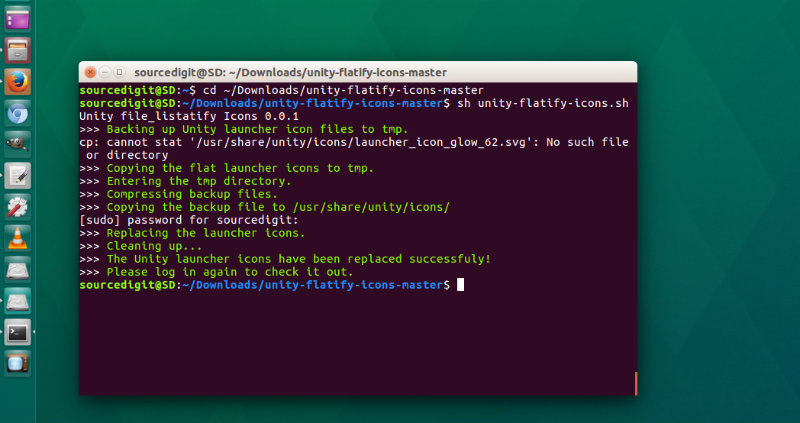
Download Unity Flatify Icons Script from Github https://github.com/mjsolidarios/unity-flatify-icons/ Once the unity-flatify-icons archive is downloaded, extract the folder. Now open Terminal and run the following command to navigate to the unity-flatify-icons folder.
cd ~/Downloads/unity-flatify-icons-master
I assume the unity-flatify-icons folder is in the downloads folder. If not enter the correct path to the folder. Now run the command given below to run the unity-flatify-icons script:
sh unity-flatify-icons.sh
As soon as you enter the command, it will run the script and at last you will get a message “The Unity launcher icons have been replaced successfuly! Please log in again to check it out.”
Method 2
Instead of downloading the folder manually, you can also run the following set of terminal commands which will enable you to run the script.
git clone https://github.com/mjsolidarios/unity-flatify-icons.git

cd unity-flatify-icons

sh unity-flatify-icons.sh
Please note that these commands need to run again if Ubuntu updates the Unity launcher icons.
Credit:
- http://omgubuntu.co.uk/
- https://github.com/mjsolidarios/unity-flatify-icons/