
• Skip to primary navigation
  • Skip to main content
  • Skip to primary sidebar
Source Digit

Source Digit

Linux, Ubuntu Tutorials & News, Technology, Gadgets & Gizmos

  • Home
  • How To
  • Ubuntu
  • Instagram
  • Blogging
  • Android
  • WordPress
  • +More
    • Cloud Computing
    • Gadgets
    • Social Media
    • Technology
  • Write for Us
Home / Ubuntu / Install Lollypop Music Player On Ubuntu 16.04

Install Lollypop Music Player On Ubuntu 16.04

By Sourabh / September 17, 2016 Category: How To, Ubuntu

Install Lollypop music player on Ubuntu 16.04/6.10 Systems. Lollypop is a GNOME music player application for Linux Systems. Lollypop is a powerful Rhythmbox alternative. Lollypop open-source audio player is developed in GTK+3 and supports various popular audio formats, including mp3, mp4, ogg and flac. It can also be used to visualize the songs via album, artist or genre. The music player has two UI – White and Black.

Install Lollypop Music Player On Ubuntu
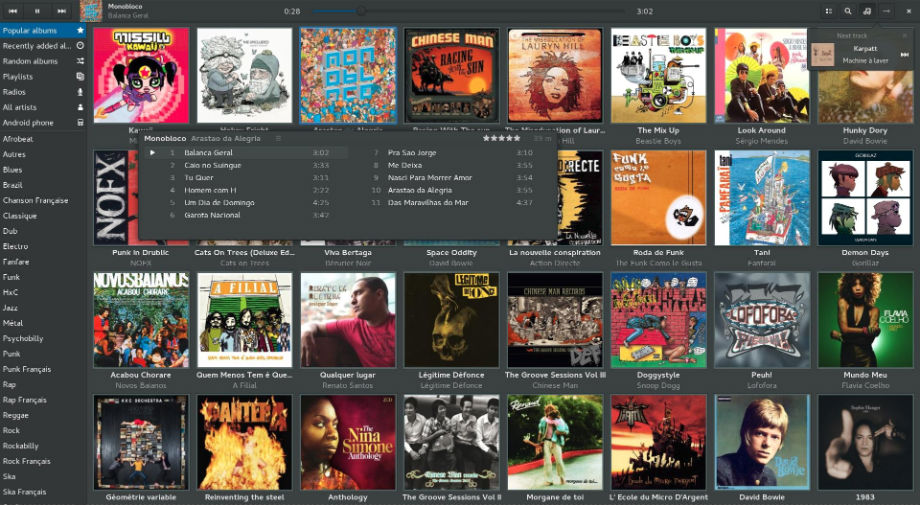
lollypop-music-ubuntu

Lollypop 0.9.113 is the latest release of the music player. lollypop 0.9.113 has been released with Lastfm scrobbler fix.

Lollypop 0.9.113 Changelog

  • Enhanced search engine
  • MTP sync for albums
  • Move stats to settings dialog
  • Move artist artwork outside cache
  • Fix Lastfm scrobbler
  • Guess tracknumber from filename
  • Fix issues with Unity
  • Rework all code (may have introduced unwanted regressions)

To install Lollypop 0.9.113 on Ubuntu 16.04, Ubuntu 15.04, Ubuntu 14.04 and other Ubuntu Derivatives, run the command given below:

sudo add-apt-repository ppa:gnumdk/lollypop
sudo apt-get update
sudo apt-get install lollypop

Ubuntu Unity users should disable the overlay scrollbars by executing the following command:

gsettings set com.canonical.desktop.interface scrollbar-mode normal

In case you want the integration with Last.fm to work you need to install pylast


apt-get install python3-pip
pip3 install pylast

Once installed, open Lollypop music player from Ubuntu Dash or Terminal.

Tags: Install Lollypop 0.9.113 on Ubuntu, Install Lollypop 0.9.113 on Ubuntu 16.04, Linux Lollipop Music Player, Lollipop Music Player, Lollipop Music Player Apk, Lollipop Music Player Apk Download, Lollipop Music Player For Kitkat, Lollipop Music Player Linux, Lollipop Music Player Not Working, Lollipop Music Player Ubuntu, Lollipop Music Player Ubuntu 16.04, Lollipop Music Player Ubuntu 16.10, Lollipop Music Player Xda, Lollypop 0.9.113 Music Player, Lollypop Audio Player, Lollypop Music Player Ubuntu 16.04, Lollypop Music Player Ubuntu 16.10, Music Player Lollypop 0.9.113, Samsung Music Player Apk, Ubuntu 16.04 Install Lollypop 0.9.113, Ubuntu 16.04 Lollipop Music Player, Ubuntu 16.04 Lollypop Music Player, Ubuntu 16.10 Lollipop Music Player, Ubuntu 16.10 Lollypop Music Player, Ubuntu Install Lollypop 0.9.113, Ubuntu Lollipop Music Player

Primary Sidebar

Latest Posts

Delete Directory And Contents Recursively Without Prompt On Linux

Check User Login History In Ubuntu Linux Command Line

Use Locate Command To Find File In Linux Terminal By Name

How To Change Terminal Color In Ubuntu Command Line

How To Run Fsck Manually In Linux To Fix Unexpected Inconsistency

How To Fix Broken Packages On Ubuntu From Terminal

Re Execute The Previous Command In Linux Ubuntu Command Line

How Much RAM Is Needed For Ubuntu PC

How To Find Large Files And Directories In Linux Command Line

How To Use Clear Command History In Linux Terminal

© 2026 Source Digit • Linux, Ubuntu Tutorials & News, Technology, Gadgets & Gizmos

  • Home
  • About
  • Privacy Policy
  • Terms & Conditions
  • Contact Us
  • Sitemap