
• Skip to primary navigation
  • Skip to main content
  • Skip to primary sidebar
Source Digit

Source Digit

Linux, Ubuntu Tutorials & News, Technology, Gadgets & Gizmos

  • Home
  • How To
  • Ubuntu
  • Instagram
  • Blogging
  • Android
  • WordPress
  • +More
    • Cloud Computing
    • Gadgets
    • Social Media
    • Technology
  • Write for Us
Home / Ubuntu / Twitter App Corebird 1.3.1 Released – Install Corebird Twitter Client On Ubuntu

Twitter App Corebird 1.3.1 Released – Install Corebird Twitter Client On Ubuntu

By Sourabh / September 6, 2016 Category: How To, Ubuntu

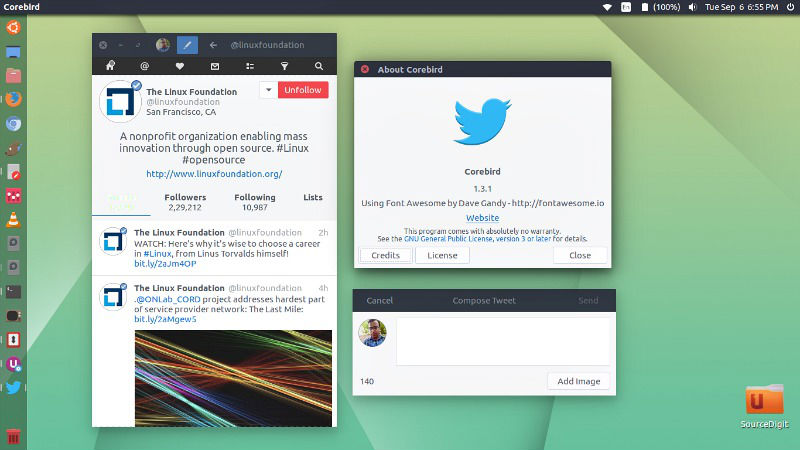
Install Corebird Twitter Client for Linux Ubuntu 16.04/16.10 Desktop. Twitter App Corebird 1.3.1 is released with some fixes and UI improvements.

Corebird 1.3.1 is an improvement release and brings a total of 7 fixes and UI improvements. Below is the Corebird 1.3.1 Changelog:

  • Fix muted and/or blocked tweets still showing up in timelines
  • Fix accounts not getting saved when first created
  • Fix retweets of the authenticating user not getting theiry correct seen status
  • Fix profiles descriptions containing ampersand characters and links
  • Fix profile banner fade-in transition
  • Fix doubly-escaped ampersands in link tooltips
  • Fix missing underlines in @screen_names in the profile popover
corebird-ubuntu

Install Corebird

Open terminal and run the following commands to install Corebird 1.3 on Ubuntu Systems:

$ sudo add-apt-repository ppa:ubuntuhandbook1/corebird
$ sudo apt-get update
$ sudo apt-get install corebird

Set Up Corebird on Ubuntu

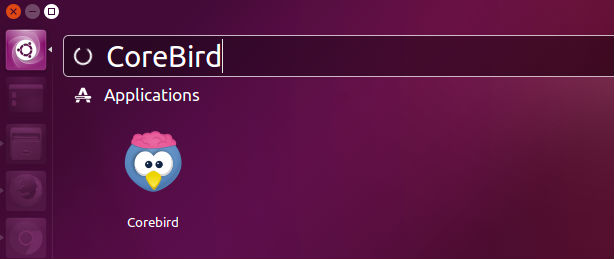
Once installed, open Corebird from Ubuntu Dash. Type Corebird and click on it to open the Twitter Client.
corebird-open

For the first time users, you will be asked to authorise Corebird using your Twitter account. All you need is to authorize your Twitter account to use Corebird. Once done, you are ready to use Corebird.

Uninstall Corebird From Ubuntu

If you wish to remove and uninstall corebird, run the command given below:

$ sudo apt install ppa-purge
$ sudo ppa-purge ppa:ubuntuhandbook1/corebird

Tags: Corebird 1.3.1 Released, Corebird 1.3.1 Twitter App, Corebird Twitter Client Ubuntu 16.10, Corebird Ubuntu 16.10, Install Corebird 1.3.1 Twitter App, Install Corebird on Ubuntu, Install Corebird on Ubuntu 16.04, Install Corebird On Ubuntu 16.10, Install Corebird Twitter Client On Linux, Install Corebird Twitter Client on Ubuntu, Install Twitter App Corebird 1.3.1, Twitter App Corebird 1.3.1, Ubuntu 16.04 Install Corebird, Ubuntu 16.10 Corebird, Ubuntu 16.10 Corebird Twitter Client, Ubuntu 16.10 Install Corebird

Primary Sidebar

Latest Posts

Job Scheduling Using At Command In Linux With Examples

How To Check Permissions Of A Directory In Linux Command

Delete Directory And Contents Recursively Without Prompt On Linux

Check User Login History In Ubuntu Linux Command Line

Use Locate Command To Find File In Linux Terminal By Name

How To Change Terminal Color In Ubuntu Command Line

How To Run Fsck Manually In Linux To Fix Unexpected Inconsistency

How To Fix Broken Packages On Ubuntu From Terminal

Re Execute The Previous Command In Linux Ubuntu Command Line

How Much RAM Is Needed For Ubuntu PC

© 2026 Source Digit • Linux, Ubuntu Tutorials & News, Technology, Gadgets & Gizmos

  • Home
  • About
  • Privacy Policy
  • Terms & Conditions
  • Contact Us
  • Sitemap