
Darktable is an open source photography workflow application and raw developer. A virtual lighttable and darkroom for photographers. It manages your digital negatives in a database, lets you view them through a zoomable lighttable and enables you to develop raw images and enhance them.
Darktable supports fully non-destructive editing. The application can import a variety of standard, raw and high dynamic range image formats (e.g. jpg, cr2, hdr, pfm, .. ). For export functions it supports Picasa webalbum, flickr upload, disk storage, 1:1 copy, email attachments and can generate a simple html-based web gallery. darktable allows you to export to low dynamic range (JPEG, PNG, TIFF), 16-bit (PPM, TIFF), or linear high dynamic range (PFM, EXR) images.
Darktable 2.0.6
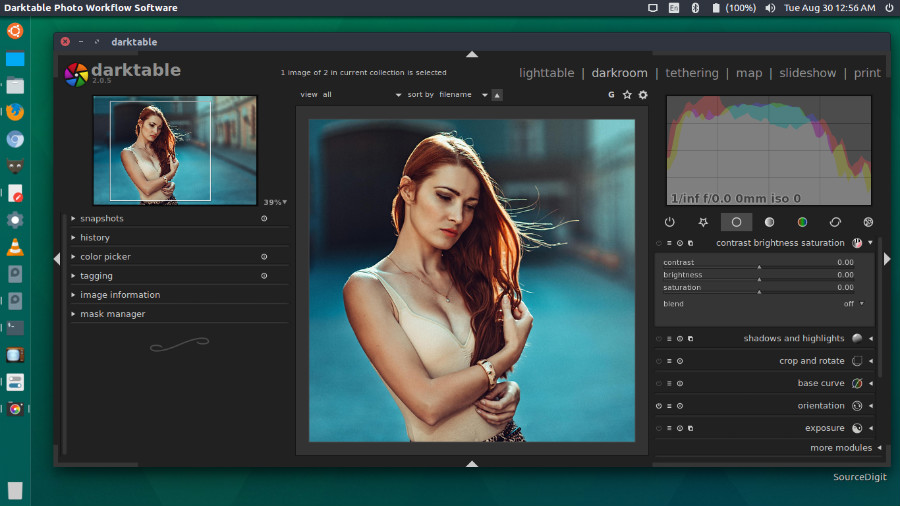
Darktable 2.0.6 has been released with the following changes:
New Features
- Jpeg format writer: use libexiv2 to write metadata, like with other formats
- Accept non-mosaiced raw files with 4 channels, assume they are RGBA (alpha channel is ignored)
Bugfixes
- Once again, fix for yet another gtk theming regression…
- OpenCL: properly discard CPU-based OpenCL devices. Fixes crashes on startup with some broken OpenCL implementations like pocl.
- darktable-cli: do not even try to open display, we don’t need it.
- Rawspeed: NikonDecoder: stop accepting generic camera entries. Fixes multitude of Nikon raw loading issues.
- OpenCL: fix border handling in crop&rotate module
- Hotpixels iop: make it actually work for X-Trans
- Clipping IOP: scale width of gray crop path with zoom level
- One more fixup to canon lens name reading from exif
- Fixup Bayer pattern for Olympus SP570UZ
- Fix internal build issue: do not assume that Perl’s @INC contains ‘.’
Base Support
- Canon EOS-1D X Mark II
- Canon EOS 1300D
- Canon EOS Kiss X80
- Canon EOS Rebel T6
- Canon EOS M10
- Canon PowerShot G7 X Mark II
- Canon PowerShot G9 X
- Fujifilm X-T2
- GITUP GIT2 action camera
- Panasonic DMC-FZ18 (16:9, 3:2)
- Panasonic DMC-FZ50 (16:9, 3:2)
- Pentax K-1
- Sony DSLR-A380
- Sony ILCE-6300
- Nikon D500
- Some other whitelevel fixups for some other Nikon cameras (in particular, mostly for 12-bit and not compressed raws)
Install Darktable 2.0.6 on Ubuntu
Open Terminal and run the following commands in Terminal to install Darktable 2.0.6 on Ubuntu 16.04, Ubuntu 15.04, Ubuntu 14.04, Ubuntu 15.10, Ubuntu 14.10 and other Ubuntu Derivatives:
sudo add-apt-repository ppa:pmjdebruijn/darktable-unstable

sudo apt-get update

sudo apt-get install darktable
Once installed, open Darktable from Ubuntu Dash or Terminal.