
• Skip to primary navigation
  • Skip to main content
  • Skip to primary sidebar
Source Digit

Source Digit

Linux, Ubuntu Tutorials & News, Technology, Gadgets & Gizmos

  • Home
  • How To
  • Ubuntu
  • Instagram
  • Blogging
  • Android
  • WordPress
  • +More
    • Cloud Computing
    • Gadgets
    • Social Media
    • Technology
  • Write for Us
Home / Ubuntu / Install Sayonara Music Player On Ubuntu

Install Sayonara Music Player On Ubuntu

By Sourabh / November 18, 2016 Category: How To, Ubuntu

Install Sayonara Music Player on Ubuntu 16.10 and Ubuntu 16.04. Sayonara is a small, clear and fast audio player for Linux Ubuntu written in C++, supported by the Qt framework. It uses Gstreamer as audio backend. Sayoanra comes with a lot of features that can easily work on even big music collections. Sayonara’s main focus during developing has been performance, low CPU usage and low memory consumption.
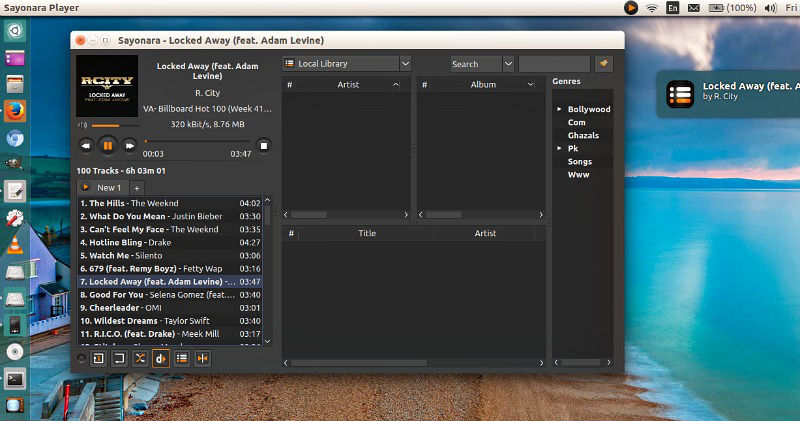
sayonara-ubuntu

Sayonara music player is a good alternative to players like Rhythmbox, Clementine or Amarok. Those who miss Winamp for Linux should give Sayonara a try. Sayonara is only available for Linux Ubuntu.

Main features

  • Many supported music and playlist formats
  • Media library with search function
  • Directory view
  • External device support
  • Genre organization
  • Playlist view organized by tabs
  • (Dynamic) playback
  • Equalizer
  • Metadata editor (including tags from path)
  • Lyrics
  • Shutdown function
  • MP3 Converter
  • Customizable spectrum analyzer and level meter
  • Remote controllable

Web based features

  • Last.FM scrobbling
  • Soundcloud support
  • Soma.fm support
  • Internet streams
  • Stream recorder
  • Podcasts
  • Radio Broadcasting

Install Sayonara on Ubuntu

Run the following commands in Terminal to install Sayonara on Ubuntu 16.04 Systems:

sudo apt-add-repository ppa:lucioc/sayonara
sudo apt-get update
sudo apt-get install sayonara

Once installed, open Sayonara music player from Ubuntu Dash.

Tags: How To Install Sayonara on Ubuntu, Install Sayonara Music Player on Ubuntu, Install Sayonara on Ubuntu, Sayonara Music Player Ubuntu, Sayonara Music Player Ubuntu 16.04, Sayonara Music Player Ubuntu 16.10, Ubuntu 16.04 Sayonara Music Player, Ubuntu 16.10 Sayonara Music Player, Ubuntu Sayonara Music Player

Primary Sidebar

Latest Posts

Delete Directory And Contents Recursively Without Prompt On Linux

Check User Login History In Ubuntu Linux Command Line

Use Locate Command To Find File In Linux Terminal By Name

How To Change Terminal Color In Ubuntu Command Line

How To Run Fsck Manually In Linux To Fix Unexpected Inconsistency

How To Fix Broken Packages On Ubuntu From Terminal

Re Execute The Previous Command In Linux Ubuntu Command Line

How Much RAM Is Needed For Ubuntu PC

How To Find Large Files And Directories In Linux Command Line

How To Use Clear Command History In Linux Terminal

© 2026 Source Digit • Linux, Ubuntu Tutorials & News, Technology, Gadgets & Gizmos

  • Home
  • About
  • Privacy Policy
  • Terms & Conditions
  • Contact Us
  • Sitemap