
Download and Install Rambox for Linux Ubuntu. Rambox is all in one messaging and emailling app for Linux Ubuntu. It is like every messenger app in one single app. Rambox supports 72 messaging and e-mail services.
Rambox focuses heavily on privacy. It doesn’t store or save any kind of personal information. All Rambox sessions persist using the partition:persist attribute for Webviews and every time you open Rambox, your sessions will keep alive until you remove the service.
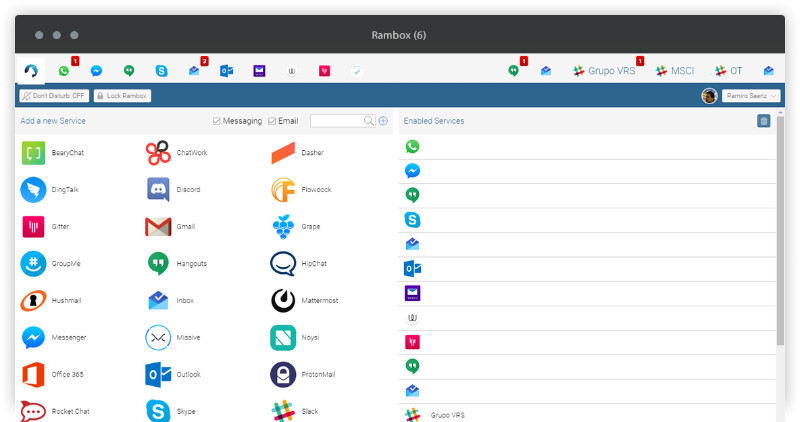
Rambox Features
- Notifications – Displays notifications natively if the messaging service supports it.
- Sync Services – If you use Rambox in different computers, you can synchronize your configuration.
- Master Password – Ask for a password every time Rambox is opened.
- Lock – You can lock Rambox if you will be away for a period of time.
- Don’t Disturb – Disable all sounds and notifications.
- Add Custom Services – You can add any custom service of your choice.
- Reorder and grouping – Reorder services in the tab bar and group into two groups (left and right).
- Badges – Every time you have something new to check, you will see a badge in the tab of the service and in taskbar icon.
- System Tray – Rambox always runs and can be accessed in the system tray.
- Start automatically on system startup
- Custom Code Injection – You can add custom behaviours if you want.
- Proxy – Configure Rambox to use a Proxy if your network blocks some services.
Download & Install Rambox On Linux
- Go to www.rambox.pro and download zip file for Linux.
- Unzip downloaded file. Be sure to extract all the files inside a new folder called Rambox for example.
- In a Terminal, type: chmod +x Rambox.
- Then, we have to install a library (probably missing) to allow tray icon. So type sudo apt-get install libappindicator1.
- Last, in the same Terminal type: ./Rambox to start the application.
Rambox can be accessed in the system tray and it displays notifications natively. The messaging app comes with don’t disturb mode that disables all sounds and notifications.
Download
Download Rambox from:
- https://github.com/saenzramiro/rambox/releases/tag/0.4.4
- http://rambox.pro/